Is OpenClaw Safe to Use? A Security Deep-Dive (2026)
OpenClaw is not safe in its default configuration. With deliberate hardening running inside Docker Sandboxes, keeping it patched, binding the gateway to localhost, and auditing every skill, it becomes conditionally safe for personal use.


OpenClaw (previously known as Clawdbot and Moltbot after trademark disputes) is an open-source AI agent created by developer Peter Steinberger. Unlike traditional AI assistants that just answer questions, OpenClaw is autonomous. It can execute shell commands, read and write files, browse the web, send emails, manage calendars, and take actions across your digital life.
Users interact with OpenClaw through messaging platforms like WhatsApp, Slack, Telegram, Discord, and iMessage. The agent runs locally and connects to large language models like Claude or GPT.
That convenience is exactly what makes the security question so important.
The Short Answer: No, Not by Default
The product documentation itself admits: "There is no 'perfectly secure' setup." Granting an AI agent unlimited access to your data, even locally is a recipe for disaster if any configurations are misused or compromised.
A security audit conducted in late January 2026 identified a full 512 vulnerabilities, eight of which were classified as critical. That is not a product you want running on your primary machine with default settings.
The Critical Vulnerabilities You Need to Know
CVE-2026-25253: The WebSocket Hijacking Bug
The vulnerability stemmed from OpenClaw's failure to distinguish between connections coming from the developer's own trusted apps and services and connections coming from a malicious website running in the developer's browser.
The vulnerability allowed a malicious website to hijack a developer's AI agent without requiring any plug-ins, browser extensions, or user interaction. Security researchers confirmed the attack chain takes "milliseconds" after a victim visits a single malicious webpage.
The vulnerability was patched in version 2026.1.29. Before that patch landed, Censys found over 21,000 OpenClaw instances publicly exposed on the internet, many over plain HTTP.
ClawJacked: The Second Wave
One of the most concerning bugs, dubbed ClawJacked, allowed malicious websites to silently hijack a locally running OpenClaw agent. By exploiting trust assumptions around localhost WebSocket connections, attackers could brute-force gateway credentials directly from the victim's browser and take control of the agent with administrative privileges. No plugins, extensions, or obvious user interaction were required.
The Malicious Skills Problem
Researchers at Koi Security found that out of 10,700 skills on ClawHub, more than 820 were malicious — a sharp increase from the 324 discovered just a few weeks prior in early February. Trend Micro found threat actors using 39 such skills across ClawHub and SkillsMP to distribute the Atomic macOS info stealer.
A broader audit of 31,000 agent skills across multiple platforms found that 26% contained at least one vulnerability. Learn more.
Why OpenClaw Is Structurally Risky
Beyond individual CVEs, the architecture itself creates persistent risk.
Prompt Injection Has No Perfect Fix
Prompt injection is an attack where malicious content embedded in the data processed by the agent ~ emails, documents, web pages, and even images forces the large language model to perform unexpected actions not intended by the user. There's no foolproof defense against these attacks, as the problem is baked into the very nature of LLMs.
Matvey Kukuy, CEO of Archestra.AI, demonstrated how to extract a private key from a computer running OpenClaw. He sent an email containing a prompt injection to the linked inbox, and then asked the bot to check the mail ~ the agent then handed over the private key from the compromised machine.
The Lethal Trifecta
OpenClaw does not maintain enforceable trust boundaries between untrusted inputs (web content, messages, third-party skills) and high-privilege reasoning or tool invocation. As a result, externally sourced content can directly influence planning and execution without policy mediation.
Persistent memory acts as an accelerant, amplifying these risks. Malicious payloads no longer need to trigger immediate execution on delivery ~ they can be fragmented inputs written into long-term agent memory and later assembled into executable instructions. This enables time-shifted prompt injection, memory poisoning, and logic bomb–style activation.
The Agent Can Act Before You Can Stop It
A Meta employee working in AI safety publicly shared that she was unable to stop OpenClaw from deleting a large portion of her email inbox. In a separate case, a user found his agent had drafted and sent a legal rebuttal to his insurance company without being asked.
How to Use OpenClaw More Safely
If you're committed to running OpenClaw, here's what the security community recommends.
1. Run It Inside Docker Sandboxes (sbx)
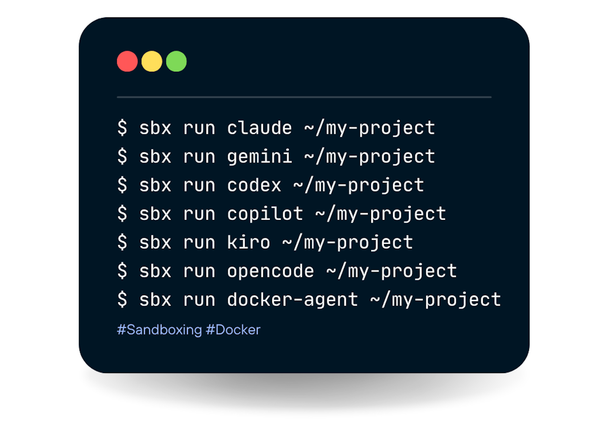
The single best thing you can do is isolate OpenClaw from your host machine entirely. Docker Sandboxes lets you run OpenClaw completely isolated in a microVM — it can only read and write files in the workspace you give it, with no API keys, no cloud costs, and complete privacy when paired with Docker Model Runner.
 Oleg Selajev
OpenClaw can run tools inside sandbox backends to reduce blast radius. This is optional and controlled by configuration. The gateway stays on the host; tool execution runs in an isolated sandbox when enabled. This is not a perfect security boundary, but it materially limits filesystem and process access when the model does something unexpected.
Any image tagged latest before January 29, 2026 carries the critical RCE vector from CVE-2026-25253. Every OpenClaw deployment that has not migrated to version 2026.1.29 or later is actively vulnerable.
Never expose the gateway port publicly. Bind to localhost (or a private IP) only. For remote access, use Tailscale, SSH tunneling, or a VPN not an open port on the internet. The OpenClaw gateway is the control plane for your agent; exposing it to the internet allows unauthenticated or weakly authenticated access to your AI and connected services.
Before you install any skill you didn't write yourself, treat it as untrusted code. Fork it, read it, then install it. Download counts and star ratings are not a reliable safety signal.
5. Protect Your API Keys
Set a spending cap on every API key, every provider supports this. Use separate keys per OpenClaw instance. If one is compromised, you only need to rotate that one key. Rotate keys regularly, and never let them appear in Docker logs or monitoring tools in plain text.
OpenClaw's tool policies let you require human confirmation before certain action types. Use those settings for anything irreversible, including deletions, outbound messages, and anything involving payments.
When choosing an LLM, use Claude, as it is currently the best at spotting prompt injections. Practice an "allowlist only" approach for open ports, and isolate the device running OpenClaw at the network level. Set up dedicated accounts for any messaging apps you connect to OpenClaw.
Is It Safe for Enterprise Use?
If employees deploy OpenClaw on corporate machines and connect it to enterprise systems while leaving it misconfigured and unsecured, it could be commandeered as a powerful AI backdoor agent capable of taking orders from adversaries.
When connected to corporate SaaS apps like Slack or Google Workspace, the agent can access Slack messages and files, emails, calendar entries, cloud-stored documents, and OAuth tokens that enable lateral movement. Making matters worse, the agent's persistent memory means any data it accesses remains available across sessions. Learn more.
The verdict for enterprise: do not deploy without dedicated security governance tooling, SIEM integration, and an explicit agent inventory program. CrowdStrike Falcon, Cisco's Skill Scanner, and enterprise wrappers like NemoClaw (from NVIDIA) are all being positioned to fill this gap.
The Verdict
| Scenario | Verdict |
|---|---|
| Default install, primary laptop, no patching | Unsafe |
| Patched, localhost-only, no skills | Low risk |
| Patched + Docker Sandboxes (sbx) + reviewed skills | Conditionally safe |
| Connected to corporate Slack/email, no governance | High risk |
| Enterprise use without security tooling | Not recommended |
OpenClaw is a genuinely innovative piece of technology. The idea of a persistent AI agent that follows you across messaging platforms is compelling. But at this stage of its development, treating OpenClaw as a hardened productivity tool is wishful thinking, since it behaves more like an over-eager intern with a long memory and no real understanding of what should stay private. Learn more.
The path to safer use runs directly through Docker Sandboxes, aggressive patching, and minimizing the agent's access to only what it strictly needs. The technology is worth watching but not worth trusting in its raw form.
References:
 Docker Inc
 Docker Inc
 Docker Inc
 Docker Inc