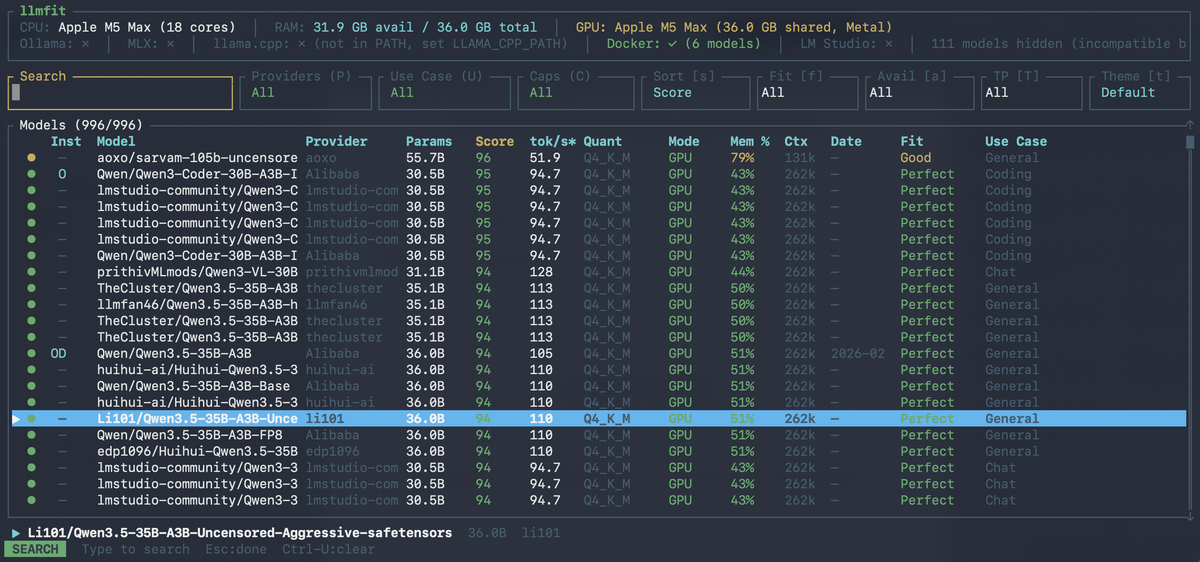
Stop guessing. Start running. llmfit picks the right LLM for your hardware.
With 21,000+ GitHub stars and 497 models from 133 providers, llmfit is the fastest way to know which local LLMs will actually run and, run well on your machine.

The Problem With Running LLMs Locally
The promise of local LLMs is fantastic: private, offline, fast, and free. The reality is often a frustrating maze of out-of-memory errors, sluggish token rates, and wasted downloads.
Every developer who has tried to run a local model has been here: you spend 20 minutes pulling a 40 GB model, fire it up, and immediately get a cryptic memory error or worse, it starts generating at 0.3 tokens per second.
The problem isn't the models or the hardware. It's the information gap between what a model needs and what your machine has.
llmfit closes that gap with a single command.
What Is llmfit?
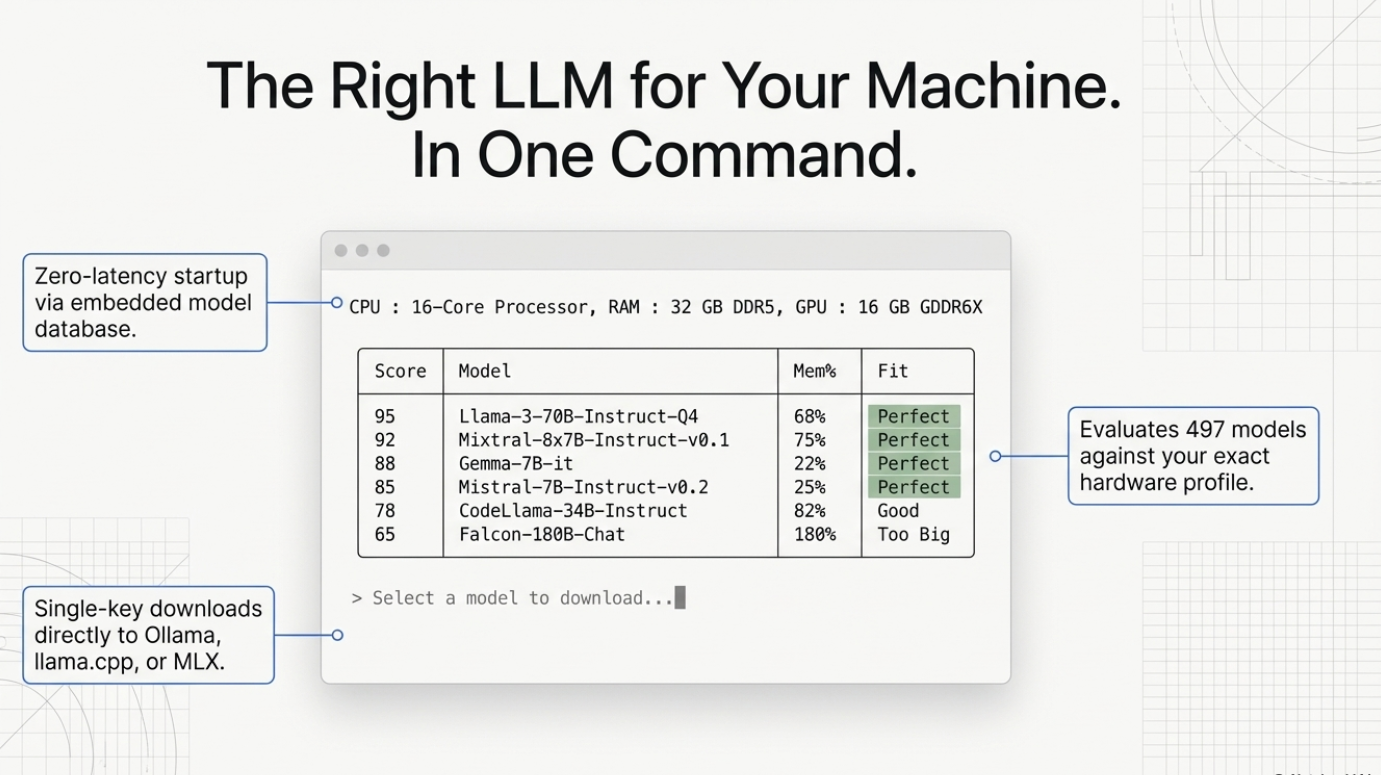
llmfit is an open-source Rust CLI and TUI tool created by Alex Jones that answers one question precisely: Which LLMs will run well on my hardware?
It covers 497 models across 133 providers — from Meta's Llama family, Mistral, Qwen, Phi, Gemma, DeepSeek, and more — and supports local runtimes including Ollama, llama.cpp, and MLX (Apple Silicon).
Since its release, llmfit has accumulated over 21,300 GitHub stars and 1,200+ forks, making it one of the fastest-growing developer tools in the local AI ecosystem.
GitHub: github.com/AlexsJones/llmfit
How llmfit Works Under the Hood
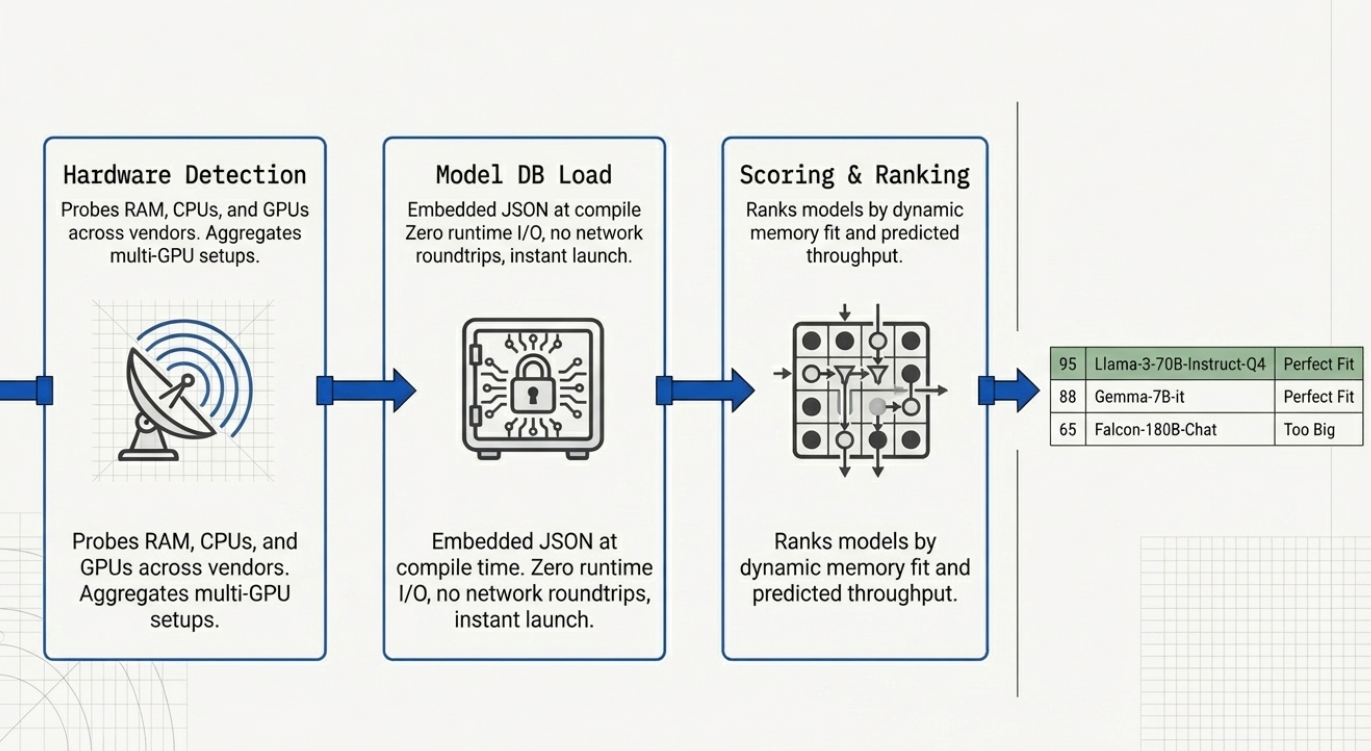
llmfit executes three sequential stages every time you run it:
Stage 1 — Hardware Detection
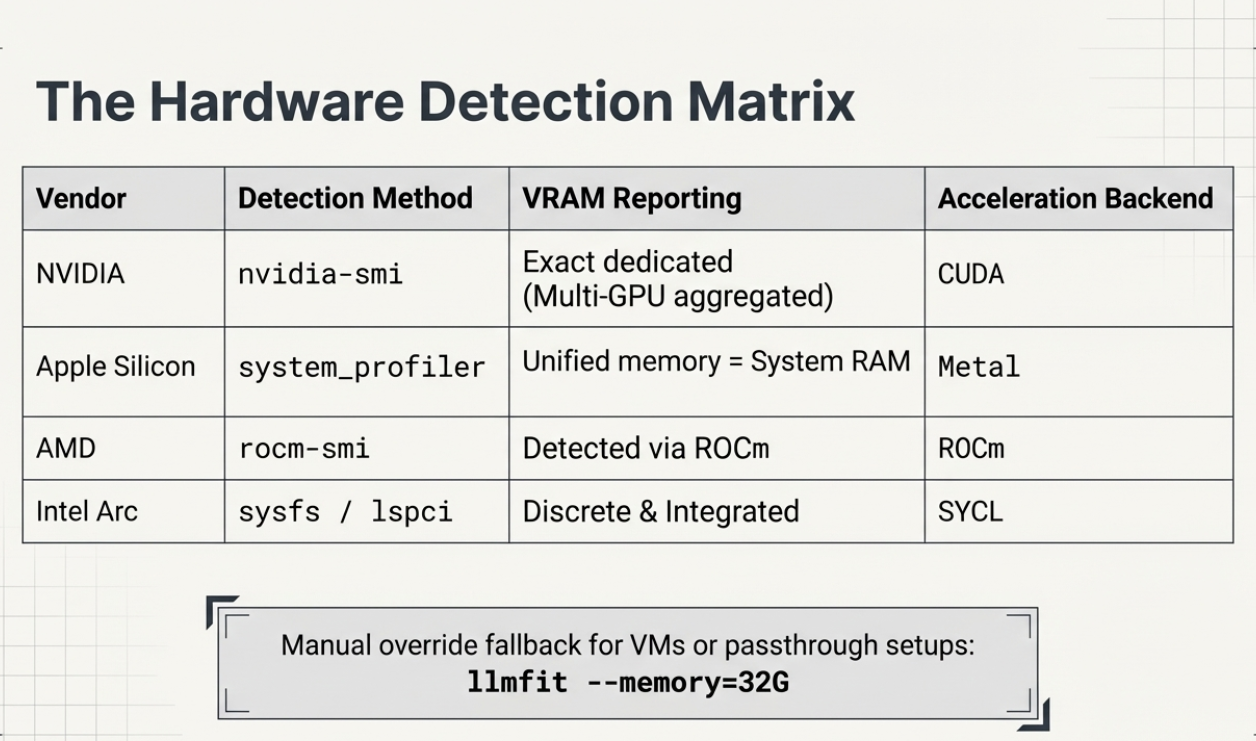
hardware.rs runs SystemSpecs::detect() which reads total and available RAM and CPU core count via the sysinfo crate. GPU detection is multi-path:
- NVIDIA: shells out to
nvidia-smi, aggregates VRAM across all detected GPUs - AMD: uses
rocm-smi - Intel Arc: reads discrete VRAM via
sysfs, integrated vialspci - Apple Silicon: reads unified memory via
system_profiler— VRAM = system RAM
Stage 2 — Model Database Load
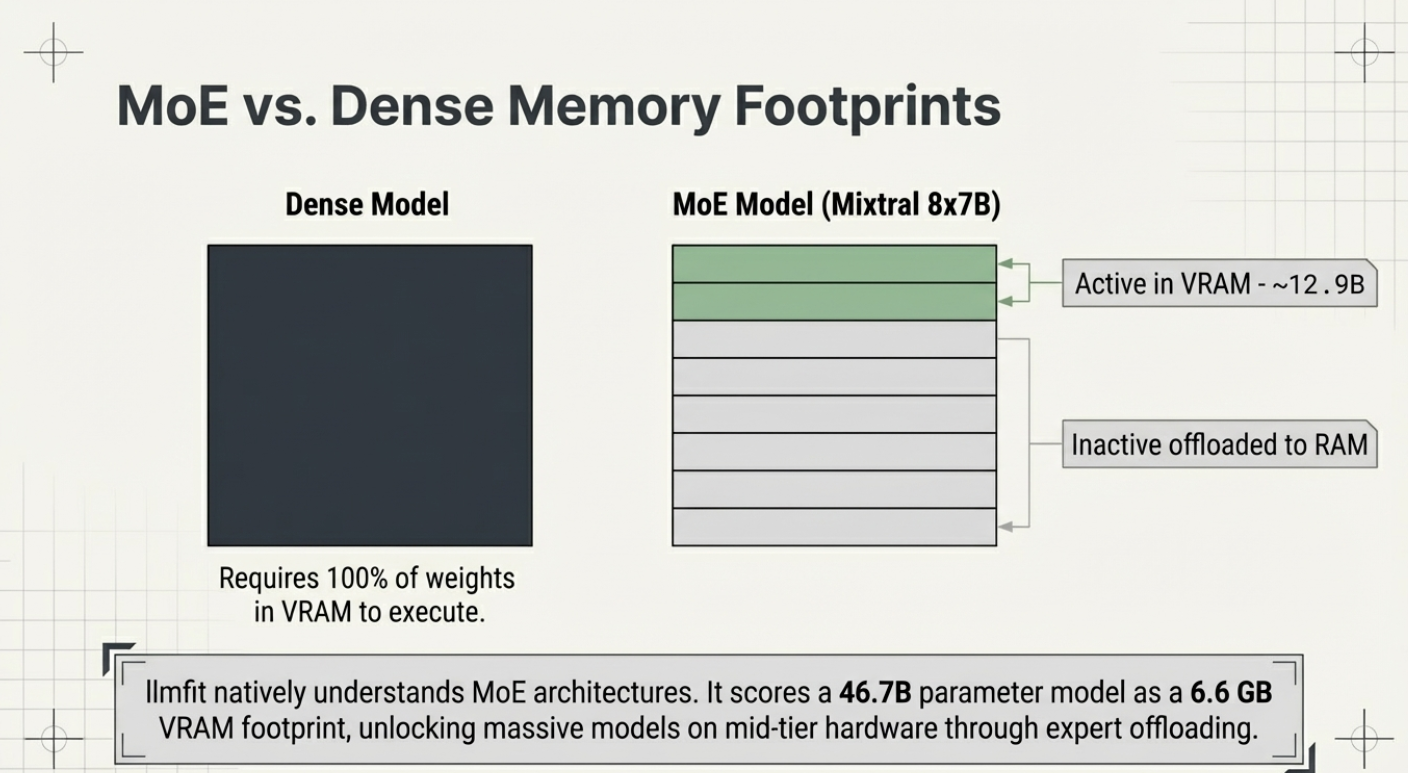
The model database (data/hf_models.json) is embedded at compile time. This means zero runtime I/O, no network roundtrip, no cache warm-up. llmfit starts instantly. The database contains parameter counts, quantization specs, use-case categories, and provider metadata for every supported model.
Stage 3 — Scoring and Ranking
Every model is scored across four dimensions and ranked by a composite score. The interactive TUI or CLI table is then rendered with the results sorted from best to worst fit for your specific machine.
The Scoring Algorithm Explained
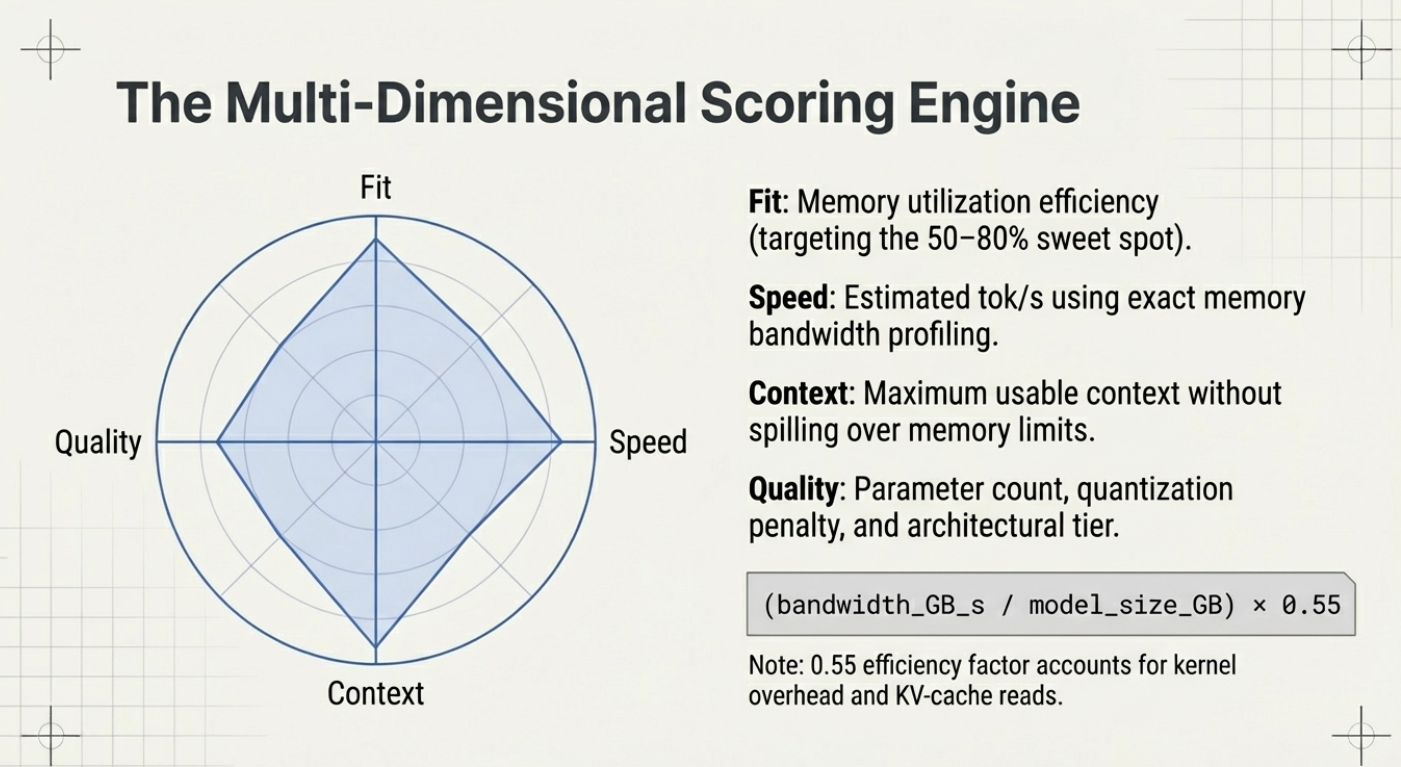
The heart of llmfit is its composite scoring system. Each model receives a score across four orthogonal dimensions:
| Dimension | What it measures |
|---|---|
| Quality | Estimated output quality relative to parameter count and architecture tier |
| Speed | Predicted tokens/second based on your backend (CUDA, Metal, ROCm, CPU) and VRAM bandwidth |
| Fit | How well the model's memory footprint matches your available RAM/VRAM at the best quantization |
| Context | Maximum usable context length on your hardware without exceeding memory limits |
A model with a perfect composite score fits entirely in GPU VRAM at a useful quantization level, runs fast enough for interactive use, and handles long contexts without swapping to RAM.
The Quantization Ladder
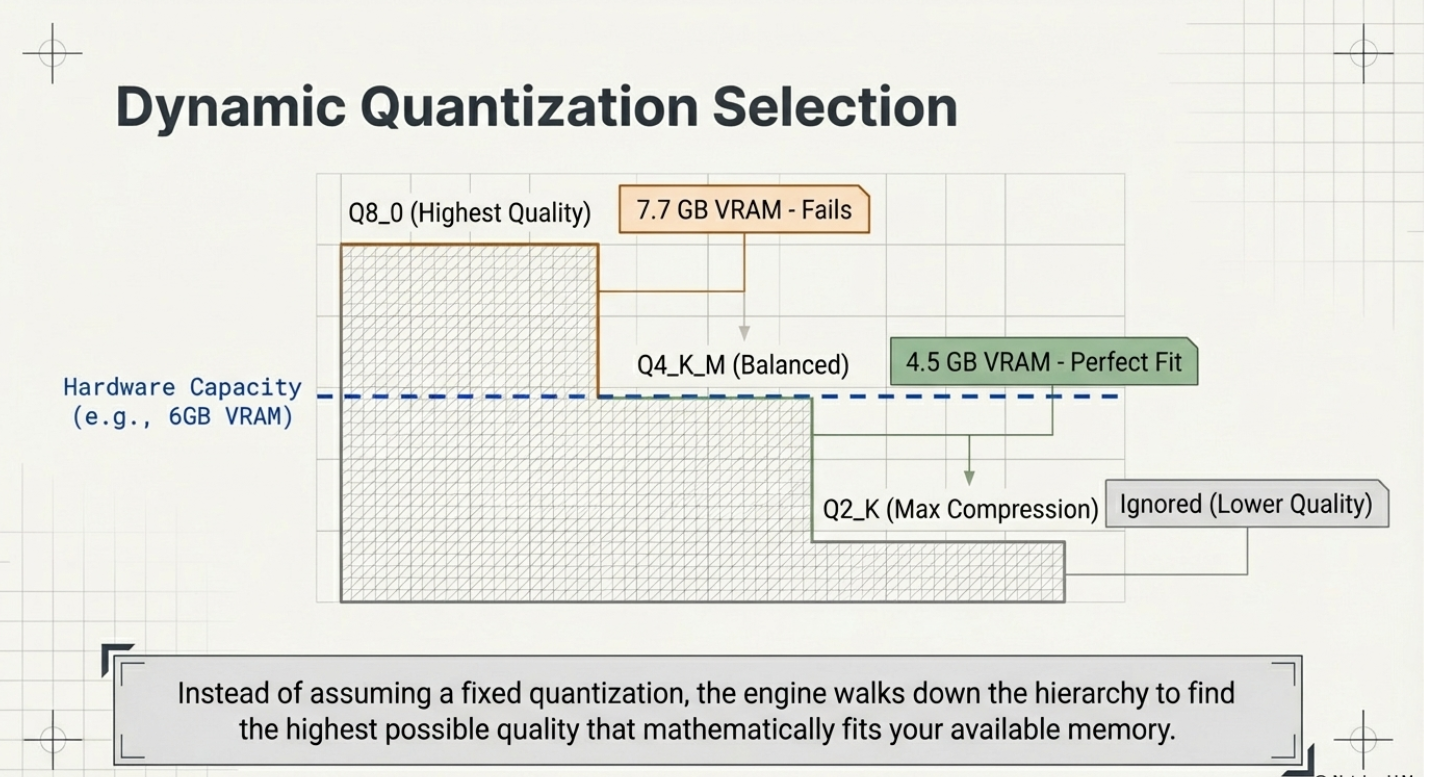
One of llmfit's most practical features is its dynamic quantization selection. Rather than assuming you want Q4 or Q8, it computes memory requirements across the full quantization hierarchy — from Q8_0 (highest quality) down to Q2_K (smallest size) — and selects the best quantization your hardware can run for each model.
Memory for a quantized LLM is calculated from its parameter count:
- A 7B model at Q4_K_M uses roughly 4.5 GB
- A 7B model at Q8_0 uses roughly 7.7 GB
llmfit runs this calculation across all 497 models automatically and matches results against your detected VRAM and RAM.
Speed Estimation by Backend
Predicted tokens/second is estimated by detecting your acceleration backend:
| Backend | Detection Method | Notes |
|---|---|---|
| CUDA | nvidia-smi | Multi-GPU: aggregates VRAM across all GPUs |
| Metal | system_profiler | Apple Silicon: unified memory = VRAM = system RAM |
| ROCm | rocm-smi | AMD discrete GPUs |
| SYCL | sysfs / lspci | Intel Arc discrete + integrated |
| CPU ARM / x86 | sysinfo | Fallback — slower tok/s estimates |
Hardware Detection in Depth
llmfit's hardware.rs module handles edge cases that trip up other tools:
Apple Silicon is handled correctly — a MacBook Pro with 36 GB of unified memory shows 36 GB of effective "VRAM" for scoring, which matches actual MLX runtime behavior.
Multi-GPU setups are supported — NVIDIA VRAM is aggregated across all detected GPUs via nvidia-smi.
Broken GPU detection (VMs, passthrough setups) is handled gracefully via manual override:
# Override with 32 GB VRAM
llmfit --memory=32G

# Works with any mode
llmfit --memory=24G --cli
llmfit --memory=24G fit --perfect -n 5
llmfit --memory=80G recommend --json
Accepted suffixes: G/GB/GiB, M/MB/MiB, T/TB/TiB — case-insensitive.
Key Commands and CLI Reference
llmfit ships with two modes: an interactive TUI (default) and a classic CLI for scripting.
# Launch the interactive TUI (default)
llmfit

# Classic table output — all models ranked by fit
llmfit --cli

# Show detected hardware specs
llmfit system

# Only perfectly fitting models, top 5
llmfit fit --perfect -n 5

# Search by name, provider, or size
llmfit search "llama 8b"

# Detailed view of a single model
llmfit info "Mistral-7B"

# Top 5 recommendations as JSON (for agents/scripts)
llmfit recommend --json --limit 5

# Filter recommendations by use case
llmfit recommend --json --use-case coding --limit 3

# Force a specific runtime (bypass MLX auto-select on Apple Silicon)
llmfit recommend --force-runtime llamacpp

# Cap context length for memory estimation
llmfit --max-context 8192 fit --perfect -n 5
The plan Command — Inverse Hardware Lookup
The plan command flips the question from "what fits my hardware?" to "what hardware do I need for this model?" This is invaluable for procurement decisions or cloud instance selection:
bash
# What VRAM do I need to run Qwen3-4B at 8K context, targeting 25 tok/s?
llmfit plan "Qwen/Qwen3-4B-MLX-4bit" --context 8192 --target-tps 25 --json

# Plan with a specific quantization
llmfit plan "Qwen/Qwen3-4B-MLX-4bit" --context 8192 --quant mlx-4bit
The serve Command — REST API Mode
# Expose llmfit as a node-level REST API
llmfit serve --host 0.0.0.0 --port 8787
This is especially useful for cluster schedulers — each node runs llmfit serve, and an orchestrator queries each node's capability before routing model placement decisions.
Getting Started in 30 Seconds
macOS / Linux (one-liner):
curl -fsSL https://llmfit.axjns.dev/install.sh | shmacOS (Homebrew):
brew install llmfitWindows (Scoop):
bash
scoop install llmfitBuild from source (requires Rust 1.85+):
git clone https://github.com/AlexsJones/llmfit.git
cd llmfit
cargo build --release
# Binary at: target/release/llmfit
Your first three commands:
# 1. See what llmfit detects about your system
llmfit system

# 2. Get your top 5 model recommendations as JSON
llmfit recommend --json --limit 5

# 3. Launch the full interactive TUI
llmfit
Ollama Integration
If Ollama is running locally, llmfit integrates with it automatically:
- On startup, llmfit queries
GET /api/tagsto list your installed Ollama models - Each installed model gets a green ✓ in the Inst column of the TUI
- The system bar shows
Ollama: ✓ (N installed) - Press
don any model in the TUI to trigger a download viaPOST /api/pull— with a real-time progress indicator
If Ollama isn't running, llmfit skips Ollama operations gracefully and continues with llama.cpp and other providers.
Real-World Use Cases
1. Picking your daily driver model
Setting up Ollama for local coding assistance? Run:
llmfit recommend --use-case coding --limit 5You'll get the top five code-optimized models ranked for your hardware — no guesswork, no wasted downloads.
2. Multi-node cluster scheduling
Running a multi-node inference cluster? llmfit serve starts a REST API on each node exposing its hardware profile and top model fits. A cluster scheduler can query each node's endpoint and route model placement based on real capability — not assumed specs.
3. CI/CD and agent pipelines
# Auto-select the best model for this runner's hardware
llmfit recommend --json --limit 1
Use this in your Dockerfile or CI pipeline to pick the right model for a given runner without hardcoding model names.
4. Hardware planning before purchase
# What does 24 GB of VRAM unlock vs 16 GB?
llmfit --memory=16G --cli
llmfit --memory=24G --cli
llmfit --memory=48G --cli
Simulate any hardware configuration to quantify exactly what you gain before spending.
Why Rust — and Why It Matters
llmfit is written in Rust (edition 2024, stable toolchain, no unsafe code), and that design choice has real consequences:
- Zero startup latency — the model database is embedded at compile time; there's no runtime I/O or network call
- No async complexity — hardware detection is synchronous; failure modes are predictable
- Single binary distribution — one static binary, no Python environment, no Node.js runtime
- Cross-platform by default — identical scoring logic on macOS (aarch64/x86_64), Linux (aarch64/x86_64), and Windows (MSVC)
The Bigger Ecosystem
llmfit is part of a growing suite of local-AI tooling from the same author:
- sympozium — run a fleet of AI agents on Kubernetes
- llmserve — a companion TUI for serving local models directly
- kubeclaw — manage agents in Kubernetes clusters
Summary
llmfit solves a problem every local LLM user hits within their first week: the painful trial-and-error of figuring out what actually runs on their hardware. With 21K stars, 497 models, 133 providers, and sub-second startup time, it's become the de facto standard for hardware-aware model selection.
If you're running local models — whether on a MacBook Pro, a workstation with an RTX 4090, or a multi-GPU inference server — llmfit deserves a permanent spot in your toolbox.