How I Sandboxed My AI Coding Agent Using Docker Sandboxes
I gave Claude Code access to my MacBook and it broke a different project with a single npm install. Docker Sandboxes gives agents their own microVM instead - same project files, full Docker access, zero risk to your host. One command to start, ten seconds to nuke and rebuild.


The first time I let Claude Code run on my MacBook without babysitting it, it installed a global npm package that broke a completely different project. Not maliciously - it was doing exactly what I asked. But it had access to my whole machine, and one npm install -g later, I was spending my Friday evening debugging why my other app wouldn't build anymore.
The problem isn't new, but it got worse
I've been using Claude Code, Gemini CLI, and a few other agents for months now. Mostly for refactoring, writing tests, setting up boilerplate. The productivity gain is real. But so is that nagging feeling every time you see the agent running sudo or touching files outside your project directory.
I tried macOS sandbox profiles for a bit. Didn't last long.
- The agent would try to install a package - blocked.
- Try to write to a temp directory - blocked.
- Try to run a subprocess - blocked.
I'd accept the permission, it'd hit another wall, I'd accept again. At some point you're just clicking "Allow" every 30 seconds and wondering what the point is.
The fundamental issue is that OS-level sandboxing restricts the process, but doesn't give it anywhere useful to work. It's like telling someone to cook dinner but locking all the cabinets.
So I needed something that could give the agent a full working environment without handing it my actual machine. That's what led me to Docker Sandboxes.
Docker Sandboxes: what actually worked
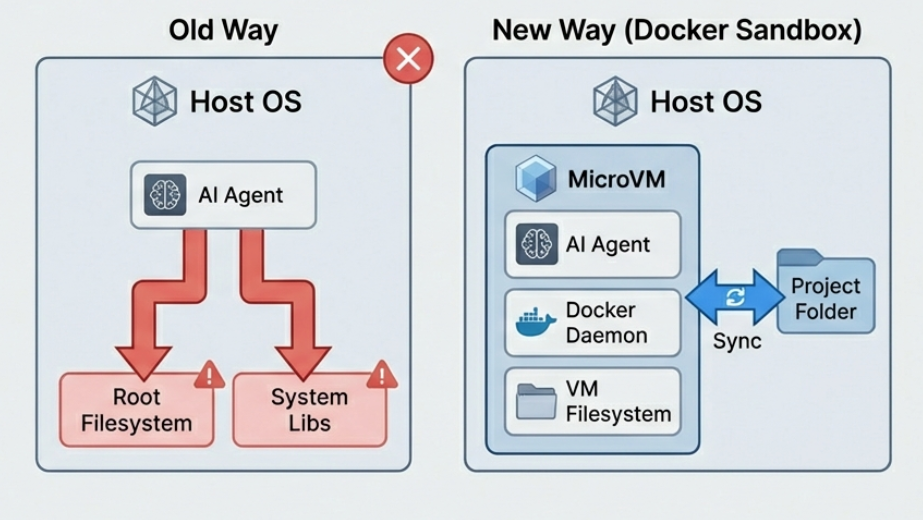
Docker Sandboxes does something smarter than OS-level restrictions. Instead of limiting what the agent can do on your machine, it gives the agent its own machine - a lightweight microVM with its own filesystem, its own Docker daemon, the works. Your project directory gets synced in, but everything else is isolated.
I first tried it a few weeks ago. Here's literally what I ran:
docker sandbox run claude ~/my-project
And this is what came back:
The selected workspace does not exist. Would you like to create it? (y/N): y
Created workspace directory: /Users/ajeetsraina/my-project
Creating new sandbox 'claude-my-project'...
That's it. No YAML files, no Dockerfiles, no configuration. It created the directory, pulled a template, spun up a microVM, and launched Claude Code inside it with --dangerously-skip-permissions enabled by default. Which sounds scary until you realize the whole point - the permissions are "dangerous" relative to a normal machine, but this isn't your machine. It's a disposable VM.
If you want more control over naming, you can separate the create and run steps:
docker sandbox create --name my-sandbox claude ~/my-project
docker sandbox run my-sandbox
One thing that tripped me up early - I ran docker ps and didn't see my sandbox. Spent a minute confused before realizing sandboxes are microVMs, not containers. You need docker sandbox ls to see them.
The path thing is actually clever
This is a small detail but it matters a lot in practice. When Docker mounts your project into the sandbox, it keeps the absolute path the same. So /Users/ajeetsraina/my-project on my Mac is also /Users/ajeetsraina/my-project inside the sandbox.
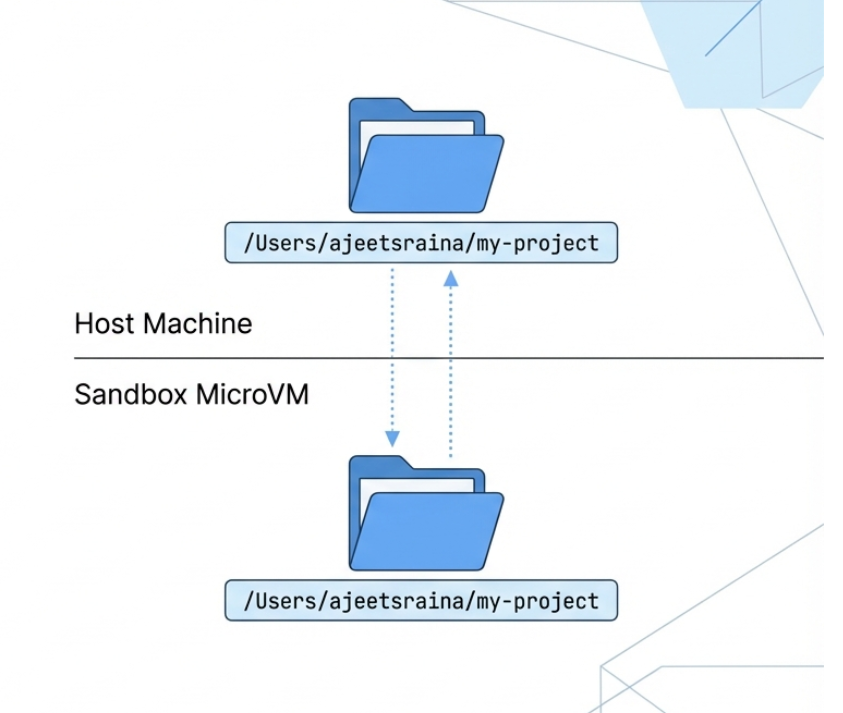
Why does this matter? Because when the agent hits an error and spits out a file path, it matches what's on your host. You don't have to mentally translate /workspace/src/index.js back to wherever your project actually lives. It sounds minor but if you've ever debugged path issues in a Docker container, you know.
With that setup done, I wanted to see how far I could push it with a real task.
What I actually tested
I didn't just spin it up and call it a day. I gave Claude Code a real task inside the sandbox - restructure an Express app, add Jest, rewrite the test config, update the Dockerfile. The kind of task where the agent touches a lot of files and installs things.
It did its thing. Installed Jest globally inside the sandbox, modified package.json, rewrote test files, updated the Dockerfile. When I exited and checked my host - nothing changed except the files in my project directory. All the global installs, all the system-level stuff, stayed inside the VM.
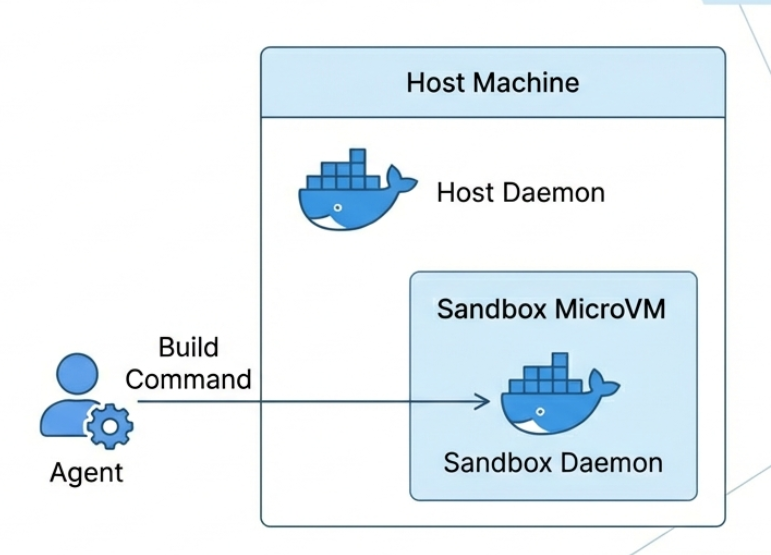
The other thing I tested: Docker-in-Docker. My agent needed to build an image and run a container as part of testing. Normally this is a pain - you either mount the host Docker socket (which defeats isolation) or deal with nested daemons. Inside the sandbox, it just works because each microVM has its own Docker daemon. The agent builds and runs containers without ever touching your host Docker. That alone made the whole setup worth it for me.
But running agents with full internet access and skip-permissions still felt a bit too wide open. That's when I looked into network policies.
Network policies - do this, seriously
Here's something I almost skipped and then realized I shouldn't have. By default, the sandbox network is wide open. Your agent can hit any URL on the internet. If you're running with --dangerously-skip-permissions (which the sandbox does by default), that's worth thinking about.
Docker lets you lock down a sandbox's outbound traffic with a denylist approach - block everything, then allow specific hosts:
docker sandbox network proxy claude-my-project \
  --policy deny \
  --allow-host "*.npmjs.org" \
  --allow-host "github.com" \
  --allow-host "api.anthropic.com"
This sets the sandbox to deny all outbound traffic by default, then explicitly allows npm, GitHub, and Anthropic's API. You can check what's getting allowed and blocked with:
docker sandbox network log claude-my-project
That shows you a live feed of requests with allowed or denied status. Took me a few tries to get the rules right - I kept forgetting that github.com doesn't match api.github.com, you need *.github.com for subdomains. But once set up, I felt much more comfortable leaving the agent running unattended.
When things go sideways
At one point during testing, the agent made a mess - installed a bunch of conflicting packages, modified files it shouldn't have (within the project, not on my host, but still). Old me would've been running git checkout . and praying. Sandbox me just did:
docker sandbox rm claude-my-project
docker sandbox run claude ~/my-project
Ten seconds, clean environment. My project files were fine - Git had my back for anything the agent changed in the workspace. But all the garbage it installed system-wide? Gone with the VM.
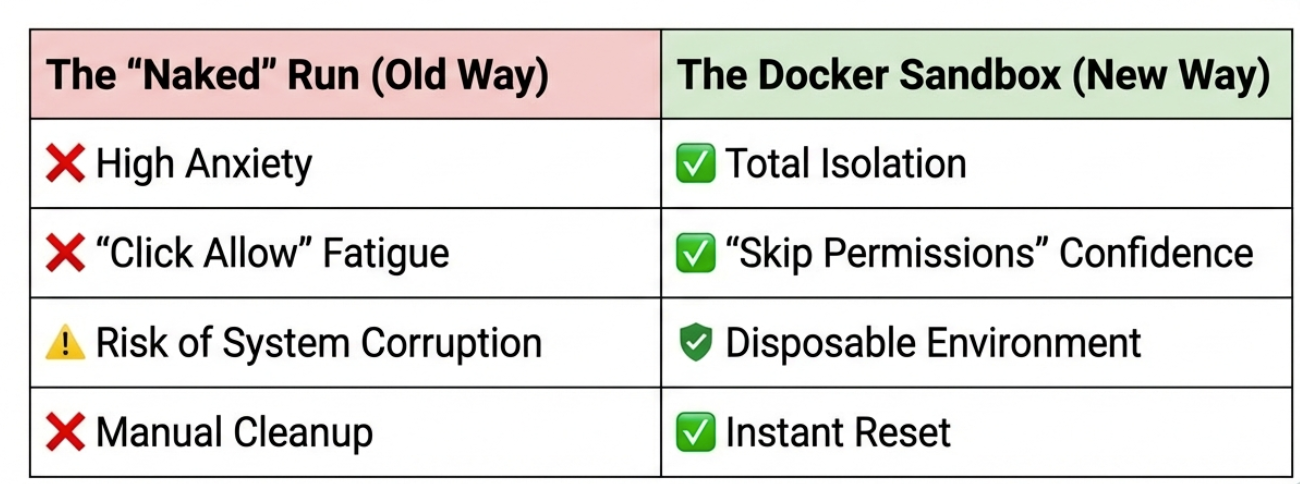
That changes how you use these agents. You stop being careful and start being experimental. If it breaks, nuke it. That's kind of the point.
A few gotchas I hit
Along the way I ran into some things that aren't obvious from the docs.
Environment variables don't work the way you'd expect. If you're used to docker run -e MY_VAR=value, you might try the same with sandboxes. It won't work. The sandbox uses a daemon process that runs independently of your shell session, so inline env vars or session-level exports don't reach it. You need to set them globally in your shell config:
# Add to ~/.zshrc or ~/.bashrc
export ANTHROPIC_API_KEY=sk-ant-xxxxx
Then restart Docker Desktop so the daemon picks up the change. Alternatively, Claude Code will prompt you to authenticate interactively if it doesn't find credentials — but you'll have to do that per workspace. For anything more custom, you'd build a custom template with ENV directives baked in.
Sandboxes persist. Unlike docker run, which throws everything away when you exit, a sandbox sticks around. Run docker sandbox run claude-my-project tomorrow and you'll pick up right where you left off - same installed packages, same config. That's actually nice most of the time, but it means you need to explicitly docker sandbox rm when you want a clean start.
Multiple agents, multiple sandboxes. I've been running Claude and Gemini on the same project for different tasks:
docker sandbox run claude ~/my-app
docker sandbox run gemini ~/my-app
Each gets its own microVM. They share the project files but can't step on each other's environments.
What's still missing
Port forwarding is the big one. If the agent starts a dev server inside the sandbox, I can't hit it from my browser on the host. That's a real limitation for web development workflows. Docker says it's coming.
Linux microVM support isn't there yet - Linux users get the older container-based sandboxes through Docker Desktop 4.57. macOS and Windows get the full microVM experience.
MCP Gateway integration inside sandboxes would be great for connecting agents to external tools. Also on the roadmap apparently.
Bottom line
I'm not going back to running agents directly on my machine. The overhead of Docker Sandboxes is basically zero - one command to start, and everything else feels the same. But now when the agent does something stupid, it's doing it in a VM I can throw away, not on the laptop I need for work tomorrow.
If you're using AI coding agents and haven't tried this yet, just run docker sandbox run claude ~/some-project and see for yourself. It takes two minutes and you'll immediately feel better about letting the agent off the leash.