Build an Autonomous A/B Testing Agent on Docker Cloud Sandboxes
What if an AI agent could run an A/B test all by itself? This tutorial walks you through building one on Docker Cloud Sandboxes.

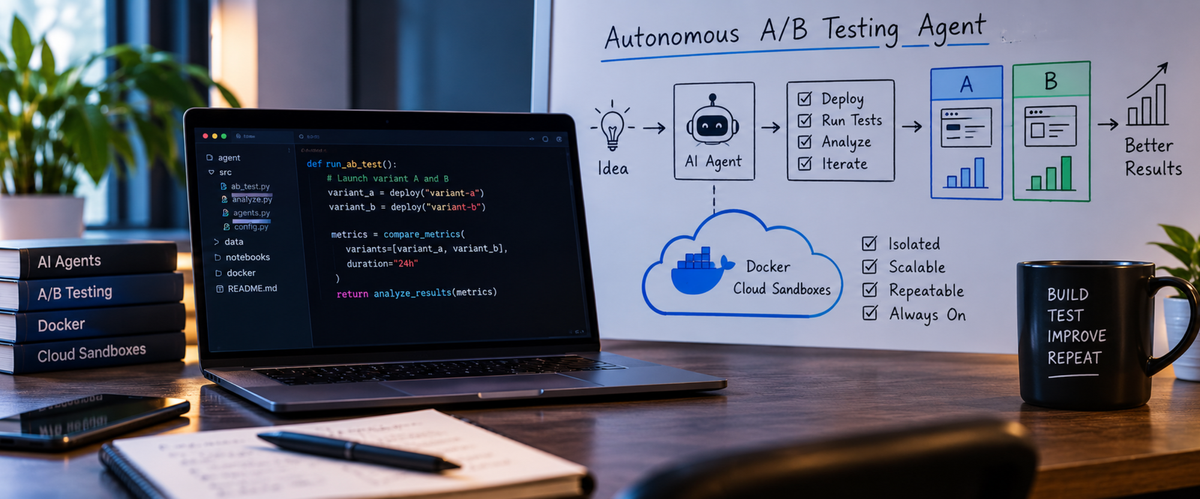
Have you ever wondered if an AI agent could run an A/B test all by itself?
In this post, we will build one together. We will go slowly, one file at a time, so you can follow along even if you have never used Docker Cloud Sandboxes before.
Full code: github.com/ajeetraina/sbx-ab-agent
What are we building?
Think of a small online shop. Some people say it is hard to find things in it. We want to fix that, but we are not sure which fix is best.
So we do this:
- Put the shop online in a safe cloud box (a sandbox).
- Send in some pretend shoppers (AI agents) and ask them how easy the shop was to use.
- Ask an analyst (another AI agent) to suggest a few fixes.
- Give each fix to a builder (another AI agent) who writes the code, each in its own sandbox.
- Send the same pretend shoppers to test each new version.
- Pick the version with the best score and copy its code back to your laptop.
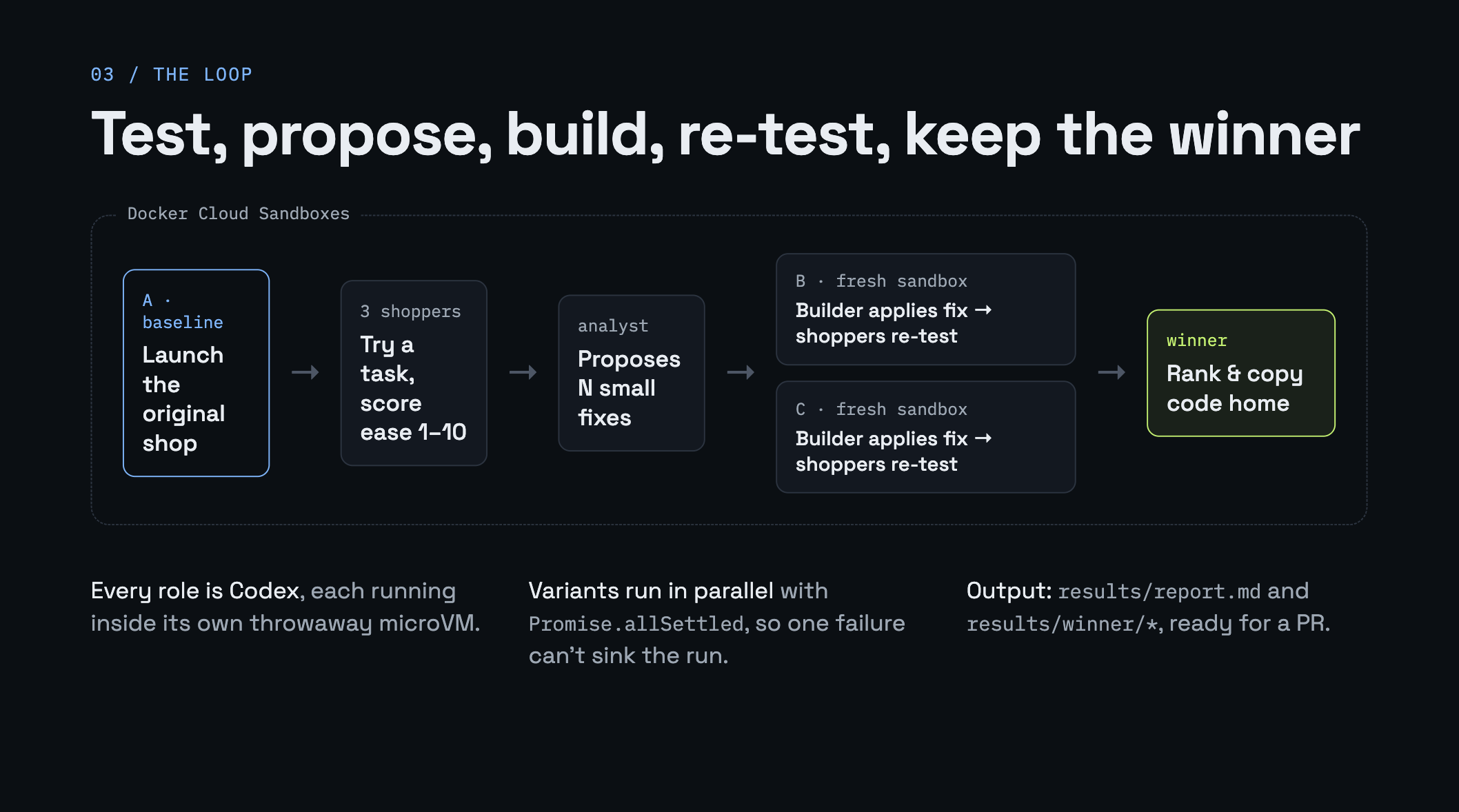
Here is the same idea as a picture:
                ┌──────────── Docker Cloud Sandboxes ────────────┐
npm start ──►   │ A  original shop  → shoppers test → analyst    │
                │ B  new sandbox → builder adds fix B → re-test  │
                │ C  new sandbox → builder adds fix C → re-test  │
                └────────────────────────────────────────────────┘
                                   │
                                   ▼
                    winner + report + winning code
"A" is the original shop. "B" and "C" are the new versions. That is all A/B testing really means: try a few versions and see which one works better.
Why use a sandbox at all?
Our builder agent will write and run code that nobody has checked. You do not want that running on your laptop.
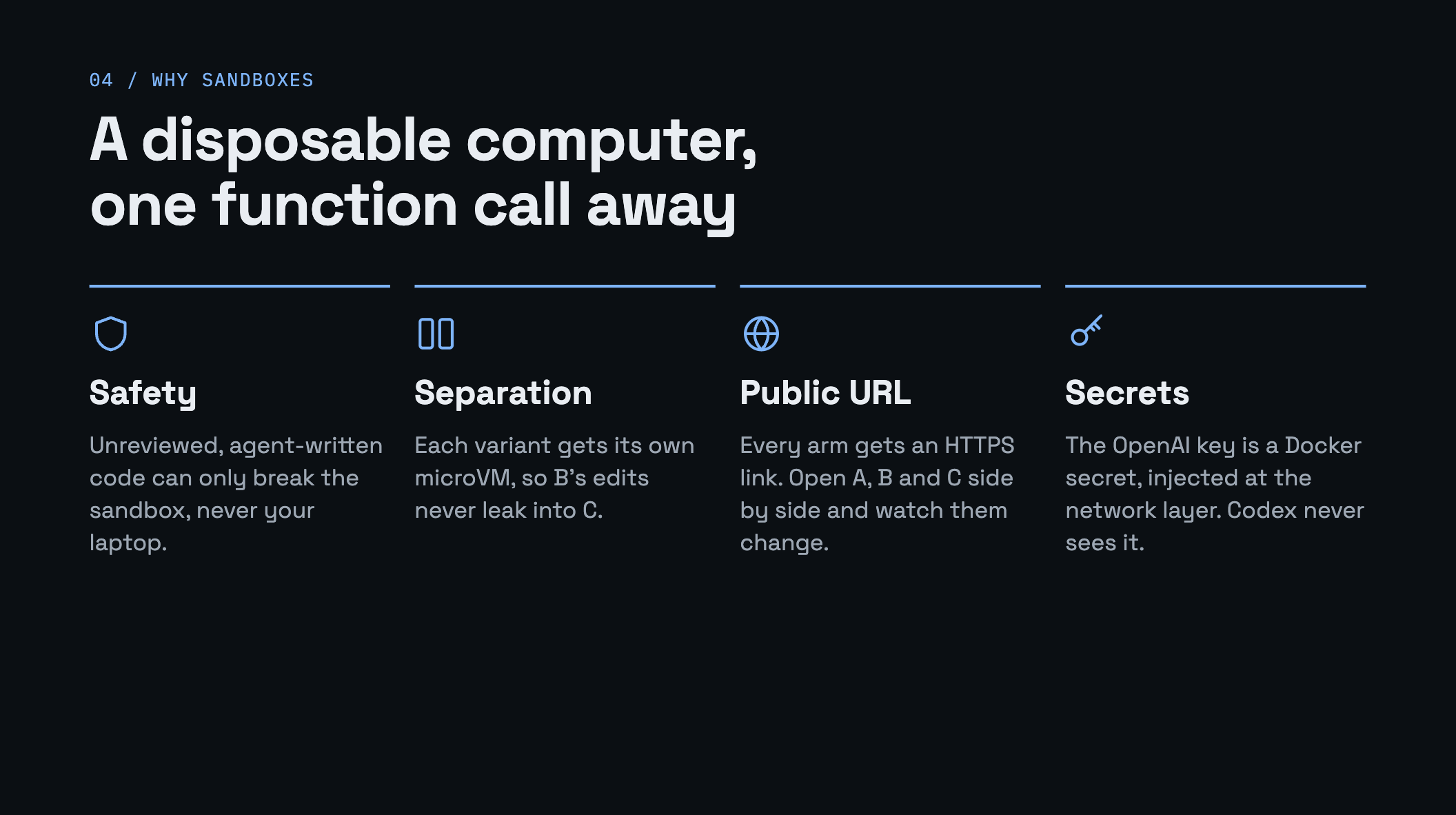
A Docker Cloud Sandbox is a small, throwaway computer in the cloud (a microVM). It gives us four things we need:
- Safety. If the agent does something silly, only the sandbox is affected.
- Separation. Fix B and fix C each get their own sandbox, so they never mix.
- A real link. Each sandbox can share a public HTTPS URL, so you can open every version in your browser.
- Safe keys. Your OpenAI key is stored as a secret. The sandbox uses it for outgoing calls, but the key never sits inside the sandbox.
We control all of this from a small TypeScript program using the @docker/sandboxes SDK.
What you need
- Node.js 20 or newer
- A Docker account with access to Docker Cloud Sandboxes
- An OpenAI API key (the agents use OpenAI's Codex)
Step 1: Get the code and look around
git clone https://github.com/ajeetraina/sbx-ab-agent
cd sbx-ab-agent
npm install
The project is small. Here is a map:
app/                 the demo shop
  server.mjs         a tiny web server
  index.html         the page
  app.js             shows the products
  styles.css         the look
  products.json      the product list
src/
  sbx.ts             helpers that talk to Docker Cloud Sandboxes
  prompts.ts         the instructions for each AI agent
  ab.ts              the main program that runs every step
  dashboard.ts       a live web page to watch the run
  cleanup.ts         deletes the sandboxes when you are done
A good reading order is: app/ first, then prompts.ts, then sbx.ts, then ab.ts. That is the order we will follow.
Step 2: Meet the shop (app/)
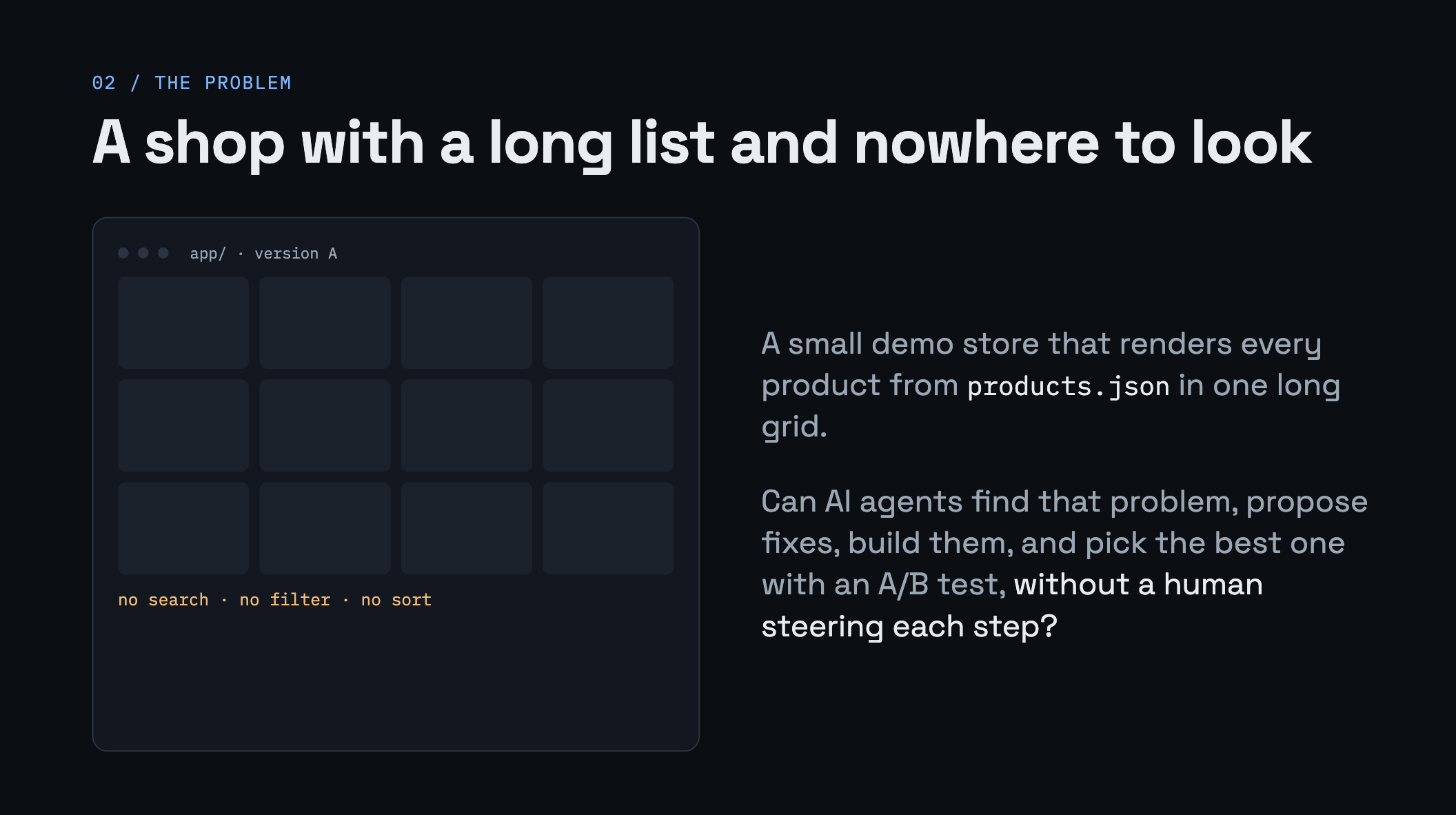
The shop shows a long list of products. That is it. There is no search, no filter and no sort. This is on purpose. It is the problem we want our agents to find and fix.
Here is the code that draws the products, from app/app.js:
async function main() {
  const products = await (await fetch('/products.json')).json();
  render(products);
}
It loads every product and puts them all on the page. Nothing more.
Now look at the server in app/server.mjs. The key line is this one:
const body = await readFile(file);
The server reads the file from disk every time someone asks for it. It never keeps an old copy. This matters later: when the builder agent changes app.js, the live site changes right away. No restart needed.
Try the shop on your own machine:
npm run shop
# open http://localhost:3000
Step 3: Meet the three AI helpers (src/prompts.ts)
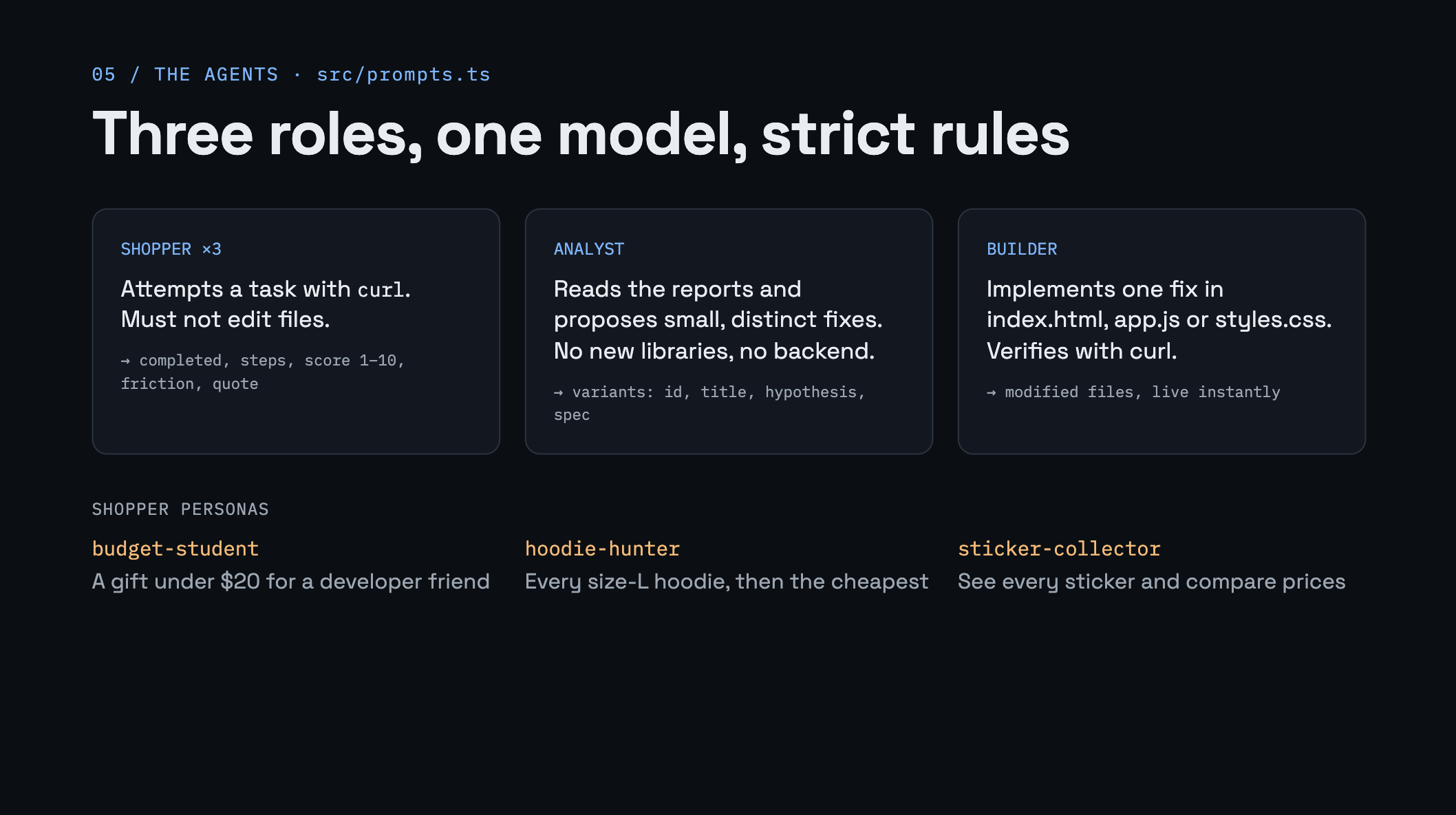
We have three roles. They all use the same AI (Codex). The only difference is the instructions (the prompt) we give each one.
Helper 1: the pretend shopper
We have three shoppers, each with a simple goal:
| Shopper | Who they are | What they want |
|---|---|---|
budget-student | a student with about $20 | a gift under $20 for a developer friend |
hoodie-hunter | a busy engineer | all hoodies in size L, then the cheapest one |
sticker-collector | a sticker fan | see every sticker and compare prices |
In code, a shopper is just a small object:
{
  id: 'hoodie-hunter',
  who: 'a busy engineer who already knows they want a hoodie in size L',
  task: 'find all hoodies available in size L and pick the cheapest one',
}
The shopper is told: "You are a real person, not a developer. Do not edit any files." It looks at the shop using curl and imagines the clicks and scrolling a real person would need.
Most important: the shopper must answer in JSON, not in a paragraph. That way our program can read the answer easily.
{
  "persona": "hoodie-hunter",
  "completed": true,
  "steps": 14,
  "score": 4,
  "friction": ["had to scroll the whole list; no size filter"],
  "quote": "I found it, but I had to look at everything."
}
score goes from 1 to 10. A 10 means the task was very easy.
Helper 2: the analyst
The analyst reads all the shopper reports and suggests a few fixes. The rules we give it:
- Each fix must be small.
- Only change
index.html,app.jsandstyles.css. - No new libraries, no backend changes.
- Each fix should be a different idea.
It also answers in JSON:
{
  "summary": "Shoppers scroll the whole list. There is no way to narrow it down.",
  "variants": [
    { "id": "B", "title": "Search box and category filters", "hypothesis": "...", "spec": "..." },
    { "id": "C", "title": "Sort by price", "hypothesis": "...", "spec": "..." }
  ]
}
Helper 3: the builder
The builder gets one fix (for example "Sort by price") and writes the code. It has strict rules too:
- Only edit
index.html,app.jsandstyles.css. - Plain HTML, CSS and JavaScript. No frameworks.
- Do not restart the server.
- When done, check the page still loads with
curl.
These rules keep every version fair. Each version is the same shop plus one small change.
Step 4: Connect to Docker and store your key (src/sbx.ts)
Now we start talking to Docker Cloud Sandboxes. Everything in this file is a small helper we will call later.
Signing in
const auth = oauth({
  store: fileOAuthCredentialStore({ path: '.docker-sandboxes/oauth.json' }),
  onVerification: ({ verificationUriComplete, verificationUri, userCode }) => {
    console.log(`Sign in to Docker: ${verificationUriComplete ?? verificationUri}`);
    console.log(`Code: ${userCode}`);
  },
});
await auth.getAccessToken();
return new Sandboxes({ auth });
In plain words:
- The first time, it prints a link and a code. You open the link and sign in.
- It saves your sign-in to a local file, so next time it does not ask again.
new Sandboxes({ auth })gives us a client. We use this client for everything else.
If you prefer no browser step, set DOCKER_USERNAME and DOCKER_PAT (a personal access token). The code then uses pat() instead.
Storing the OpenAI key as a secret
const secret = await client.secrets.create({
  displayName: 'sbx-ab-agent-openai',
  serviceType: 'openai',
  token: { value: key },
});
This saves your OpenAI key in Docker, not inside any sandbox. Later we attach the secret to each sandbox. When Codex calls OpenAI, the sandbox adds the key to the request on the way out. Codex never sees the key itself.
One small thing to remember: the SDK does not attach your OpenAI secret for you. You must pass it in when you create a sandbox. We will do that in the next step.
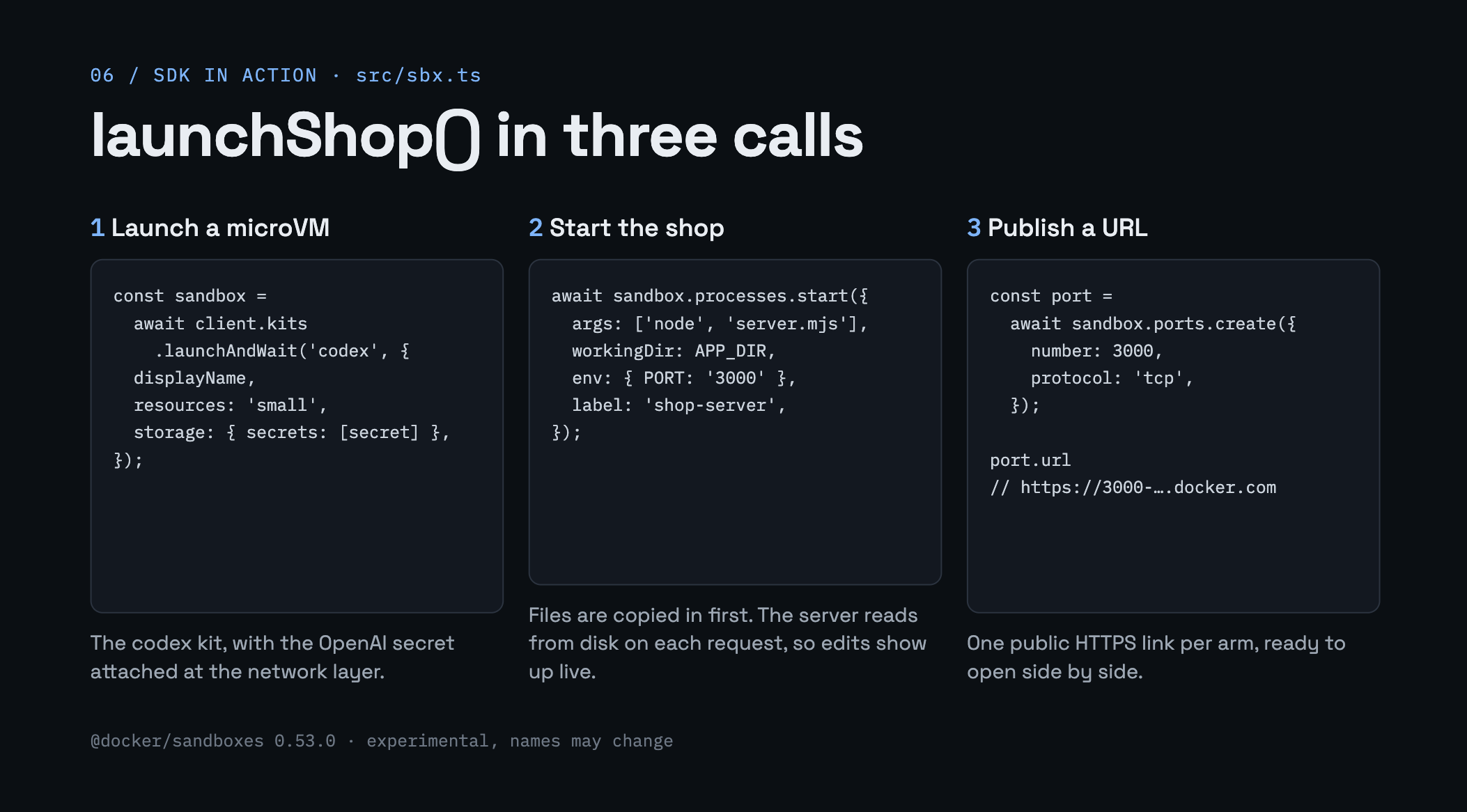
Step 5: Start a sandbox and put the shop inside (launchShop)
This one function does five small jobs. Let us take them one by one.
1. Create the sandbox
const sandbox = await client.kits.launchAndWait('codex', {
  displayName,
  resources: 'small',
  storage: { secrets: [secret] },
});
'codex' is a kit: a ready-made sandbox that already has Codex installed. launchAndWait creates it and waits until it is ready. Notice we pass our secret here.
2. Copy the shop files in
await sandbox.files.mkdir(APP_DIR, { mode: 0o755, parents: true });
for (const f of await readdir(localAppDir)) {
  await sandbox.files.write(`${APP_DIR}/${f}`, await readFile(join(localAppDir, f), 'utf8'));
}
Make a folder in the sandbox, then copy each file from your app/ folder into it.
3. Start the web server
await sandbox.processes.start({
  args: ['node', 'server.mjs'],
  workingDir: APP_DIR,
  env: { PORT: '3000' },
  label: 'shop-server',
});
processes.start runs a command in the background. The server keeps running while we do other things.
4. Wait until the server answers
The waitForHttp helper uses sandbox.run(...) to try the server once a second, up to 30 times. When it gets a good answer, we move on.
5. Get a public link
const port = await sandbox.ports.create({ number: 3000, protocol: 'tcp' });
return { sandbox, url: port.url };
This opens port 3000 to the internet and gives back a real HTTPS URL. You can open it in your browser.
That is it. One function, and we have a live shop running in the cloud.
Step 6: Ask Codex to do a job (runAgent)
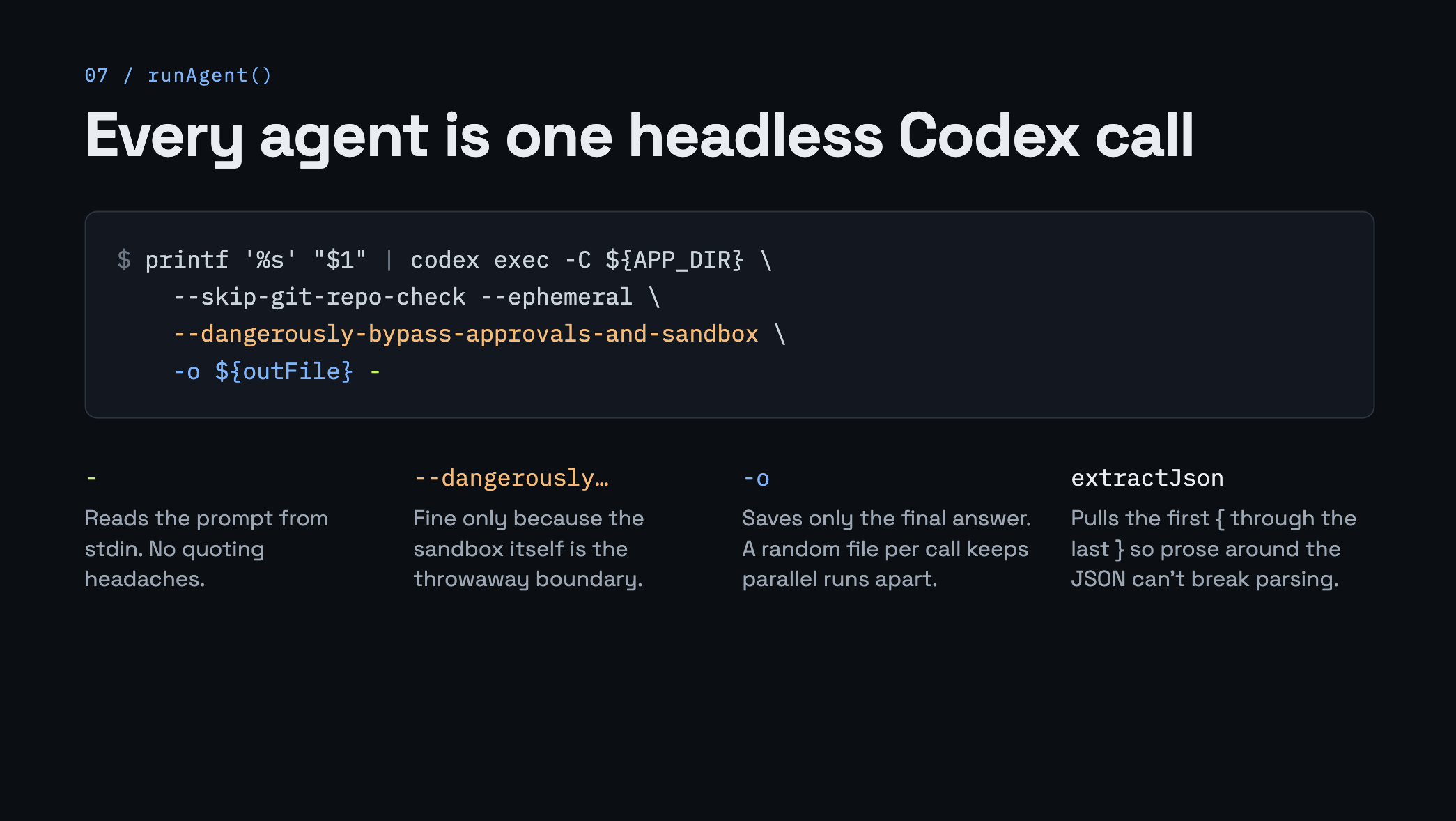
Every AI helper (shopper, analyst, builder) runs through this one function. It runs Codex inside the sandbox with no chat window, just a prompt in and an answer out.
const script =
  `printf '%s' "$1" | codex exec -C ${APP_DIR} --skip-git-repo-check --ephemeral ` +
  `--dangerously-bypass-approvals-and-sandbox -o ${outFile} -`;

const r = await sandbox.processes.run(
  { args: ['bash', '-lc', script, 'bash', prompt], workingDir: APP_DIR },
  { timeoutMs },
);
This looks scary, so let us break it down:
codex execruns Codex once, without asking us questions.printf ... | ... -sends the prompt into Codex. The-at the end means "read the prompt from input". If you pass the prompt another way, Codex waits and then fails.--dangerously-bypass-approvals-and-sandboxturns off Codex's own safety box. That is fine here, because we are already inside a throwaway sandbox.-o ${outFile}saves only Codex's final answer to a file.- Each call uses a new random file name, so many shoppers can run at the same time without mixing up answers.
After it finishes, we read the answer back:
return await sandbox.files.read(outFile, { encoding: 'utf8' });
Pulling out the JSON
AI answers are not always clean. Sometimes the JSON comes wrapped in a code block, or with a sentence before it. The extractJson helper finds the first { and the last } and reads what is between them. Simple, and it works well.
Step 7: Put it all together (src/ab.ts)
Now the main program. It just calls the helpers above in order. Read main() from top to bottom and you will see these steps:
Step A: Start the original shop
const base = await launchShop(client, 'ab-A-baseline', secret, 'app');
Step B: Send the shoppers in
const baseSessions = await simulate(base.sandbox, 'A', PERSONAS);
simulate runs all three shoppers at the same time with Promise.all. Each one returns its JSON report.
Step C: Ask the analyst for fixes
const plan = extractJson(
  await runAgent(base.sandbox, analystPrompt(GOAL, baseSessions, N_VARIANTS)),
);
Step D: Build and test every fix, all at once
const settled = await Promise.allSettled(
  variants.map((v) => runVariant(client, secret, v)),
);
For each fix, runVariant does three things:
- Starts a new sandbox with a fresh copy of the shop.
- Asks the builder to add the fix.
- Sends the same three shoppers in to test it.
We use Promise.allSettled instead of Promise.all. The difference: if one fix fails, the others still finish. One bad version does not ruin the whole run.
Step E: Pick the winner
const ranked = [...arms].sort((a, b) =>
  b.avgScore - a.avgScore || b.completion - a.completion || a.avgSteps - b.avgSteps);
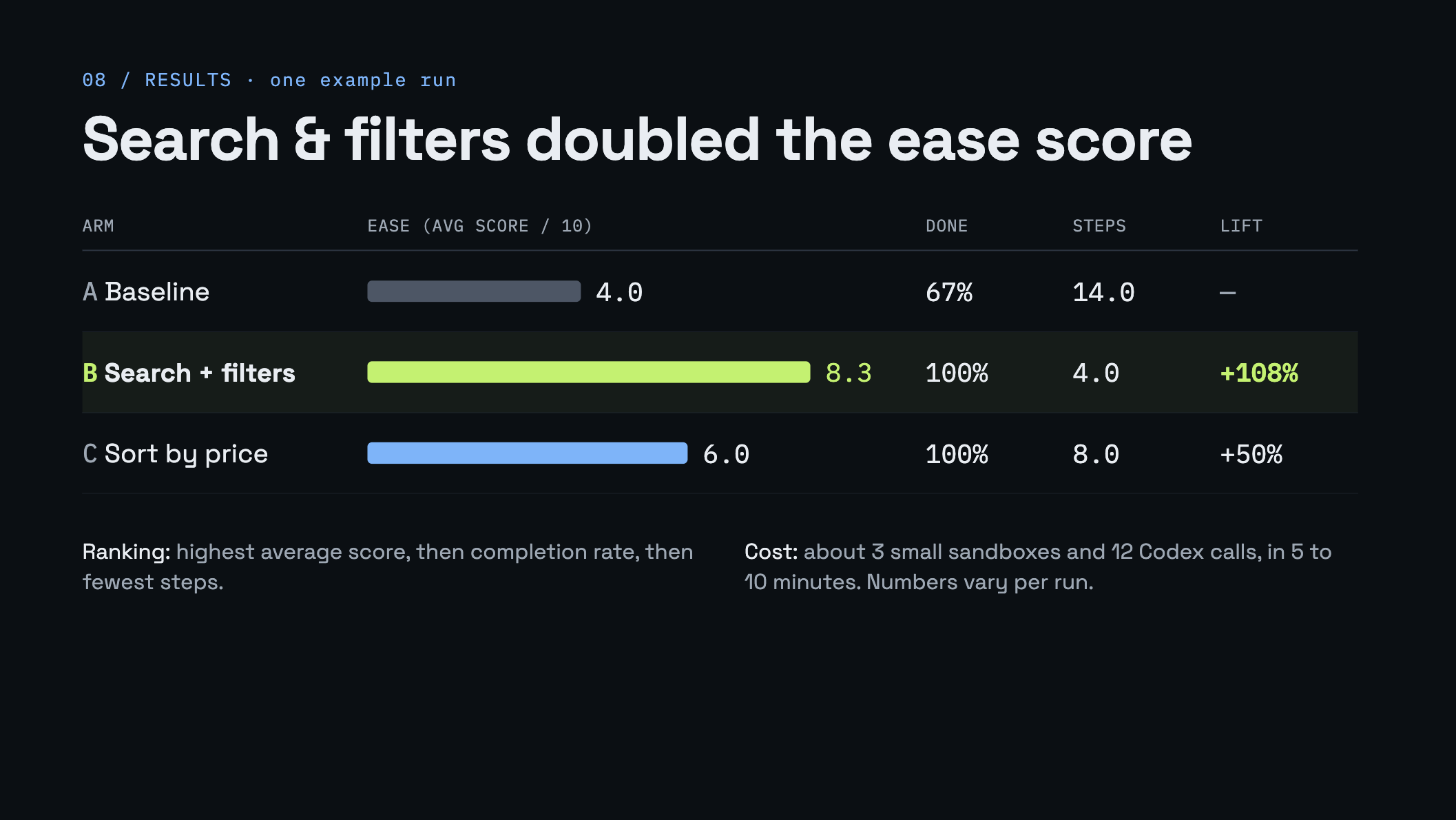
In plain words: highest average score wins. If two are tied, the one where more shoppers finished wins. If still tied, fewer steps wins.
Step F: Bring the winning code home
const body = await winner.sandbox.files.read(`${APP_DIR}/${f}`, { encoding: 'utf8' });
await writeFile(`results/winner/${f}`, body);
The winning files are copied from the sandbox to results/winner/ on your laptop. The program also writes results/report.md and results/report.json with all the scores and shopper quotes.
Step 8: Run it
Set up your key:
cp .env.example .env
# open .env and add: OPENAI_API_KEY=sk-...
set -a; source .env; set +a
Then start the run:
npm start
The first time, you will see a Docker sign-in link. Open it, sign in, and the run continues.
A normal run (2 fixes, 3 shoppers) uses 3 small sandboxes and about 12 Codex calls. It takes around 5 to 10 minutes.
Some handy options:
npm start -- --variants 3 --personas 2
npm start -- --goal "Users can't tell which items are on sale"
npm start -- --cleanup          # delete the sandboxes at the end
npm start -- --no-dashboard     # skip the live web page
Step 9: Watch it live and read the results
While it runs, open http://localhost:4000. This is the live dashboard (src/dashboard.ts). You will see each step light up, and a box for A, B and C showing scores as they come in.
The terminal also prints a public link for each version. Open A, B and C in three tabs. You can watch B and C change while the builder is still working.
When it finishes, you get a table like this:
| Arm | Variant | Ease | Done | Steps | Lift |
|---|---|---|---|---|---|
| A | Baseline | 4.0 | 67% | 14.0 | - |
| B (winner) | Search and filters | 8.3 | 100% | 4.0 | +108% |
| C | Sort by price | 6.0 | 100% | 8.0 | +50% |
(Your numbers will be different. Every run is a little different.)
"Lift" means how much better the score is compared to A.
To see exactly what the AI changed, compare the files:
diff -u app/app.js results/winner/app.js
That diff is basically your pull request.
A quick note on ports, since there are a few:
| URL | Where | What |
|---|---|---|
http://localhost:4000 | your laptop | the live dashboard |
https://3000-....sbx.sandboxes-cloud.docker.com | the cloud | each version of the shop |
http://localhost:3000 | your laptop | only when you run npm run shop |
Step 10: Clean up
By default, the sandboxes stay running so you can click around each version. When you are done:
npm run cleanup
This deletes every sandbox whose name starts with ab-. It uses client.allSandboxes() to list them and delete({ force: true }) to remove each one.
Cheat sheet: every SDK call we used
| What we wanted | SDK call |
|---|---|
| Sign in | oauth() or pat() |
| Save the OpenAI key | client.secrets.create(...) |
| Create a sandbox | client.kits.launchAndWait('codex', ...) |
| Copy files in and out | sandbox.files.mkdir / files.write / files.read |
| Start a server in the background | sandbox.processes.start(...) |
| Run a quick command | sandbox.run([...]) |
| Run a command and wait for it | sandbox.processes.run(...) |
| Get a public URL | sandbox.ports.create({ number: 3000 }) |
| Clean up | client.allSandboxes(), sandbox.delete(...) |
That is the whole SDK surface for this project. About ten calls.
Common problems
- "No OpenAI credential": you did not set
OPENAI_API_KEY. Check your.envand run set -a; source.env; set +a again. - Codex exits with code 1: the error message is at the end of the output. Read the last few lines.
- A version shows "failed": that is fine. The other versions still finish because of
Promise.allSettled. - Too many sandboxes left over: run
npm run cleanup.
Things to keep in mind
- The shoppers read the page with
curl, not a real browser. They can tell when search or filters are missing, but they cannot judge how the page looks. - Scores come from AI judgement on only a few shoppers. Treat them as a hint, not hard proof.
- The Sandboxes SDK is still experimental. This project uses
@docker/sandboxes0.53.0, so some names may change later.
What you learned
You now know how to:
- Sign in and create a client with the Docker Sandboxes SDK.
- Store an API key safely as a secret.
- Start a sandbox, copy files in, run a server and get a public URL.
- Run an AI agent inside a sandbox and read its answer.
- Run many sandboxes at the same time and compare the results.
The shop is just an example. The same pattern works for many things: testing prompts, tuning settings, trying different copy. Anywhere you can pretend to be a user and give a score, you can use this loop.
The big idea is simple. When a safe, throwaway computer is just one function call away, letting an agent "try it and see" stops being risky.
Give it a try, and let me know what you build with it!