Claude Code Yolo Mode: What You Need to Know

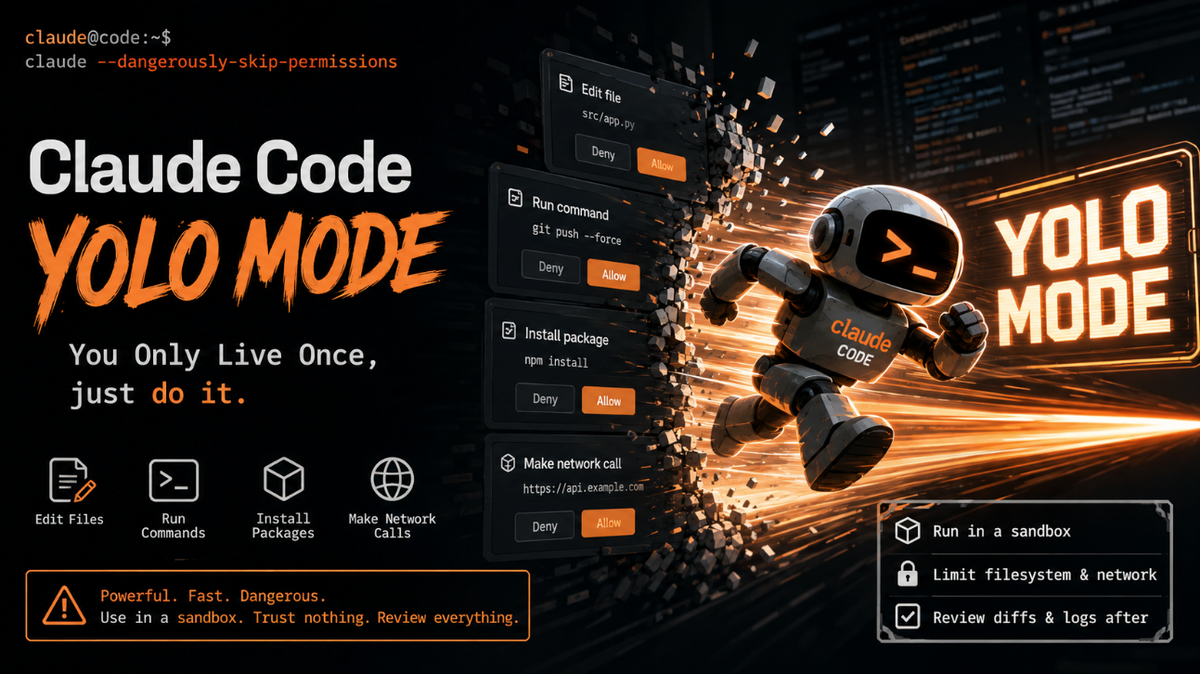
Claude Code, like most agentic coding tools, asks for permission before it does anything consequential: editing a file, running a shell command, installing a package, or making a network call. That permission system is a safety rail.
It's become a popular shorthand among developers because it captures exactly what's happening: you're telling the agent "You Only Live Once, just do it." Here's a technical breakdown of what the mode actually does, how to invoke it, and why you should think carefully before flipping it on.
The Command
Yolo mode is enabled with a single flag when launching Claude Code from the terminal:
claude --dangerously-skip-permissionsThe flag name is deliberately alarming.
Anthropic didn't call it --auto-approve or --fast-mode; they called it "dangerously," which is a strong signal about the intended usage pattern. When this flag is set, every tool call the agent wants to make (file writes, bash execution, package installs, git operations) is executed immediately instead of being queued for your approval.
You can also enable a similar behavior for a single session or for specific tool categories using the /permissions command inside an interactive session, or by editing the permissions block in a project's .claude/settings.json file, for example allowing a specific set of bash commands without prompts while still gating file deletion or network access. The blanket flag simply removes all of these guardrails at once.
What's Actually Happening Under the Hood
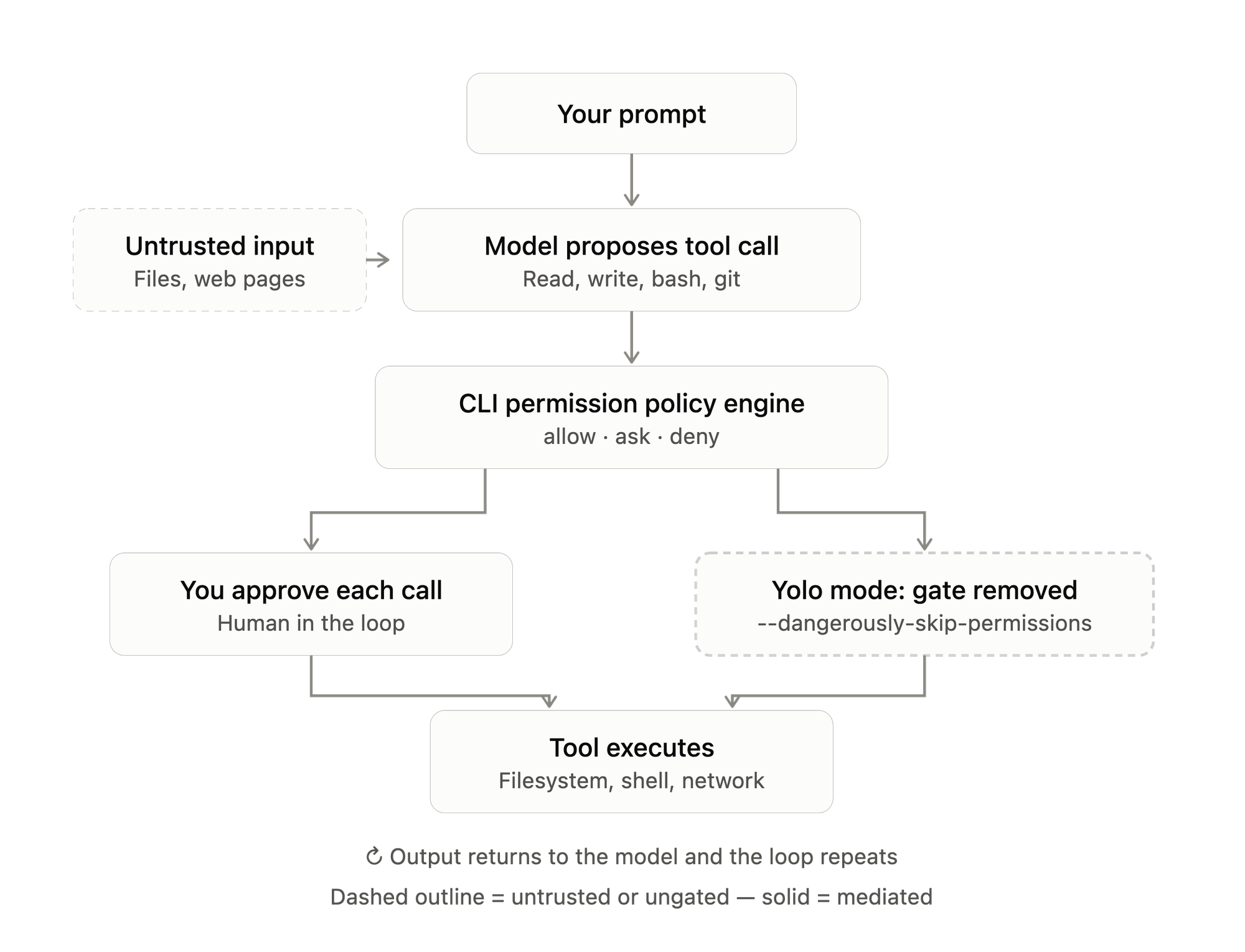
Claude Code's normal execution loop works like a mediated tool-call cycle: the model proposes a tool invocation, the CLI intercepts it, checks it against a permissions policy (allow, ask, or deny), and only executes it once approved. That policy engine is what makes Claude Code usable in a codebase you care about, because it gives you a checkpoint before every filesystem mutation or command execution.
--dangerously-skip-permissions effectively short-circuits the "ask" branch of that policy so every tool call resolves to "allow" automatically. The agent still plans, reads files, and reasons the same way; what changes is the removal of the human-in-the-loop checkpoint between decision and execution. This matters because Claude Code's tool surface is broad: it can read and write arbitrary files in the working directory, execute shell commands, and interact with installed CLIs like git, npm, or docker. In yolo mode, none of that requires a pause.
Why Developers Use It
The appeal is speed and flow. Long, multi-step tasks like refactoring across dozens of files, running and iterating on a test suite, or scaffolding a new project generate a constant stream of permission prompts in normal mode. Each prompt is a context switch: you have to read what's being requested, decide, and click back into your work. For a well-scoped task in a disposable environment, that friction adds little value and yolo mode lets the agent run to completion unattended.
The Real Risks
The core risk is that Claude Code, running with skipped permissions, will execute whatever it decides to execute, including commands generated in response to content it reads, not just your original prompt. If the agent reads a file, a webpage, or a package's README that contains adversarial or malformed instructions, and it's operating with no approval gate, there is nothing stopping it from acting on that content the same way it would act on your own request. This is the same class of prompt-injection risk that affects any autonomous agent with tool access, and removing the permission layer removes the one practical mitigation Claude Code ships by default.
Beyond injection, there's plain autonomy risk: a misinterpreted instruction can turn into a broad rm command, a forced git push, an accidental overwrite of an unrelated file, or a credential left exposed in a committed file, all before you'd have had a chance to see the prompt and say no. In normal mode these are single, reviewable actions. In yolo mode they're just steps in a longer unattended chain.
Using It Responsibly
The consistent advice from experienced Claude Code users is to treat yolo mode as something you run inside a boundary, not on your primary machine. In practice that means running it inside an ephemeral container or virtual machine with only the project directory mounted, using a scoped filesystem so the agent can't reach your home directory, SSH keys, or other projects, and restricting or fully disabling outbound network access unless the task specifically needs it. Tools built around this idea, such as Docker-based sandboxes or devcontainer configurations purpose-built for agent workloads, exist specifically to give yolo mode a blast radius smaller than "your entire machine."
It's also worth pairing the flag with narrower permission rules where possible rather than an all-or-nothing switch: allow-listing specific bash commands, denying destructive operations like rm -rf or force pushes at the policy level, and reviewing the agent's diff or commit log after a run rather than during it. That gives you most of the speed benefit while keeping a few hard stops in place for the operations that are genuinely irreversible.
The Bottom Line
--dangerously-skip-permissions trades Claude Code's built-in approval checkpoints for uninterrupted autonomy. It's a legitimate tool for sandboxed, disposable, or CI environments where the task is well-scoped and the blast radius is contained, but the name is accurate: running it on a machine with real credentials, real production access, or unreviewed third-party content in scope is genuinely risky. If you're going to use it, isolate it first.