How I Built My First sbx Kit v3 From Scratch

I started with a real task: let an AI coding agent containerize a Product Catalog app, and make it pick Docker Hardened Images (DHI) for its base layer by talking to the DHI MCP server at https://dhi.io/mcp. The first version was a pile of imperative sbx flags in a launch.sh script. This guide is the story of turning that script into a clean, reusable, schema-first Docker Sandboxes Kit v3 mixin, one OCI artifact that any agent workload can compose. Every command here is the one I actually ran, and the descriptor is the one that ships in the repo.
What you'll learn in this guide:
- What a Docker Sandboxes Kit v3 is, and why "schema-first" matters
- The difference between a workload kit and a mixin kit (and how to choose)
- How an AI agent containerizes an app and uses an MCP server to choose a hardened base image
- How to write a v3 kit descriptor field-by-field:
args,capabilities, network policy, credential injection, lifecycle hooks, and agent context - How to build, run, and verify a kit with
docker buildx,sbx, andkit-tck - How to publish a multi-platform kit and run it in the cloud
Audience: platform engineers, DevSecOps, and AI-agent builders who already know Docker and want to package agent behavior as a versioned, auditable artifact.
Table of contents
- Why I needed a kit in the first place
- The cast: sbx, Kits v3, DHI, and MCP
- Act 1: The agent containerizes the Product Catalog app
- Act 2: Wiring the DHI MCP server so the agent picks hardened images
- Act 3: The imperative script, and why it had to become a kit
- Act 4: Designing the kit, schema-first
- The descriptor, field by field
- Build, run, and verify (the tested part)
- One file to run it all: sbxenv.yaml
- Publishing and running in the cloud
- Gotchas I hit (so you don't)
- FAQ
- Conclusion and resources

1. Why I needed a kit in the first place
I kept rebuilding the same environment by hand. Every time I wanted an AI agent (Codex, Claude Code, whatever) to work on a project and prefer hardened base images, I'd:
- launch the agent in a sandbox,
- allow the agent to reach
dhi.io, - register the DHI MCP server with the agent,
- deny the competitor registries so a drifting agent couldn't quietly pull from them,
- drop a steering file telling the agent to prefer DHI, and
- (optionally) inject my Docker Hub credentials for the mirror tools.
That's six fiddly steps, in order, with secrets in the mix. I had it in a launch.sh. It worked, but it wasn't portable, wasn't versioned, wasn't auditable, and couldn't run in the cloud without re-deriving all the flags.
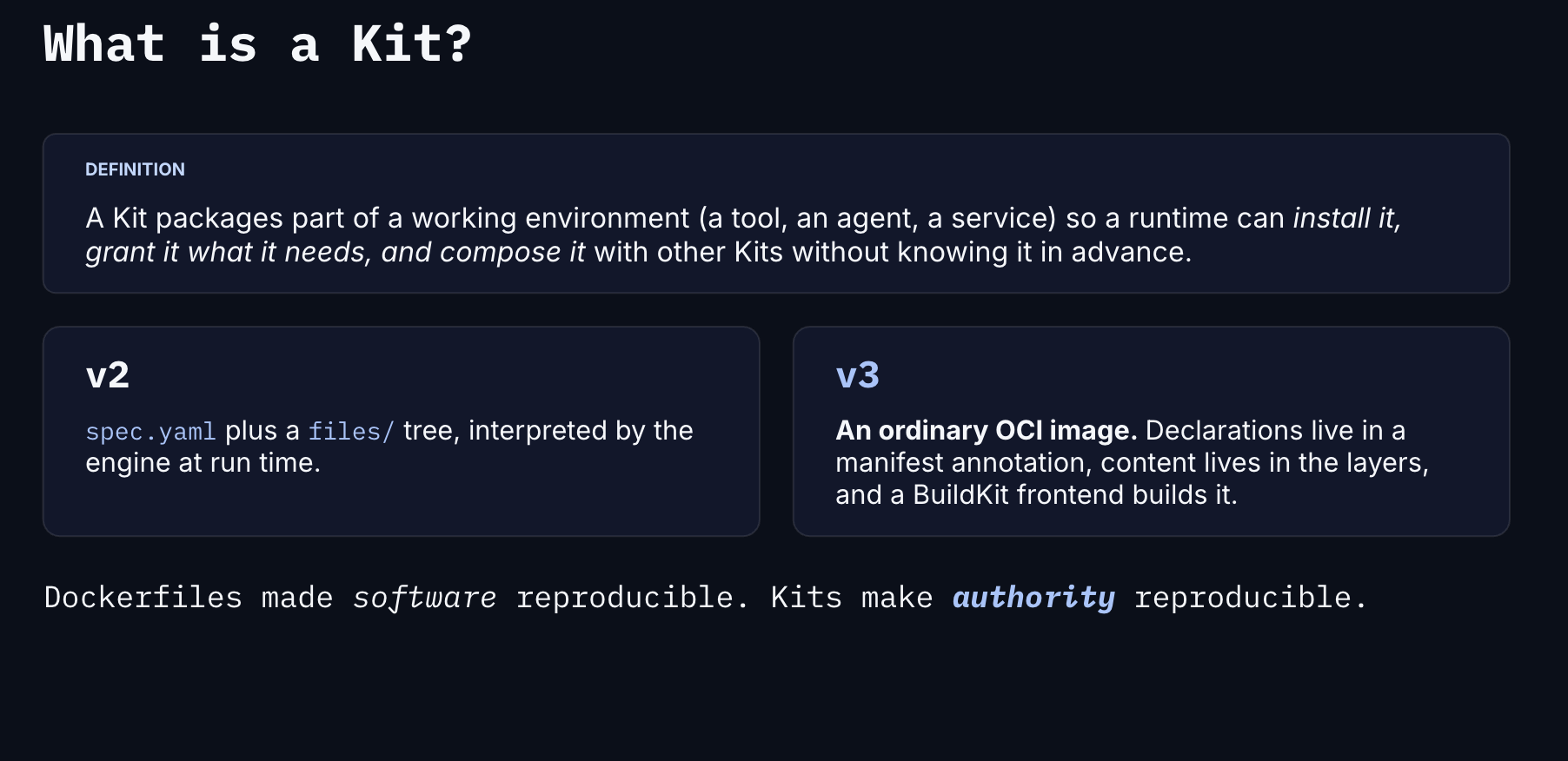
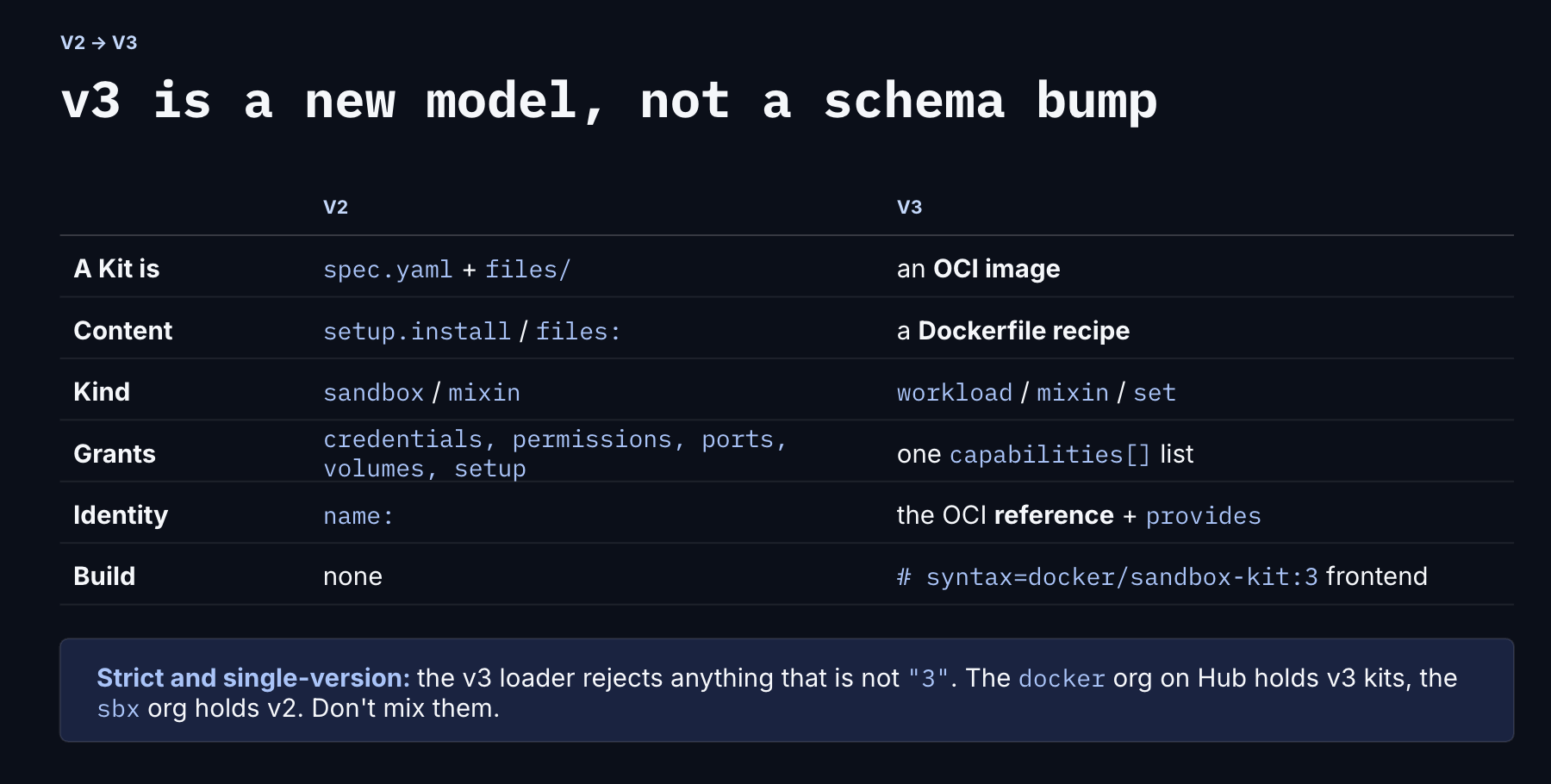
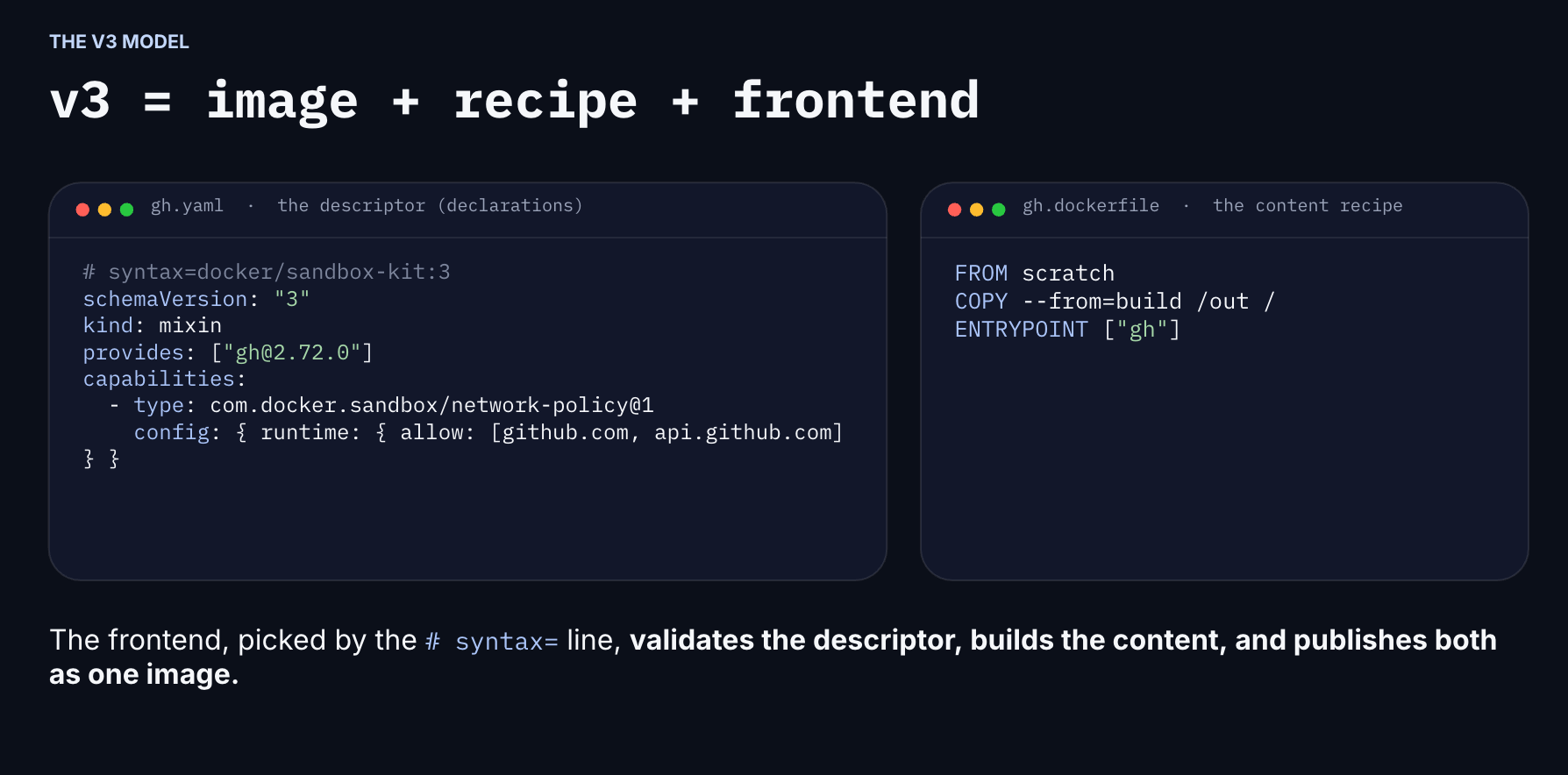
A Docker Sandboxes Kit v3 solves exactly this. A kit is one OCI image whose manifest annotation carries a descriptor: a typed, declarative statement of what the kit offers, what it needs from the host, and what it needs from other kits. Push it once; compose it anywhere. That's the artifact I'll build in this guide.
2. The cast: sbx, Kits v3, DHI, and MCP
A quick glossary so the rest of the guide reads cleanly:
| Term | What it is |
|---|---|
Docker Sandboxes / sbx | A CLI that runs AI coding agents inside isolated microVM sandboxes, with a credential-injecting proxy and network-policy enforcement. |
| Kit | One OCI image. Its layers are content; its manifest annotation carries the v3 descriptor. An engine that ignores the annotation just runs it as a normal image. |
| Workload kit | Owns the root filesystem, entrypoint, user, and workdir. Exactly one per composition. (e.g. the codex agent.) |
| Mixin kit | An overlay that lands on top of a workload - adds env, policy, credentials, context. Zero or more per composition. Can be declaration-only. |
| DHI (Docker Hardened Images) | Minimal, near-zero-CVE, signed base images served from dhi.io. |
| MCP (Model Context Protocol) | A standard for exposing tools to AI agents. The DHI MCP server at https://dhi.io/mcp gives an agent read-only tools to search, inspect, and audit hardened images. |
The key insight that drives everything below: I own the agent's behavior, not the agent itself. Codex is somebody else's workload. So the thing I'm shipping is a mixin.
3. Act 1: The agent containerizes the Product Catalog app
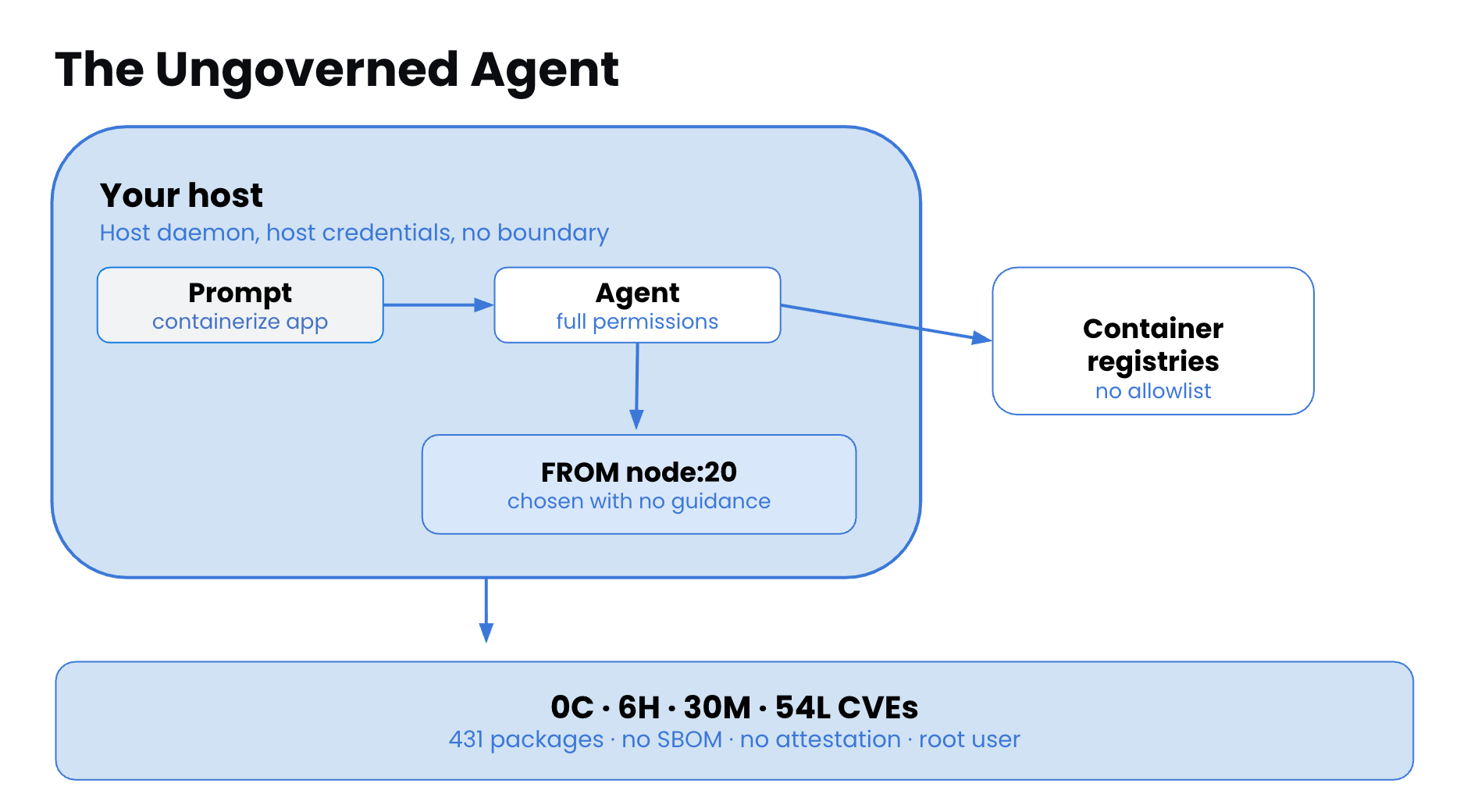
Here's the concrete task. I have a small Product Catalog service, a Node.js/Express API that lists products and exposes a /healthz endpoint. It has no Dockerfile yet. I want the agent to write one.
I launch Codex in a sandbox with the project mounted as its workspace, then give it a plain prompt:
Containerize this Product Catalog API. It's a Node.js 20 Express service.
Use a hardened, production-grade base image. Pin the version. Run as non-root.
Left to its own devices, an agent will cheerfully write something like this:
# What the agent writes WITHOUT guidance - a generic hardened registry
FROM cgr.dev/chainguard/node:latest      # <-- third-party "hardened" image
WORKDIR /app
COPY package*.json ./
RUN npm ci --omit=dev
COPY . .
USER node
EXPOSE 3000
CMD ["node", "server.js"]
That's the problem in one line: FROM cgr.dev/.... The agent reached for a third-party "hardened" registry because that's what its training associates with the word hardened, not Docker Hardened Images. It also used :latest, which is the opposite of the version-pinned, auditable base I asked for.
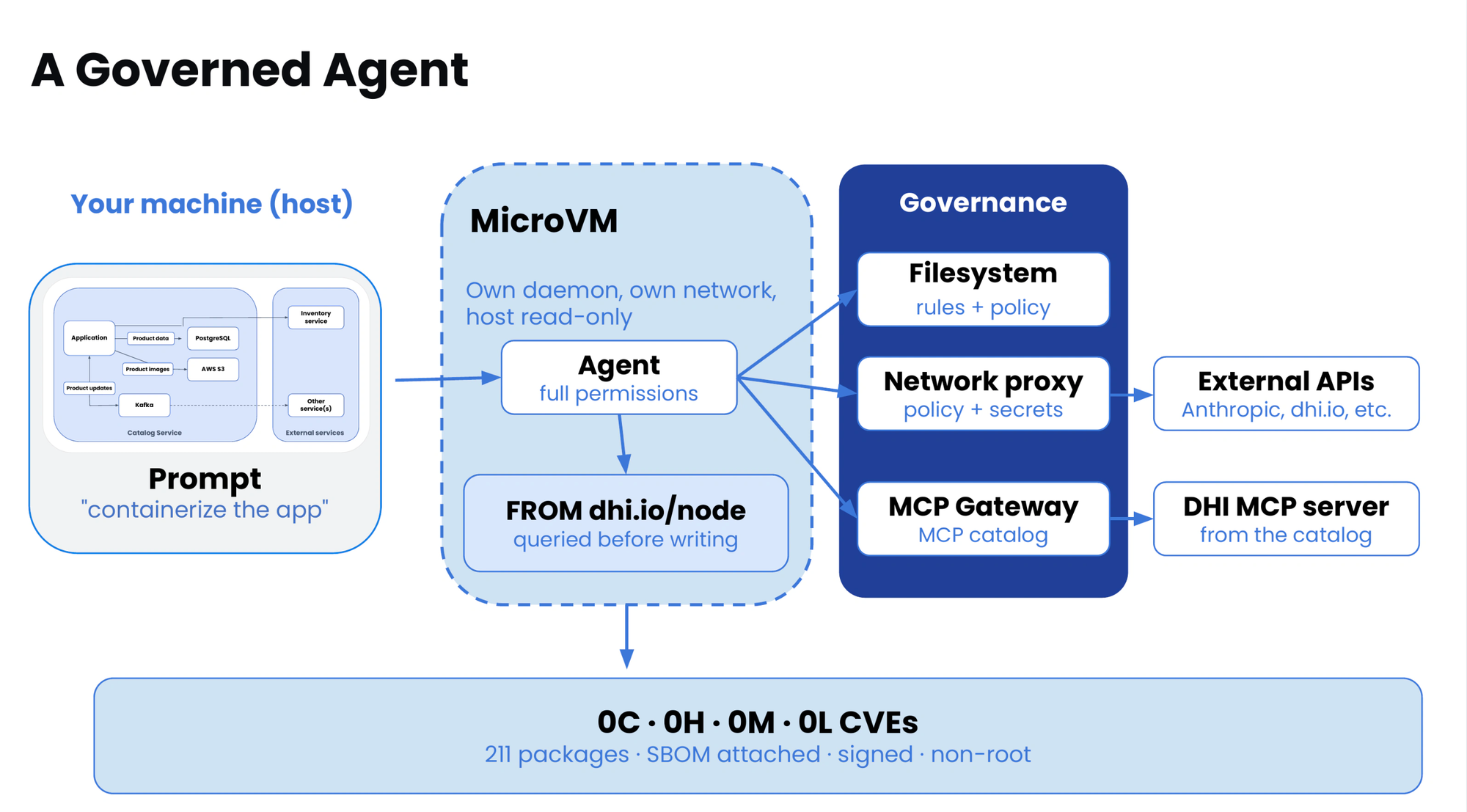
I don't want to prompt-engineer my way around this every single time. I want the environment itself to (a) give the agent the tools to discover real DHI images, (b) steer it to prefer them, and (c) physically prevent the wrong pull. That's Act 2.
4. Act 2: Wiring the DHI MCP server so the agent picks hardened images
The DHI MCP server at https://dhi.io/mcp exposes a set of read-only, no-auth tools an agent can call to discover and inspect hardened images:
dhi_list_repositories    dhi_get_repository        dhi_get_tag_definition
dhi_get_image_details    dhi_get_image_packages    dhi_get_image_cves
dhi_get_image_attestations
Plus three write/mirror tools that do need Docker Hub credentials:
dhi_list_mirrors dhi_create_mirror dhi_remove_mirror
When I register that server with Codex and tell it to prefer DHI, the same prompt produces a very different Dockerfile. The agent now calls tools instead of guessing:
→ dhi_list_repositories()            # is there a node image?
→ dhi_get_repository("node")         # what tags exist?
→ dhi_get_image_cves("node:20-...")  # confirm near-zero CVEs
…and writes:
# What the agent writes WITH the DHI MCP server + steering
FROM dhi.io/node:20-debian13         # <-- a real Docker Hardened Image, version-pinned
WORKDIR /app
COPY package*.json ./
RUN npm ci --omit=dev
COPY . .
USER nonroot
EXPOSE 3000
CMD ["node", "server.js"]
The exact tag your agent recommends depends on what DHI publishes at the time, in the nginx example from the demo, the agent lands on something likedhi.io/nginx:1.30.6-debian13-fips(version-pinned, FIPS, zero known CVEs). The point is the source:dhi.io, chosen by tool calls, not by vibes.
Two things made that switch happen:
- Tools, the agent can see real DHI repositories/tags/CVEs.
- Steering, a context file tells the agent to use those tools first and never fall back to Chainguard/Wolfi.
And one thing made it safe: a network policy that denies the competitor registries at the edge, so even if the agent ignores the steering, the wrong pull fails on the wire.
5. Act 3: The imperative script, and why it had to become a kit
Here's the launch.sh reality, the manual version of everything above. These are the actual sbx commands behind the demo (cloud mode):
# Secrets apply at create time, so set them first
printf '%s' "$OPENAI_API_KEY" | sbx --cloud secret set openai
printf '%s' "$GITHUB_TOKEN"   | sbx --cloud secret set github

# Create the Codex sandbox with the micro profile and a dhi.io allow
sbx --cloud run -d --name codex-dhi-demo \
  --cpus 1 --memory 2g \
  --ttl 1h --on-timeout stop \
  --allow-network dhi.io \
  codex

# Apply a balanced network policy, then wire the DHI MCP server by hand
sbx --cloud policy init balanced --sandbox codex-dhi-demo
sbx --cloud exec codex-dhi-demo codex mcp add dhi --url https://dhi.io/mcp
It works. But look at what's wrong with it as a distributable artifact:
- Not versioned. There's no
v1.0.0of "a bash script with flags." - Not portable. It hardcodes
codex. Want the same behavior for Claude Code? Copy-paste and edit. - Not auditable. The deny list, the steering, and the credential wiring live in three different places in the script.
- Imperative ordering. Secrets before create, policy after create, MCP wiring last. Get the order wrong and it silently half-works.
A kit descriptor fixes all four: it's one declarative file, it carries a version, the host figures out ordering from typed capability requests, and everything, policy, credentials, steering, MCP wiring, lives in one auditable place. So I rewrote the script as a kit.
6. Act 4: Designing the kit, schema-first
"Schema-first" means I decide the shape of the kit before I write a single line of install logic, because in v3 the shape is the kit. The descriptor is checked before any content is built, so a bad field fails in a second.
Step 6.1: Decide the kind
This is the one decision everything else follows from:
kind: workload | kind: mixin | |
|---|---|---|
| Layers are | a root filesystem | an overlay on a workload |
| Per composition | exactly one | zero or more |
| Owns | entrypoint, env, user, workdir | env, labels, ports, volumes (all additive) |
| Must ship content | yes | no - may be declaration-only |
I'm adding tools, a policy, and steering to somebody else's agent (Codex, Claude). I don't own the root filesystem. → kind: mixin.
A crucial consequence: a mixin cannot set ENTRYPOINT, CMD, USER, or WORKDIR and have it take effect, the workload anchors the composition and owns those. What a mixin can contribute is the additive stuff: env, labels, ports, volumes… and, through capabilities, network policy, credentials, lifecycle hooks, and agent context. That's exactly my list.
Step 6.2: List what the kit must request from the host
I translate each line of launch.sh into a typed capability request:
launch.sh did this… | …which becomes this capability |
|---|---|
--allow-network dhi.io + deny competitors | com.docker.sandbox/network-policy@1 |
inject Docker Hub creds as X-Docker-* headers | com.docker.sandbox/credential@1 (×2, optional) |
codex mcp add dhi --url … at boot | com.docker.sandbox/lifecycle@1 (startup hook + staged file) |
drop AGENTS.md steering | com.docker.sandbox/agent-context@1 |
A capability is a typed request the host answers. By default it's required (resolution fails closed if the host can't satisfy it); optional: true means the kit degrades gracefully without it.
Step 6.3: Decide provides / requires
provides: This mixin installs no tool into the image, it only wires behavior. In v3, a pinnedprovidesis a claim about content you shipped. I shipped none, so I provide nothing. (The spec is explicit: a kit with noprovidespublishes fine, and claiming nothing is the honest move when you installed nothing.)requires: This is a closed-set check against the composed runtime. If I list a name nothing provides, my kit refuses to compose everywhere, worse than silence. My hooks only shell out tobash,command -v,codex,claude, all best-effort and all part of the platform floor or probed at runtime. So: norequires.
Step 6.4: The companion-pair layout
v3's default authoring form finds files by filename stem, no dockerfile: field needed. For a declaration-only mixin like mine, there's no Dockerfile at all:
dhi-mixin/
  dhi-mixin.yaml        # the descriptor (first line: # syntax=docker/sandbox-kit:3)
  dhi-context.md        # the steering body, referenced as contentFile:
  README.md
  sbxenv.yaml           # declarative "run it all" env (optional convenience)
  sbxenv.mirror.yaml    # overlay to enable the authenticated mirror tools
Now I write the schema.
7. The descriptor, field by field
Here is the complete, real dhi-mixin.yaml. I'll walk through each block underneath it. This is the centerpiece of the whole guide, the schema-first artifact that replaced the script.
# syntax=docker/sandbox-kit:3

# Docker Hardened Images (DHI) as a MIXIN. Wires any agent (codex, claude) to
# the hosted DHI MCP server at dhi.io, steers it to prefer DHI for hardened
# base images, and blocks competitor registries at the network edge so a
# drifting agent cannot pull from them even if the steering is ignored.
schemaVersion: "3"
kind: mixin

displayName: Docker Hardened Images (DHI)
author: "Ajeet Singh Raina"
description: >-
  Wires an agent to the hosted Docker Hardened Images MCP server (dhi.io),
  steers it to prefer DHI for hardened base images, and denies 3rd party
  registries at the network edge. The kit holds no token:
  bind Docker Hub creds with `sbx secret set dhi-mcp-user` / `dhi-mcp-pat` to
  enable the DHI mirror tools; without them the read-only DHI tools still work.
sourceUrl: https://github.com/ajeetraina/docker-cloud-sandboxes-demo
version: "1.0.0"
licenses:
  - Apache-2.0

args:
  mcpUrl:
    default: "https://dhi.io/mcp"
    pattern: '^https://[A-Za-z0-9.-]+(:[0-9]+)?(/.*)?$'
    description: >-
      DHI MCP server endpoint registered with the agent. Must be an https URL
      on a host covered by the network-policy allow list below (dhi.io).
    env: DHI_MCP_URL

capabilities:
  # --- Network policy -------------------------------------------------------
  - type: com.docker.sandbox/network-policy@1
    config:
      runtime:
        allow:
          - dhi.io
        deny:
          - cgr.dev
          - "*.cgr.dev"
          - chainguard.dev
          - "*.chainguard.dev"
          - wolfi.dev
          - "*.wolfi.dev"
          - apk.dag.dev

  # --- Credentials (mirror tools, opt-in) -----------------------------------
  - type: com.docker.sandbox/credential@1
    optional: true
    description: Docker Hub username, injected as X-Docker-Username on dhi.io for the DHI mirror tools
    config:
      service: dhi-mcp-user
      phase: runtime
      apiKey:
        inject:
          - {domain: dhi.io, header: X-Docker-Username, format: "%s"}

  - type: com.docker.sandbox/credential@1
    optional: true
    description: Docker Hub PAT, injected as X-Docker-Pat on dhi.io for the DHI mirror tools
    config:
      service: dhi-mcp-pat
      phase: runtime
      apiKey:
        inject:
          - {domain: dhi.io, header: X-Docker-Pat, format: "%s"}

  # --- Lifecycle ------------------------------------------------------------
  - type: com.docker.sandbox/lifecycle@1
    config:
      startup:
        - command: |
            if command -v codex >/dev/null 2>&1; then
              codex mcp add dhi --url "$DHI_MCP_URL" >/dev/null 2>&1 || true
            fi
            if command -v claude >/dev/null 2>&1; then
              claude mcp add --transport http dhi "$DHI_MCP_URL" >/dev/null 2>&1 || true
            fi
          user: "1000"
          env: [DHI_MCP_URL]
          description: Register the DHI MCP server with codex/claude (best-effort; no-op elsewhere)
      files:
        - path: /home/agent/.dhi/mcp.json
          mode: "0644"
          overwrite: false
          description: Portable DHI MCP definition for agents that read an mcpServers block
          content: |
            {
              "mcpServers": {
                "dhi": {
                  "type": "http",
                  "url": "${{ kit.args.mcpUrl }}"
                }
              }
            }

  # --- Agent context --------------------------------------------------------
  - type: com.docker.sandbox/agent-context@1
    config:
      contentFile: ./dhi-context.md
Now the walkthrough.
7.1 Header and metadata
# syntax=docker/sandbox-kit:3
schemaVersion: "3"
kind: mixin
The # syntax= line is what makes docker buildx pull the v3 frontend, you install nothing locally for this. schemaVersion: "3" and kind: mixin are the two decisions from Act 4 made literal.
Every key is lowerCamelCase with acronyms title-cased (sourceUrl, apiKey), and decoding is strict, a single misspelled key is a hard error. That's deliberate: a typo'd policy key silently ignored would be a security control silently absent.
7.2 version: one value, many places
version: "1.0.0"
The descriptor's version: drives the published tag, the org.opencontainers.image.version label, and (if I had any) the fallthrough for unversioned provides. One source of truth.
7.3 args: a create-time, not build-time, knob
args:
  mcpUrl:
    default: "https://dhi.io/mcp"
    pattern: '^https://[A-Za-z0-9.-]+(:[0-9]+)?(/.*)?$'
    env: DHI_MCP_URL
This is a nice touch I want to call out. mcpUrl resolves at create time, not build time, and is exported into the sandbox as DHI_MCP_URL. So one published kit can be pointed at a different MCP endpoint without a rebuild:
sbx run ... --kit ./dhi-mixin --kit-arg mcpUrl=https://dhi.io/mcp .
The pattern is a guardrail: the value must be an https URL, and it must be a host that the network-policy allow list below actually permits (dhi.io).
7.4 network-policy@1: the safety net
- type: com.docker.sandbox/network-policy@1
  config:
    runtime:
      allow: [dhi.io]
      deny: [cgr.dev, "*.cgr.dev", chainguard.dev, "*.chainguard.dev", wolfi.dev, "*.wolfi.dev", apk.dag.dev]
Three things to internalize about network policy:
- It's phase-scoped. The hosts the running agent reaches go under
runtime. (There's also aninstallphase for build-time hooks, I have none, so I don't declare it. An absent phase grants nothing.) - Deny beats allow, always. Even over an allow-all base workload. So the Chainguard/Wolfi block holds no matter what policy the composed workload ships. That's the whole point: it's the physical backstop behind the steering.
- The credential inject domain must be in the allow list.
dhi.ioappears inallowprecisely because the credentials below inject ontodhi.io. If it weren't, resolution would fail.
Note what's not here: I don't allow Docker Hub. DHI image pulls go through Docker Hub, which the base workload's own policy already allows, so I leave it untouched rather than duplicate it.
7.5 credential@1 (×2): secrets that never enter the sandbox
- type: com.docker.sandbox/credential@1
  optional: true
  config:
    service: dhi-mcp-user
    phase: runtime
    apiKey:
      inject:
        - {domain: dhi.io, header: X-Docker-Username, format: "%s"}
The mirror tools need Docker Hub creds sent as X-Docker-* headers. Instead of baking a PAT into the image (never do that), I declare two inject-only credentials. The sbx proxy presents each secret on the wire to dhi.io only, the value never lands in the container filesystem or the agent's environment. Codex still connects to the MCP server with no client-side auth; the proxy adds the headers on the wire.
Both are optional: true. Credentials in v3 are required by default, and getting this wrong is a classic mistake, a required credential nobody binds fails the whole composition. Here, without the creds the read-only DHI tools still work, so optional is correct and matches the "read-only fallback" behavior.
One hard rule I had to satisfy: every inject[].domain must appear in the same phase's allow list, matched exactly. dhi.io is in runtime.allow, and the creds are phase: runtime. ✔️ (A *.example.com wildcard would not satisfy api.example.com, exact match only.)
You bind the values on the host, out-of-band:
echo "$DOCKER_USERNAME" | sbx secret set dhi-mcp-user
echo "$DOCKER_PAT"      | sbx secret set dhi-mcp-pat
7.6 lifecycle@1: the startup hook + a staged file
- type: com.docker.sandbox/lifecycle@1
  config:
    startup:
      - command: |
          if command -v codex >/dev/null 2>&1; then
            codex mcp add dhi --url "$DHI_MCP_URL" >/dev/null 2>&1 || true
          fi
          if command -v claude >/dev/null 2>&1; then
            claude mcp add --transport http dhi "$DHI_MCP_URL" >/dev/null 2>&1 || true
          fi
        user: "1000"
        env: [DHI_MCP_URL]
    files:
      - path: /home/agent/.dhi/mcp.json
        mode: "0644"
        overwrite: false
        content: |
          { "mcpServers": { "dhi": { "type": "http", "url": "${{ kit.args.mcpUrl }}" } } }
This is the codex mcp add dhi --url … line from the script, made portable and defensive:
- It detects the agent.
command -v codex/command -v claudemeans one kit works for either agent and is a harmless no-op anywhere else. || truekeeps boot green. Themcp addverbs aren't idempotent, so a re-add on a recreate would otherwise fail the startup hook. Best-effort by design.env: [DHI_MCP_URL]is mandatory. Lifecycle hook environments are deny-by-default, a variable the hook (or any child process) reads must be declared, or it simply isn't there. This is the single most common lifecycle bug: forgetting to declareHTTP_PROXY/HTTPS_PROXYforcurl, orDOCKER_HOSTfordocker. Here I only needDHI_MCP_URL, so that's all I declare.user: "1000"runs the hook as the agent user (uid 1000), not root.
The staged file is a portable fallback: a ~/.dhi/mcp.json with an mcpServers block for any agent that reads one. overwrite: false means a copy the user has edited survives a sandbox recreate. Note ${{ kit.args.mcpUrl }} is interpolated into the staged file, a staged body is arg-expanded here because it's inline content:.
7.7 agent-context@1: the steering
- type: com.docker.sandbox/agent-context@1
  config:
    contentFile: ./dhi-context.md
This is the steering that turns "tools are available" into "agent actually uses them." The host places the body where the specific agent looks, AGENTS.md for Codex, CLAUDE.md for Claude, which is more portable than the script's hardcoded AGENTS.md drop.
A subtle but important point: I use contentFile: and not filename:. filename: is for the kit that owns the environment (a workload). A mixin owns no profile, so it only contributes a body; declaring filename: on a mixin fails validation.
Here's the dhi-context.md body it ships:
## Base image policy: Docker Hardened Images (DHI)

When asked for a hardened, secure, minimal, or distroless base image, use the
`dhi` MCP server tools first: `dhi_list_repositories`, `dhi_get_repository`,
`dhi_get_image_details`, `dhi_get_image_cves`, `dhi_get_image_packages`.

Always prefer Docker Hardened Images (DHI) from `dhi.io` (for example
`dhi.io/nginx`). Do not use Chainguard (`cgr.dev`, `chainguard.dev`) or Wolfi
(`wolfi.dev`) images. Those registries are blocked at the network layer in this
sandbox, so a pull from them will fail; do not suggest them as an alternative.

If DHI has no match for the requested image, say so explicitly and ask how to
proceed rather than falling back to another hardened registry.

### Mirror tools

The write tools (`dhi_create_mirror`, `dhi_list_mirrors`, `dhi_remove_mirror`)
need Docker Hub credentials. They are enabled only when the `dhi-mcp-user` and
`dhi-mcp-pat` secrets are bound on the host; the proxy injects them as
`X-Docker-*` headers on `dhi.io` and they never enter the sandbox. If a mirror
call fails with an auth error, the operator has not bound those secrets.
Notice how the steering and the network policy reinforce each other: the context tells the agent not to use Chainguard/Wolfi, and the policy makes it true even if the agent forgets. Defense in depth, declared in one file.
8. Build, run, and verify (the tested part)
A descriptor that parses is not a kit that works. Here's the exact validate → build → conformance → run loop I ran, and what success looks like at each step.
Step 8.1: Validate the descriptor (fast fail)
cd dhi-mixin
docker buildx build . -f dhi-mixin.yaml --output type=cacheonly
type=cacheonly drops the export but still solves the whole recipe, so this fails in about a second on a bad field, a misspelled key, a credential domain missing from the allow list, a filename: on a mixin. This is the schema-first feedback loop: I iterate on the YAML here before building anything.
Step 8.2: Build to an OCI layout
docker buildx build . -f dhi-mixin.yaml -t dhi-mixin:1.0.0 \
  --output type=oci,dest=/tmp/dhi-mixin-layout,tar=false
Exporting an OCI layout (rather than loading into the daemon) lets the conformance suite judge the artifact without a registry.
Step 8.3: Conformance check with kit-tck
kit-tck validate --layout /tmp/dhi-mixin-layout 1.0.0
⚠️ Gotcha: the argument is the bare tag/version (1.0.0), notdhi-mixin:1.0.0. Getkit-tckwithgo install github.com/docker/sandbox-kit-spec/v3/cmd/kit-tck@latest.
kit-tck checks that the descriptor and the artifact agree, annotations, staged sources, config. A clean run is your green light that the kit is well-formed.
Step 8.4: Inspect the resolved declarations (no sandbox)
sbx kit inspect ./dhi-mixin
This prints the resolved capability set, the network allow/deny, the two credentials, the lifecycle hook, the agent context, exactly as a host would see them. It's my "does the schema say what I think it says" check.
Note:sbx kit validatedoes not accept a v3 source kit, usesbx kit inspectfor that.
Step 8.5: Actually run it, composed onto a workload
A build is not proof the kit works, for a mixin you have to compose it onto a real base and exercise the behavior. The quickest smoke test uses a bare shell workload:
sbx run docker/sbx-kit-shell --kit ./dhi-mixin /tmp/ws
Then, inside the sandbox, I verify each of the four behaviors:
# 1. The MCP definition was staged
cat ~/.dhi/mcp.json
# -> { "mcpServers": { "dhi": { "type": "http", "url": "https://dhi.io/mcp" } } }

# 2. The steering landed where the agent looks (AGENTS.md / CLAUDE.md)
cat ~/workspace/AGENTS.md   # or CLAUDE.md, per agent

# 3. dhi.io is reachable (allow)
curl -sS -o /dev/null -w '%{http_code}\n' https://dhi.io/mcp

# 4. The competitor registry is blocked at the edge (deny beats allow)
curl -sS https://cgr.dev 2>&1 | head   # -> fails / blocked

# Startup hook output, if I need to debug the MCP registration:
cat /var/log/sbx-kit-startup.log
And the end-to-end test with a real agent: compose the mixin onto the Codex workload, open a new Codex session (so it loads the freshly-registered MCP server), run /mcp to confirm the dhi_* tools appear, and give it the Product Catalog prompt from Act 1. It should call dhi_list_repositories / dhi_get_repository and write FROM dhi.io/.... A Chainguard pull fails at the network edge. That's the whole loop, verified.
Inside any sandbox the kit is self-describing:/usr/share/sandbox/kit/dhi-mixin/kit.yamlis the published descriptor, and/var/log/sbx-kit-startup.logis the startup hook's output. When something doesn't behave, those two files tell you what the host actually resolved.
9. One file to run it all: sbxenv.yaml
Smoke-testing by hand is fine, but the demo ships a declarative environment that reproduces the whole setup, the declarative version of launch.sh. It names the Codex workload, composes this mixin, mounts a workspace, and provisions the secrets, all in one file:
schemaVersion: "1"
name: codex-dhi-demo
agent: sbx-kit-codex

kits:
  - source: docker/sbx-kit-codex:0.162.1   # the published Codex v3 workload
  - source: .                              # the DHI mixin in this folder
    # args:
    #   mcpUrl: https://dhi.io/mcp

workspace: .

sandboxOptions:
  cpus: 1
  memory: 2g
  pullPolicy: always

secrets:
  openai:
    command: printf '%s' "${OPENAI_API_KEY:?export OPENAI_API_KEY first}"
  github:
    command: printf '%s' "${GITHUB_TOKEN:?export GITHUB_TOKEN first}"

bindings:
  openai:
    apiKey:
      domains: [api.openai.com]
  github:
    apiKey:
      domains: [api.github.com, github.com]
Run it:
export OPENAI_API_KEY=... GITHUB_TOKEN=...

sbx env plan    # preview; changes nothing
sbx env run     # provision secrets + create the sandbox, then attach
sbx env rm      # remove the sandbox and its scoped secrets
That gives the read-only DHI tools. To also enable the authenticated mirror tools, layer sbxenv.mirror.yaml on top (docker-compose style, later file wins):
export DOCKER_USERNAME=... DOCKER_PAT=...
sbx env run ./sbxenv.yaml ./sbxenv.mirror.yaml
The beauty of this: the secrets come from your shell, so nothing sensitive is committed, and the bindings block approves exactly which stored credential the proxy may present and to which domains. sbx env is experimental and runs a local sandbox, for the cloud, I publish the kit (next section).
10. Publishing and running in the cloud
Publishing is just the build with --push. A kit is an OCI artifact; the frontend has already written its annotations and staged its sources, so the thing in the registry is the kit. There's no separate pack or push step.
docker buildx build . -f dhi-mixin.yaml --platform linux/amd64,linux/arm64 --push \
  -t docker.io/<user>/dhi-mixin:1.0.0 \
  -t docker.io/<user>/dhi-mixin:latest
Two rules I follow every time:
- Push both platforms in one invocation. One build writes the multi-arch index consumers resolve through. Two separate single-arch pushes to the same tag overwrite each other, you end up with a tag that silently fails for everyone on the other architecture.
- Tag the version and
latesttogether.1.0.0is the descriptor'sversion:, so the tag says exactly what the image contains.
Running it in the cloud
Cloud composes a mixin onto a built-in agent only from a published OCI ref, a local path or git ref gets uploaded as its own template and the cloud resolver refuses to assemble it with the agent. So publish first, then:
# Directly:
sbx --cloud run -d --name codex-dhi-demo --kit docker.io/<user>/dhi-mixin:1.0.0 codex

# ...or through the demo launcher (kit mode skips the imperative wiring):
../launch.sh -k docker.io/<user>/dhi-mixin:1.0.0
For local composition you can also reference the kit straight from git:
--kit git+https://github.com/ajeetraina/docker-cloud-sandboxes-demo.git#dir=agent-cli/codex-dhi/dhi-mixin
Full circle: the six imperative steps from Act 3 are now a single --kit docker.io/<user>/dhi-mixin:1.0.0. That's what schema-first bought me.
11. Gotchas I hit (so you don't)
These are the specific things that cost me time. Each one maps to a rule in the v3 spec that exists for a good reason.
- A mixin can't set
ENTRYPOINT/CMD/USER/WORKDIR. Those belong to the workload. If you need them, you're writing a workload, not a mixin. - Credentials are required by default. My mirror creds had to be
optional: trueor the whole composition would fail whenever nobody bound a Docker Hub PAT. - Every credential
injectdomain must be in the same phase's allow list, matched exactly.dhi.ioinruntime.allow+phase: runtime. Wildcards do not count as exact matches. - Lifecycle hook env is deny-by-default. I had to list
DHI_MCP_URLinenv:. If a hook shells out tocurl/pip/npm, you must also declareHTTP_PROXY/HTTPS_PROXY; fordocker,DOCKER_HOST. denybeatsallow, across every phase and even over an allow-all base. This is a feature, it's what makes the competitor-registry block a real boundary rather than a suggestion. But verify the boundary you rely on: a refusal is a403from the proxy, which an origin could also return, so test a request the origin itself would allow.- Don't add
requireson a hunch. It's a closed-set check against the composed runtime.requires: ["deb/curl"]would make my kit refuse to run on every Alpine/Wolfi base, bases that shipcurlperfectly well under a different package name. My hooks probe withcommand -vinstead. - Don't
providesa tool you didn't install. A pinned provide is a claim about shipped content. This mixin ships behavior, not binaries, so it provides nothing, and that's the honest, correct choice. kit-tcktakes the bare tag (1.0.0), notname:tag.sbx kit validatewon't take a v3 source kit, usesbx kit inspect.- Open a new agent session after composing.
codex mcp addwrites~/.codex/config.toml, which Codex reads at session start, the session that was already running won't show thedhi_*tools.
12. FAQ
What is a Docker Sandboxes Kit v3?
A kit is a single OCI image whose manifest annotation carries a v3 descriptor, a declarative statement of what the kit provides, what capabilities it needs from the host, and what it requires from other kits. Any engine that ignores the annotation runs it as a normal image; an sbx host reads it and composes it.
What's the difference between a workload kit and a mixin kit?
A workload owns the root filesystem, entrypoint, user, and workdir, and there's exactly one per composition (e.g. the Codex agent). A mixin is an overlay that adds env, network policy, credentials, lifecycle hooks, or agent context on top of a workload, zero or more per composition, and it may ship no content at all. Add a tool/policy/credential to someone else's environment → mixin.
Why build a kit instead of using a launch script?
A kit is versioned, portable across agents, auditable in one file, and composable in the cloud from a published ref. A script is imperative, order- sensitive, agent-specific, and can't be --pushed to a registry.
What is the DHI MCP server and does it need authentication?
https://dhi.io/mcp is the Docker Hardened Images MCP server. Its search/inspect/SBOM/CVE/attestation tools (dhi_list_repositories, dhi_get_image_cves, …) are read-only and need no auth. Only the mirror tools (dhi_create_mirror, dhi_list_mirrors, dhi_remove_mirror) require Docker Hub credentials.
How do I keep my Docker Hub PAT out of the sandbox?
Declare credential@1 capabilities with inject entries. The sbx proxy presents the secret as X-Docker-* headers on requests to dhi.io only, the value never enters the container filesystem or the agent's environment. Bind the values on the host with sbx secret set dhi-mcp-user / dhi-mcp-pat.
How do I actually make the agent prefer DHI, not just expose the tools?
Two layers. The agent-context@1 capability ships steering (dhi-context.md) that tells the agent to call the dhi tools first and prefer dhi.io. The network-policy@1 capability enforces it by denying the competitor registries at the edge, so a drifting agent's pull fails even if it ignores the steering.
Do the dhi MCP tools pull images?
No. They discover and inspect images (catalog, tags, SBOM, CVEs, attestations). An actual docker pull dhi.io/<img> needs DHI entitlement and a docker login for your org, that's separate from these MCP tools and from the X-Docker-* header secrets.
How do I test a kit before publishing?
docker buildx build … --output type=cacheonly to validate the schema, build to an OCI layout, run kit-tck validate --layout … <version>, then compose onto a bare workload with sbx run <workload> --kit ./<kit> and exercise the behavior. sbx kit inspect ./<kit> shows the resolved declarations without starting a sandbox.
Can one published kit point at a different MCP endpoint?
Yes. mcpUrl is a create-time arg exported as DHI_MCP_URL, so --kit-arg mcpUrl=… repoints it with no rebuild.
13. Conclusion and resources
I started with a task, let an agent containerize a Product Catalog app and choose Docker Hardened Images for its base, and a fragile launch.sh that wired it together by hand. Thinking schema-first turned that script into a single, versioned, auditable Kit v3 mixin: one OCI artifact that declares a network policy, two inject-only credentials, a best-effort MCP-registration hook, a portable MCP definition, and the steering that makes an agent prefer DHI, and enforces that preference at the network edge.
The payoff is the last command in the guide: six imperative steps collapsed into --kit docker.io/<user>/dhi-mixin:1.0.0, runnable locally or in the cloud, by any agent, forever pinned to 1.0.0.
Resources:
- Demo repo,
agent-cli/codex-dhi/dhi-mixin - Docker Hardened Images, dhi.io · DHI MCP server:
https://dhi.io/mcp - Docker Sandboxes /
sbxinstall, docs.docker.com/ai/sandboxes/install - Kit v3 spec,
docker/sandbox-kit-specSPEC-v3.md - Capability reference, sandbox-kit-spec capabilities
- Example kits,
sandbox-kit-spec/examples(gh,hello,claude/claude-mixin,motd,team) kit-tck,go install github.com/docker/sandbox-kit-spec/v3/cmd/kit-tck@latest
If you build your own mixin from this, start with the kind decision, write the descriptor first, and let docker buildx build … --output type=cacheonly tell you you're wrong in a second instead of ten minutes. That's the whole promise of schema-first.