Best Practices for Sandboxing Agents and Kits
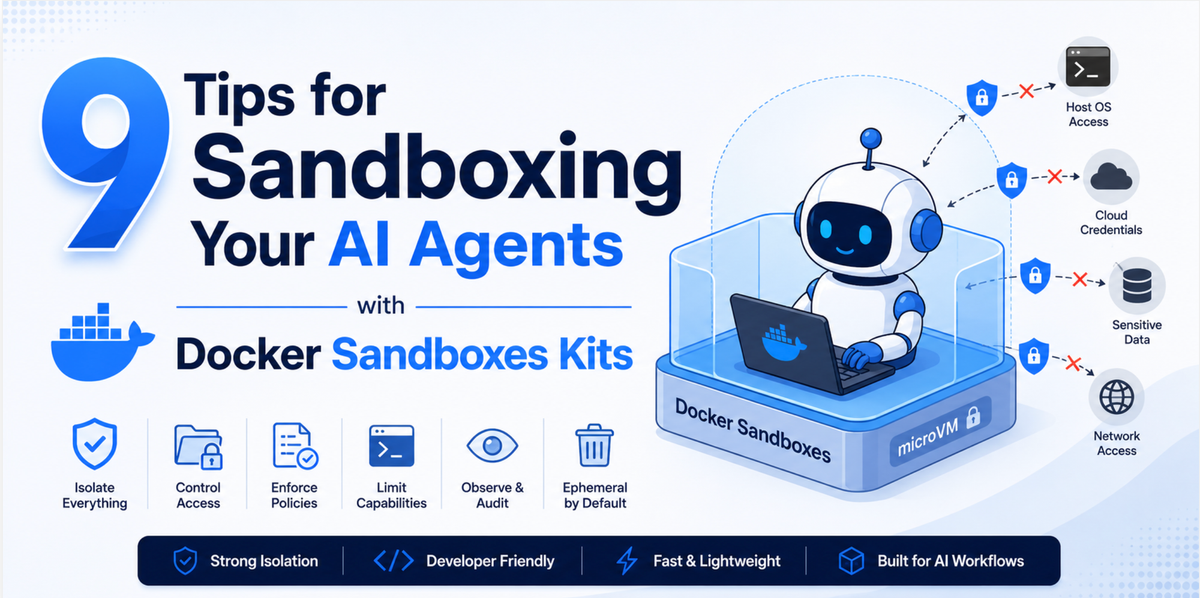
Here's a quick 9 tips for Sandboxing your AI agents with Docker Sandboxes Kits

AI coding agents are useful precisely because they act on their own. They clone repos, install packages, run shell commands, and call out to APIs without asking you to approve every step. That autonomy is also the problem. An agent that can curl | bash anything it likes, on your machine, with your credentials, is a supply-chain incident waiting to happen.
Docker Sandboxes flips that around.
You run the agent inside a sandbox, and the sandbox, not the agent's judgment becomes the security boundary. The agent can run wide open because the walls around it are tight. Kits are how you build those walls: a kit is a small, declarative artifact (a spec.yaml plus an optional files/ directory) that extends a sandbox agent with tools, credentials, and a network policy.
Get the kit right and you can hand an agent broad, unattended permissions safely. Get it wrong and you've just automated an attacker's job. Here are nine tips every one of them pulled straight from real kits in the sbx-kits-contrib repo for writing kits that hold the line.
1. Declare every domain your agent is allowed to reach
The single most important field in your kit is network.allowedDomains. It's the agent's complete outbound contract. Sandboxes run under a deny-all default policy, so any host you don't list is simply blocked at request time.
This is your best defense against exfiltration. A hijacked dependency or a prompt-injected agent can only phone home to a host you allowed — so keep the list as short as the kit can possibly work with.
The mem0 kit is a great minimal example. It needs the network only at install time to grab a package from PyPI; at runtime it talks to a local model over loopback and needs nothing else:
network:
  allowedDomains:
    - pypi.org
    - files.pythonhosted.org
Watch out for the package-manager trap. apt-get update refreshes every configured source, not just yours, so on Docker-based templates you'll also need download.docker.com, plus archive.ubuntu.com, security.ubuntu.com, and ports.ubuntu.com for both amd64 and arm64. Not sure what your install scripts actually reach? Probe under deny-all and read the blocked list:
sbx policy reset -f && sbx policy set-default deny-all
sbx create --name probe --kit "$PWD/my-kit" claude /tmp/dbg || true
sbx policy log probe        # every "Blocked" row is a domain to add
sbx rm -f probe && sbx policy reset -f
Add hosts until the block list is empty and no further.
2. Pin and verify everything you install
Never pipe a moving target into a shell. curl … | bash against a rewriteable tag is exactly the supply-chain pattern attackers weaponize: change the upstream script once, and every sandbox created afterward silently runs new code.
The trivy kit shows the gold standard. It pins the release by version and per-architecture SHA-256, downloads over enforced TLS, and verifies the checksum before unpacking, so a tampered download fails closed:
commands:
  install:
    - command: |
        set -euo pipefail
        TRIVY_VERSION=0.70.0
        ARCH=$(dpkg --print-architecture)
        case "$ARCH" in
          amd64) TARBALL="trivy_${TRIVY_VERSION}_Linux-64bit.tar.gz"
                 SHA256="8b4376d5d6befe5c24d503f10ff136d9e0c49f9127a4279fd110b727929a5aa9" ;;
          arm64) TARBALL="trivy_${TRIVY_VERSION}_Linux-ARM64.tar.gz"
                 SHA256="2f6bb988b553a1bbac6bdd1ce890f5e412439564e17522b88a4541b4f364fc8d" ;;
          *) echo "unsupported arch: $ARCH" >&2; exit 1 ;;
        esac
        URL="https://github.com/aquasecurity/trivy/releases/download/v${TRIVY_VERSION}/${TARBALL}"
        curl --proto '=https' --tlsv1.2 -fsSL -o /tmp/trivy.tgz "$URL"
        echo "${SHA256}  /tmp/trivy.tgz" | sha256sum -c -
        tar -C /usr/local/bin -xzf /tmp/trivy.tgz trivy
      user: "0"
The same goes for package versions, the mem0 kit pins its dependency so an upstream publish can't change behavior under you:
- command: "pip install --break-system-packages mem0ai==2.0.5" If a vendor installer script is genuinely unavoidable, call it out in your PR so a reviewer signs off on it consciously.
3. Pin the kit itself
Tips 1 and 2 harden what the kit consumes. This one hardens the kit itself. When you share a kit, tell people to pin it to a tag or an exact commit, never a branch. A branch ref means the allowlist and the install steps can change under a running deployment with no review.
# Recommended for production — pinned to a tag
$ sbx run --kit "git+https://github.com/docker/sbx-kits-contrib.git#ref=v0.2.0&dir=code-server" claude

# Fully reproducible — pinned to an exact commit
$ sbx run --kit "git+https://github.com/docker/sbx-kits-contrib.git#ref=abc1234&dir=code-server" claude
Bake the pinned form into your kit's README so it's the path of least resistance.
4. Never bake a secret into a kit
A kit is a declarative artifact checked into git and, often, pushed to a registry. Anything inside it - spec.yaml, files/, a build-time env var is readable by anyone who can pull it. So real credentials must never live there. Instead, declare where the secret goes and let the sandbox proxy inject it at runtime.
The amp kit declares the header and format for its API token, but never the value, the proxy fills it in for matching requests, and the token is provisioned separately with sbx secret set-custom:
network:
  serviceDomains:
    ampcode.com: amp
  serviceAuth:
    amp:
      headerName: Authorization
      valueFormat: "Bearer %s"      # %s is filled by the proxy at runtime
The nanoclaw kit goes further with OAuth: the token fields hold sentinel placeholders, never real tokens, and the proxy swaps them in:
oauth:
  service: anthropic
  sentinels:
    accessToken: sk-ant-oat01-proxy-managed    # placeholder, not a secret
    refreshToken: sk-ant-ort01-proxy-managed
And when a value looks like a secret but isn't, label it. The mem0 kit sets OPENAI_API_KEY: "dmr" purely because the OpenAI SDK rejects an empty string when talking to a local, no-auth model and it says so in a comment, so no reviewer wastes time chasing a "leaked key."
5. Run as the non-root agent user
Default every install and startup command to the unprivileged agent user (user: "1000"). Reach for root only on the one step that truly needs it, and hand ownership straight back.
commands:
  install:
    - command: "pip install --break-system-packages mem0ai==2.0.5"
      user: "1000"
When a step does need root, keep it surgical. The github-ssh kit uses root only to write into /home/agent/.ssh, then immediately chowns everything back to agent with tight permissions:
- command: |
    mkdir -p /home/agent/.ssh && chmod 700 /home/agent/.ssh
    chown agent:agent /home/agent/.ssh
    curl -s https://api.github.com/meta \
      | jq -r '.ssh_keys[] | "github.com " + .' >> /home/agent/.ssh/known_hosts
    chmod 644 /home/agent/.ssh/known_hosts
    chown agent:agent /home/agent/.ssh/known_hosts
  user: "0"
One thing that surprises people: it's perfectly fine for the agent binary itself to run with flags like --dangerously-allow-all (as amp does) or --dangerously-skip-permissions (as nanoclaw does). That's the whole design. The sandbox boundary, tips 1 through 4 is what constrains the agent, so it doesn't need to stop and ask permission for every action.
6. Forward credentials and use local endpoints instead of storing secrets
The safest secret is the one that never enters the sandbox at all. Where you can satisfy a need by forwarding the host's SSH agent or pointing at a local model, do that a key that never lands inside the container can't leak from it.
The git-ssh-sign kit signs commits using the forwarded SSH agent socket. It reads the public key live at runtime; the private key stays on the host:
if [ -z "$SSH_AUTH_SOCK" ]; then
    echo "[git-ssh-sign] no SSH agent - cannot sign commits" >&2
    exit 1
fi
key=$(ssh-add -L 2>/dev/null | head -n 1)   # public key only, pulled live
The mem0 and claude-model-runner kits point their LLM traffic at a local Docker Model Runner over host.docker.internal, no cloud API key, no external database, nothing sensitive leaving the box:
# claude-model-runner/spec.yaml
environment:
  variables:
    ANTHROPIC_BASE_URL: "http://host.docker.internal:12434"
Because that's host-gateway loopback rather than proxied egress, it needs zero allowedDomains entries, the smallest network footprint you can have.
7. Make install and startup idempotent
Sandboxes resume, and resuming re-runs your hooks. A command that isn't safe to run twice will corrupt state or, worse, silently overwrite a security setting a user tightened by hand. So idempotency is a safety property, not just a tidiness one.
The mem0 kit seeds its config exactly once with onlyIfMissing, so user edits survive every resume:
initFiles:
  - path: /home/agent/.mem0/config.json
    mode: "0644"
    onlyIfMissing: true    # won't clobber on resume
When you're scripting it by hand, guard with test -f (as nanoclaw does before writing settings.json) or make config changes fail-safe with || true (as git-ssh-sign does when unsetting git keys). Assume every hook will run again.
8. Turn off phone-home telemetry and document what you did
Many tools ship with usage analytics on by default. Under deny-all those calls get blocked anyway, but leaving them on generates per-call errors and forces a reviewer to prove they're harmless. Just switch them off:
environment:
  variables:
    MEM0_TELEMETRY: "false"
More broadly: your spec.yaml is the security boundary, so make it auditable in a single read. If a line exists for a security reason, a placeholder that isn't a secret, a domain that's only needed transitively, a deliberate root escalation, leave a comment explaining it. The mem0 and trivy kits are worth reading just for how thoroughly they annotate their own decisions. Ship a per-kit README.md too.
9. Validate, probe, and test before you ship
Every kit in this repo goes through the same local gate before it's merged. You should run it before you open a PR, because each layer catches a class of failure the others can't:
$ sbx kit validate ./my-kit/          # schema + required fields
$ cd my-kit && ../scripts/test-kit.sh # TCK: network/creds/commands/files well-formed
$ ../scripts/test-kit-e2e.sh          # boots a REAL sandbox, verifies content landed
$ sbx run --kit ./my-kit/ claude      # catches install hooks hitting unexpected hosts
The Technology Compatibility Kit (TCK) checks your spec against a fast, fabricated container. The optional e2e layer boots a real sbx sandbox and verifies your files, env vars, and tmpfs mounts actually made it inside and it catches things like install commands that fail as the non-root user, which the fast tests can't see. Pair that with the deny-all probe from tip 1 to prove your allowlist is both complete and minimal.
One more provenance note: this repo enforces signed, signed-off commits on merge. Configure it once and the trust chain that produces your kit is as auditable as the one it consumes:
git config --global commit.gpgsign true
git commit -s -m "feat(my-kit): add pinned install"   # -s adds the DCO sign-off
Wrapping up
The theme running through all nine tips is a single idea: the sandbox is the trust boundary, so the kit's job is to keep that boundary tight. Declare the smallest network you can. Pin and verify everything you pull in. Keep secrets out of the artifact entirely. Run unprivileged, stay idempotent, and make every decision auditable. Do that, and you can let an agent run wide open, knowing the walls around it will hold.
Ready to build one?
- Browse the kits in sbx-kits-contrib - start with the one closest in shape to what you want.
- Read the Kits documentation for the full spec.yaml reference.
- Follow the Build your own agent kit tutorial.
Then open a PR - pinned, signed, and deny-all clean.
References:
- https://github.com/docker/sbx-kits-contrib/tree/main/nanoclaw
- https://github.com/docker/sbx-kits-contrib/tree/main/trivy
- https://github.com/docker/sbx-kits-contrib/tree/main/smolagents
- https://github.com/docker/sbx-kits-contrib/tree/main/playwright
- https://github.com/docker/sbx-kits-contrib/tree/main/pi
- https://github.com/docker/sbx-kits-contrib/tree/main/nanobot
- https://github.com/docker/sbx-kits-contrib/tree/main/hermes-agent