Deep dive: agent skills in Docker Sandboxes
A technical deep dive into how Docker Sandboxes shares agent skills - the import flow, the persistent store, per-platform paths, the read-write trust boundary, and how it differs from shipping skills through a kit.

Docker Sandboxes (sbx) runs AI coding agents inside isolated microVMs. Each agent gets its own Docker daemon, filesystem, and network, so it can build images, install packages, and rewrite files without touching your host. That isolation is the point, but it also means the sandbox starts as a blank slate. None of the agent configuration you have tuned on your host comes along for the ride.
Agent skills are the sharpest edge of that trade-off. A skill is a reusable instruction set: a review checklist, a migration playbook, a scaffolding routine, that an agent loads on demand. You accumulate these on your host over weeks of work, and losing them at the sandbox boundary hurts. Shared agent skills, introduced in sbx 0.37.0, close that gap. This post takes them apart: what a skill is, the two ways skills reach a sandbox, how the import flow and the persistent store actually work, and the trust boundary you take on when you turn sharing on.
[!NOTE] Shared agent skills are experimental. The behavior described here reflects sbx 0.37.0 and later.What a skill is
A skill is a directory with a SKILL.md file at its root. The front matter carries a name and a description; the body is the instruction set the agent follows once the skill activates. Agents match the description against the user's request to decide when to load a skill, so the description is doing real work; it is the trigger, not decoration.
---
name: docker-review
description: "Review a Dockerfile for best practices. Use when the user asks to review, audit, or improve a Dockerfile."
---

When reviewing a Dockerfile, check:

1. Base image: pinned tag or digest, appropriate for the workload
2. Layer order: dependencies copied before application source
3. Image size: multi-stage builds, `.dockerignore`, package-manager cache flags
4. Security: non-root `USER`, no secrets in `ARG`/`ENV`
5. Reproducibility: pinned package versions, frontend directive where relevant
A skill directory can hold more than the SKILL.md: helper scripts, templates, reference files that the instructions point to. That detail matters later, because it changes what a read-write shared store actually exposes.
Different agents read skills from different directories on the host:
| Agent | Host skills directory |
|---|---|
| Claude Code | ~/.claude/skills |
| Codex | ~/.agents/skills |
| Copilot | ~/.copilot/skills |
| Cursor | ~/.cursor/skills |
| Droid | ~/.factory/skills |
Why the sandbox needs help here
The sandbox does not read your host's home directory. This is deliberate: a sandbox that mounted ~/.claude or ~/.cursor from the host would hand every agent it runs a window into your personal configuration, and every write the agent made would land back on your host. The isolation model forbids that by default.
The consequence is that user-level agent configuration, including skills, does not cross the boundary on its own. Two mechanisms bridge it, and they solve different problems:
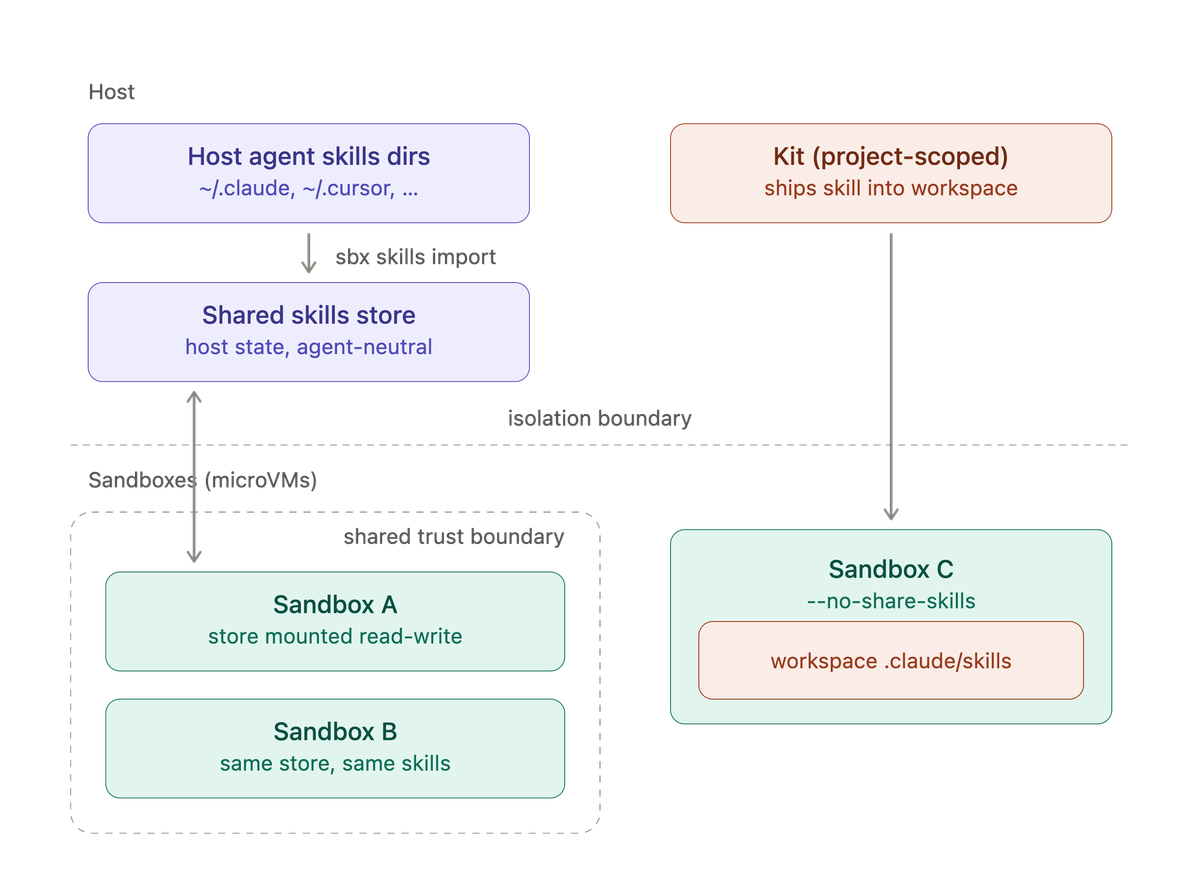
- Shared agent skills carry your host's user-level skills into a persistent store that many sandboxes share. This is the right tool for the skills you want everywhere, regardless of which project you are in.
- Kits ship project-scoped skills into a single sandbox's workspace. This is the right tool for skills that belong to a specific repository or task.
The rest of this post works through both, starting with the shared store.
The import flow, step by step
Sharing is a copy, not a live mount of your home directory. You run one command to populate a store, and sandboxes mount that store, never your ~.
Start with a dry run. It reports what sbx would copy without writing anything:
$ sbx skills import --dry-run
Under the hood, the import scans the per-agent host directories in a fixed order and copies each skill subdirectory into a single shared store. When a sandbox later starts, sbx mounts that store at the path the agent reads inside the sandbox:
| Agent | Host source | Sandbox mount target |
|---|---|---|
| Claude Code | ~/.claude/skills | /home/agent/.claude/skills |
| Codex | ~/.agents/skills | /home/agent/.agents/skills |
| Copilot | ~/.copilot/skills | /home/agent/.copilot/skills |
| Cursor | ~/.cursor/skills | /home/agent/.cursor/skills |
| Droid | ~/.factory/skills | /home/agent/.factory/skills |
Two design decisions are worth pulling out of that table.
First, every source feeds one store. Skills from Claude Code, Codex, and Cursor all land in the same place. That is what lets a skill you authored for one agent show up for another: the store is agent-neutral, and the mount target is chosen per agent at start time.
Second, the scan order resolves collisions. If two source directories contain a skill with the same directory name, the first source in the table wins and sbx warns about the rest. So a docker-review skill under ~/.claude/skills shadows a docker-review under ~/.cursor/skills. Rename one if you need both.
When the preview looks right, run the real import:
$ sbx skills import
The command copies the skill directories into the store and prints the store path when it finishes.
Where the store lives
The shared store is host-side state, kept outside any single sandbox so it can outlive them. The default location depends on your platform:
| Platform | Shared store path |
|---|---|
| macOS | ~/Library/Application Support/com.docker.sandboxes/sandboxes/agent-skills |
| Linux | ~/.local/state/sandboxes/sandboxes/agent-skills |
| Windows | %LOCALAPPDATA%\DockerSandboxes\sandboxes\state\agent-skills |
On Linux, sbx honors $XDG_STATE_HOME when it is set, using $XDG_STATE_HOME/sandboxes/sandboxes/agent-skills instead of the default.
Because this store is a plain host directory, you can inspect it, back it up, or clear it like any other. sbx reset clears it as part of resetting sandbox state.
Import semantics: replace, not merge
Re-running sbx skills import is how you push host updates into the store, and the semantics are worth being precise about.
When a skill already exists in the store, sbx prompts before replacing it. Pass --force to replace without prompting:
$ sbx skills import --force
The replacement operates on the whole skill directory, not on individual files. If you edited a skill's SKILL.md on the host but the store's copy still has a stale helper script, importing overwrites the entire directory; it does not merge file by file. That keeps the store consistent with the host source and avoids half-updated skills, but it means any change made to a skill inside the store is discarded on the next import of that skill.
The flags compose the way you would expect:
--dry-runshows what would be copied, changes nothing.--forceskips the replace-confirmation prompts.- Running the command again is the update path; there is no separate "sync" verb.
Lifecycle: when sharing binds to a sandbox
The single most common source of confusion is timing. Whether a sandbox participates in the shared store is decided when the sandbox is created, not each time it runs.
Sandboxes created with sbx 0.37.0 or later for a supported agent mount the store read-write by default. Each start re-reads the current contents of the store, so the order of these two operations does not matter:
$ sbx skills import      # populate the store
$ sbx run claude         # sandbox mounts the current store contents
$ sbx run claude         # create the sandbox first
$ sbx skills import      # import later; the next start picks it up
Either way, the sandbox sees the latest store contents on its next start. What you cannot do is change whether a sandbox shares the store after the fact. To opt a sandbox out at creation time, use --no-share-skills:
$ sbx run --no-share-skills claude
Three lifecycle rules follow from create-time binding, and each one has bitten someone:
- Upgrading
sbxdoes not retrofit sharing. A sandbox created before 0.37.0 stays non-participating after you upgrade. Remove and recreate it to enable sharing. --no-share-skillsonly applies at creation. To turn sharing off for an existing sandbox, remove it and recreate it with the flag. There is no toggle on a running sandbox.- New sessions re-scan. Some agents scan for skills once, when a session starts. If you import skills while a session is open and they do not appear, start another agent session so the agent re-scans the mount.
The trust boundary you are opting into
The shared store is mounted read-write, and that is the crux of the security model. Read-write mounting is what lets an agent create or refine a skill inside a sandbox and have it persist. It is also what puts every participating sandbox into a single trust boundary.
Walk through the mechanism concretely. Sandbox A and sandbox B both mount the store. Sandbox A's agent, or anything running in sandbox A, can modify a skill's SKILL.md or one of its helper scripts. Later, sandbox B's agent loads that skill and follows the modified instructions or runs the modified script. A compromise or a prompt-injection in one sandbox becomes an input to every other sandbox that shares the store.
Two boundaries hold, and it is important to be exact about them:
- The store is dedicated sandbox state. A modified skill in the store does not, by itself, execute on your host. Your host runs its own copy under
~, which the store never writes back to. - Sharing the store does not expose the rest of your host filesystem and does not create a direct network path between sandboxes. The exception is narrow: it is the skills store, and nothing else.
What the read-write store does change is the isolation between sandboxes. By default, two sandboxes share nothing: separate daemons, separate filesystems, separate networks. The shared skills store is a deliberate, single exception to that rule.
[!WARNING] A sandbox can modify any skill in the shared store, and another sandbox can later load the modified instructions or run the modified scripts. This does not by itself execute the modified skill on your host, but it does put every sandbox that shares the store in the same trust boundary. Use --no-share-skills to keep a sandbox outside that boundary.The practical guidance: share the store when the sandboxes are yours and you trust the code and agents running in all of them. When you are running something untrusted: a public repository, an unfamiliar kit, an experiment you would not run on your host, create that sandbox with --no-share-skills so a poisoned skill cannot follow it out.
The other path: project-scoped skills through a kit
The shared store is the answer for user-level skills you want everywhere. When a skill belongs to a specific project instead, ship it in the workspace through a kit. Kits are declarative YAML artifacts that extend a sandbox with tools, files, and configuration.
Claude Code reads project-scoped skills from .claude/skills/<name>/SKILL.md in the workspace. A kit that drops a skill into files/workspace/ makes it available in the sandbox without touching the shared store at all:
docker-review/
├── spec.yaml
└── files/
    └── workspace/
        └── .claude/
            └── skills/
                └── docker-review/
                    └── SKILL.md
schemaVersion: "1"
kind: mixin
name: docker-review
displayName: Dockerfile review skill
description: Ships a Claude Code skill that reviews Dockerfiles
Kits have to target the workspace rather than ~/.claude/ because sandboxes do not pick up user-level agent configuration from the host: the same isolation rule that motivates the shared store in the first place. A kit-shipped skill lives inside one sandbox's workspace, versions with the project that carries the kit, and never enters the cross-sandbox trust boundary.
Choosing between the two
The two mechanisms are not competitors; they cover different scopes.
Shared store (sbx skills import) | Kit-shipped skill | |
|---|---|---|
| Scope | User-level, across many sandboxes | Project-level, one sandbox's workspace |
| Source | Your host's agent skills directories | A kit's files/workspace/ |
| Persistence | Survives sandbox deletion, in a host store | Lives and dies with the sandbox |
| Shared across sandboxes | Yes, read-write by default | No |
| Trust boundary | All participating sandboxes | Contained to the one sandbox |
| Versioning | Manual re-import from the host | Travels with the project and its kit |
Reach for the shared store for the review checklists and scaffolding routines you want in every session. Reach for a kit when a skill encodes knowledge about one repository and should ride along with it, and when you want that skill to stay out of the shared trust boundary.
Wrapping up
Agent skills expose the central tension of Docker Sandboxes in miniature: isolation is the feature, and every convenience that reaches across it is a deliberate, bounded exception. The shared store carries your user-level skills across sandboxes through a copy-based import and a persistent host-side directory, mounted read-write so agents can refine skills and share the results, at the cost of a common trust boundary that --no-share-skills lets you step out of. Kits cover the other half of the problem, shipping project-scoped skills into a single workspace with no cross-sandbox exposure at all.
For the command reference, see Share agent skills and the kit examples. For the security model behind the read-write store, see the security overview. Try sbx from the get started guide, and open issues or requests at github.com/docker/sbx-releases/issues.