Docker Sandboxes: Containers vs MicroVMs - When to Use What?
Docker Sandboxes have moved from containers to microVMs & this changes everything about how AI coding agents interact with your system. In this hands-on guide, I break down the architecture differences, test the isolation boundaries, & help you decide when to use containers vs microVMs.

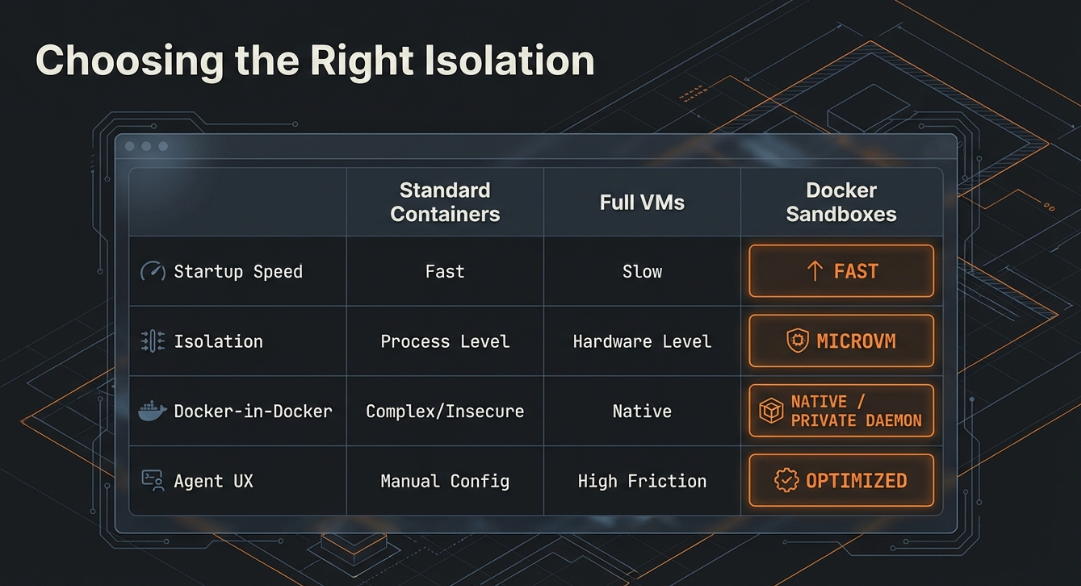
If you've been running AI coding agents like Claude Code, Gemini CLI, or Codex inside Docker, you've probably already encountered Docker Sandboxes. But here's something that caught many developers off guard ~ Docker recently shifted the entire Sandboxes architecture from container-based isolation to microVM-based isolation. And this isn't just a minor refactor. It's a fundamental change in how your AI agents interact with your system.
In this blog post, I'll break down the key differences between the legacy container-based sandboxes and the new microVM-based sandboxes, walk you through hands-on examples, and help you decide when to use what.
TL;DR
Docker Sandboxes now run inside lightweight microVMs instead of regular containers. Each sandbox gets its own private Docker daemon, hypervisor-level isolation, and network filtering. The old container-based approach shared your host kernel and Docker daemon which is risky when you're letting an autonomous AI agent run wild on your machine. The new microVM approach fixes this by giving each sandbox its own VM boundary.
The Problem: Why Containers Weren't Enough
Let me explain. You're running Claude Code inside a Docker container on your MacBook. The agent needs to run docker build, spin up test containers, and maybe even run docker compose up to test a multi-service app. Sounds reasonable, right?
But here's the catch ~ to do all of that, the agent needs access to your Docker daemon. And if it has access to your Docker daemon, it can see all your running containers, pull any image, and even mess with volumes that have nothing to do with your project.
I tested this myself during one of our Collabnix meetups and the results were eye-opening. Let me show you what I mean.
The Legacy Container-Based Approach (Pre Docker Desktop 4.58)
In the old world, sandboxes were just regular Docker containers. Here's what that looked like:
# Old way: Creating a container-based sandbox
$ docker sandbox run claude ~/my-project

# The sandbox shows up in docker ps like any other container
$ docker ps
CONTAINER ID   IMAGE                     COMMAND       STATUS       NAMES
a3f2b1c9d8e7   docker/sandbox:latest     "/bin/sh"     Up 2 min     claude-my-project
Notice that? The sandbox appeared right alongside your regular containers. And because it shared the host Docker daemon via socket mounting, the agent inside could do this:
# Inside the container-based sandbox, the agent could see EVERYTHING
$ docker ps
CONTAINER ID   IMAGE                     COMMAND                  STATUS       NAMES
a3f2b1c9d8e7   docker/sandbox:latest     "/bin/sh"                Up 5 min     claude-my-project
b4e7c2d1f3a8   postgres:15               "docker-entrypoint.s…"   Up 2 hours   production-db
c5f8d3e2a4b9   redis:7                   "docker-entrypoint.s…"   Up 2 hours   cache-server
d6a9e4f3b5c0   nginx:latest              "/docker-entrypoint.…"   Up 1 hour    web-proxy
That production-db container? The agent could see it. The cache-server? Accessible. Your agent essentially had the keys to the entire kingdom.
The New MicroVM-Based Approach (Docker Desktop 4.58+)
Now let's look at how the new microVM-based sandboxes work. I tested this on my MacBook running Docker Desktop 4.63.0:
$ docker version
Client:
 Version:           29.2.1
 API version:       1.53
 Go version:        go1.25.6
 Git commit:        a5c7197
 OS/Arch:           darwin/arm64
 Context:           desktop-linux
Server: Docker Desktop 4.63.0 (219810)
 Engine:
  Version:          29.2.1
  ...
The docker sandbox CLI gives us everything we need:
$ docker sandbox --help
Usage:  docker sandbox [OPTIONS] COMMAND

Local sandbox environments for AI agents, using Docker.

Management Commands:
  create      Create a sandbox for an agent
  network     Manage sandbox networking

Commands:
  exec        Execute a command inside a sandbox
  ls          List VMs
  reset       Reset all VM sandboxes and clean up state
  rm          Remove one or more sandboxes
  run         Run an agent in a sandbox
  save        Save a snapshot of the sandbox as a template
  stop        Stop one or more sandboxes without removing them
  version     Show sandbox version information
# New way: Creating a microVM-based sandbox
$ docker sandbox run claude ~/my-project
First thing you'll notice ~ try running docker ps:
# On your host machine
$ docker ps
CONTAINER ID   IMAGE            COMMAND                  STATUS       NAMES
b4e7c2d1f3a8   postgres:15      "docker-entrypoint.s…"   Up 2 hours   production-db
c5f8d3e2a4b9   redis:7          "docker-entrypoint.s…"   Up 2 hours   cache-server
Where's the sandbox? It's gone from docker ps because it's NOT a container anymore ~ it's a VM. You need a different command:
# To see your sandboxes
$ docker sandbox ls
NAME                STATUS    WORKSPACE
claude-my-project   Running   /Users/ajeet/my-project
And inside the sandbox, when the agent tries to see host containers:
# Inside the microVM sandbox
$ docker ps
CONTAINER ID   IMAGE   COMMAND   STATUS   NAMES
# Empty! The agent can only see containers it creates itself
This is the critical difference ~ complete isolation at the hypervisor level.
Architecture Deep Dive
Let me break this down visually. Here's how both approaches look under the hood:
Container-Based (Legacy)
┌─────────────────────────────────────────────┐
│              Host System                    │
│                                             │
│  ┌──────────┐  ┌──────────┐  ┌──────────┐   │
│  │ Your App │  │ Your DB  │  │ Sandbox  │   │
│  │Container │  │Container │  │Container │   │
│  └────┬─────┘  └────┬─────┘  └────┬─────┘   │
│       │             │             │         │
│  ─────┴─────────────┴─────────────┴─────    │
│           Shared Docker Daemon              │
│           Shared Host Kernel                │
└─────────────────────────────────────────────┘
Everything shares the same Docker daemon and kernel. The sandbox container can see and potentially interact with your app container and database container.
MicroVM-Based (Current)
┌─────────────────────────────────────────────────────┐
│                   Host System                       │
│                                                     │
│  ┌──────────┐  ┌──────────┐  ┌─────────────────┐    │
│  │ Your App │  │ Your DB  │  │  Sandbox VM     │    │
│  │Container │  │Container │  │  ┌───────────┐  │    │
│  └────┬─────┘  └────┬─────┘  │  │Agent Cont.│  │    │
│       │             │        │  └─────┬─────┘  │    │
│  ─────┴─────────────┴─────   │  ──────┴──────  │    │
│     Host Docker Daemon       │ Private Daemon  │    │
│     Host Kernel              │ Separate Kernel │    │
│                              └─────────────────┘    │
│                   Hypervisor Boundary               │
└─────────────────────────────────────────────────────┘
The sandbox lives in its own VM with its own kernel and its own Docker daemon. It literally cannot see anything on the host side.
Hands-On: Testing the Isolation
I ran every single test on my Mac to verify these claims. Here are the real terminal outputs.
Setting Up the Test Workspace
First, I created a simple test project:
$ mkdir -p ~/sandbox-test-project
$ cd ~/sandbox-test-project
$ echo "# Sandbox Test Project" > README.md
Creating the Sandbox
$ docker sandbox run shell ~/sandbox-test-project
Creating new sandbox 'shell-sandbox-test-project'...
shell: Pulling from docker/sandbox-templates
8affc6dc89e1: Pull complete
900eee1c7b47: Pull complete
8935878ad524: Pull complete
...
Status: Downloaded newer image for docker/sandbox-templates:shell
✓ Created sandbox shell-sandbox-2026-02-26-121529 in VM shell-sandbox-test-project
  Workspace: /Users/ajeetsraina/sandbox-test-project
  Agent: shell
To connect to this sandbox, run:
  docker sandbox run shell-sandbox-test-project
Starting shell agent in sandbox 'shell-sandbox-test-project'...
Workspace: /Users/ajeetsraina/sandbox-test-project
agent@shell-sandbox-2026-02-26-121529:sandbox-test-project$
I'm now inside the microVM. Let's start testing.
Test 1: Sandbox Visibility — docker ps vs docker sandbox ls
From inside the sandbox, docker ps shows only the sandbox's own container:
agent@shell-sandbox-2026-02-26-121529:sandbox-test-project$ docker ps
CONTAINER ID   IMAGE                            COMMAND            CREATED         STATUS         PORTS     NAMES
d1550392baed   docker/sandbox-templates:shell   "sleep infinity"   2 minutes ago   Up 2 minutes             shell-sandbox-2026-02-26-121529
None of my host containers are visible. And on the host side, the sandbox doesn't appear in docker ps at all ~ you need docker sandbox ls:
$ docker sandbox ls
SANDBOX                       AGENT   STATUS    WORKSPACE
shell-sandbox-test-project    shell   Running   /Users/ajeetsraina/sandbox-test-project
Sandboxes are invisible to docker ps and only visible via docker sandbox ls.
Test 2: Host File Isolation
Can the agent access my host files? Let's check:
agent@shell-sandbox-2026-02-26-121529:sandbox-test-project$ ls ~/Desktop/ 2>&1
ls: cannot access '/home/agent/Desktop/': No such file or directory
Host directories like Desktop don't exist inside the sandbox.
But my workspace IS accessible at the exact same absolute path:
agent@shell-sandbox-2026-02-26-121529:sandbox-test-project$ ls -la /Users/ajeetsraina/sandbox-test-project/
total 8
drwxr-xr-x 3 root  root    96 Feb 26 06:42 .
drwxr-xr-x 3 root  root  4096 Feb 26 06:45 ..
-rw-r--r-- 1 agent agent   23 Feb 26 06:42 README.md
Only the workspace directory is accessible. Host files are completely isolated.
Test 3: Docker Build Inside the Sandbox
Let's test if the agent can build images using the private Docker daemon:
agent@shell-sandbox-2026-02-26-121529:sandbox-test-project$ cat > Dockerfile << 'EOF'
FROM alpine:3.20
CMD ["echo", "Hello from the sandbox!"]
EOF

agent@shell-sandbox-2026-02-26-121529:sandbox-test-project$ docker build -t sandbox-test-app .
[+] Building 5.3s (5/5) FINISHED                                          docker:default
 => [internal] load build definition from Dockerfile                                0.0s
 => [internal] load metadata for docker.io/library/alpine:3.20                      4.1s
 => [internal] load .dockerignore                                                   0.0s
 => [1/1] FROM docker.io/library/alpine:3.20@sha256:a4f4213abb84c497377b...         1.0s
 => exporting to image                                                              1.1s
 => => naming to docker.io/library/sandbox-test-app:latest                          0.0s
docker build works perfectly inside the sandbox.
Docker Run Inside the Sandbox
agent@shell-sandbox-2026-02-26-121529:sandbox-test-project$ docker run sandbox-test-app
Hello from the sandbox!
Full Docker run capabilities inside the isolated VM.
Test 5: Docker Compose Inside the Sandbox
agent@shell-sandbox-2026-02-26-121529:sandbox-test-project$ cat > docker-compose.yml << 'EOF'
services:
  web:
    image: nginx:alpine
    ports:
      - "8080:80"
EOF

agent@shell-sandbox-2026-02-26-121529:sandbox-test-project$ docker compose up -d
[+] Running 3/3
 ✔ Image nginx:alpine                     Pulled                                    5.7s
 ✔ Network sandbox-test-project_default   Created                                   0.0s
 ✔ Container sandbox-test-project-web-1   Started                                   0.2s
And docker ps inside the sandbox now shows both the sandbox container and the nginx container:
agent@shell-sandbox-2026-02-26-121529:sandbox-test-project$ docker ps
CONTAINER ID   IMAGE                            COMMAND                  CREATED          STATUS          PORTS                  NAMES
a90860e2185d   nginx:alpine                     "/docker-entrypoint.…"   26 seconds ago   Up 26 seconds   0.0.0.0:8080->80/tcp   sandbox-test-project-web-1
d1550392baed   docker/sandbox-templates:shell   "sleep infinity"         9 minutes ago    Up 9 minutes                           shell-sandbox-2026-02-26-121529
But on the host? That nginx container is completely invisible:
# On the host machine — sandbox containers don't appear
$ docker ps
# Only your regular host containers show up here
Full Docker Compose support inside the sandbox, completely isolated from the host.
Network Policies: The Smart Deny-All
One of my favourite features is network policy control. Let me show you something interesting I discovered while testing.
Setting a Deny Policy
From the host:
$ docker sandbox network proxy shell-sandbox-test-project --policy denyThen inside the sandbox:
agent@shell-sandbox-2026-02-26-121529:sandbox-test-project$ curl -s https://google.com
Blocked by network policy: matched rule <default policy>
Google is blocked. But here's what surprised me:
agent@shell-sandbox-2026-02-26-121529:sandbox-test-project$ curl -s https://github.com | head -1
<!DOCTYPE html>
Wait. GitHub works? Why?
The Secret: Docker's Curated Allowlist
I dug into the proxy config file and found the answer:
$ cat ~/.docker/sandboxes/vm/shell-sandbox-test-project/proxy-config.json{
"policy": {
"default": "deny",
"logBlocked": true,
"logAllowed": false
},
"network": {
"allowedDomains": [
"claude.ai",
"api.anthropic.com",
"console.anthropic.com",
"statsig.anthropic.com",
"*.docker.com",
"hub.docker.com",
"github.com",
"*.github.com",
"api.github.com",
"gist.github.com",
"raw.githubusercontent.com",
"*.googleapis.com",
"aiplatform.googleapis.com",
"generativelanguage.googleapis.com",
"oauth2.googleapis.com",
"vertexai.googleapis.com",
"api.openai.com",
"pkg.go.dev",
"*.docker.io",
"registry.docker.io",
"pkg.golang.org",
"sum.golang.org",
"*.npmjs.org",
"registry.npmjs.org",
"pypi.org",
"*.pypi.org",
"rubygems.org"
],
"blockedDomains": [
"metadata.azure.internal",
"metadata.google.internal",
"kube-dns.kube-system.svc.cluster.local"
],
"blockedCIDRs": [
"10.0.0.0/8",
"127.0.0.0/8",
"169.254.0.0/16",
"172.16.0.0/12",
"192.168.0.0/16",
"::1/128",
"fc00::/7",
"fe80::/10"
]
}
}So --policy deny doesn't mean raw deny-all. Docker pre-populates a curated allowlist of domains that AI coding agents need to function. Here's the breakdown:
- AI API Providers: claude.ai, api.anthropic.com, api.openai.com, googleapis.com (Vertex AI, Gemini)
- Developer Platforms: github.com, *.github.com, raw.githubusercontent.com
- Container Registries: *.docker.com, *.docker.io, hub.docker.com
- Package Registries: registry.npmjs.org, pypi.org, rubygems.org, pkg.go.dev, pkg.golang.org
- Explicitly Blocked: Cloud metadata endpoints (metadata.azure.internal, metadata.google.internal) and all private IP ranges
Let me prove the filtering works:
# GitHub — in the allowlist → works
agent@shell-sandbox-2026-02-26-121529:sandbox-test-project$ curl -s https://github.com | head -1
<!DOCTYPE html>

# Reddit — NOT in the allowlist → blocked
agent@shell-sandbox-2026-02-26-121529:sandbox-test-project$ curl -s https://reddit.com
Blocked by network policy: matched rule <default policy>

# Stack Overflow — NOT in the allowlist → blocked
agent@shell-sandbox-2026-02-26-121529:sandbox-test-project$ curl -s https://stackoverflow.com
Blocked by network policy: matched rule <default policy>
This is actually a very thoughtful design decision. AI coding agents need access to package registries and code hosting platforms to do their job, but they don't need access to social media, news sites, or arbitrary endpoints.
Sandbox Lifecycle: Stop, Remove, Clean Up
Here's the full lifecycle management I tested:
# Stop without removing (preserves VM state)
$ docker sandbox stop shell-sandbox-test-project
✓ Sandbox shell-sandbox-test-project stopped

# Remove completely (deletes VM and all state)
$ docker sandbox rm shell-sandbox-test-project
Deleting sandbox shell-sandbox-test-project...
✓ Sandbox shell-sandbox-test-project removed successfully

# Verify it's gone
$ docker sandbox ls
No sandboxes found
You can also bulk-remove sandboxes:
$ docker sandbox rm claude-my-project claude-sandbox-test claude-sandbox-test-2 my-sandboxThe Comparison Table
Here's a comprehensive side-by-side that I've put together from my testing:
| Feature | Container-Based (Legacy) | MicroVM-Based (Current) |
|---|---|---|
| Isolation Level | Kernel namespaces | Hypervisor-level (VM) |
| Docker Daemon | Host daemon (shared) | Private daemon (per sandbox) |
| Host Impact | Can affect host containers & resources | Fully isolated, zero host impact |
| Visibility | docker ps | docker sandbox ls |
| Security Boundary | Weaker — shared kernel | Strong — separate kernel per VM |
| Docker-in-Docker | Requires privileged mode or socket mount | Native — private daemon handles it |
| File Access | Could potentially access host files | Only workspace directory accessible |
| Credential Management | Stored in Docker volumes | Managed via env vars or proxy injection |
| Network Control | Standard Docker networking | Built-in HTTP/HTTPS filtering proxy with curated allowlist |
| Startup Time | Fast (container startup) | Slightly slower (VM initialization) |
| Platform Support | macOS, Windows, Linux | macOS, Windows (experimental) |
| Persistence | Standard Docker volumes | VM-level (images, packages, state) |
| Multi-Sandbox Isolation | Could interact via shared daemon | Complete isolation between VMs |
When Should You Use What?
Use MicroVM-Based Sandboxes (Recommended) When:
You're running autonomous AI agents — Claude Code, Gemini CLI, Codex, Kiro, or any agent that needs to execute code, install packages, and run Docker commands autonomously. The hypervisor-level isolation ensures that even if the agent goes rogue, your system stays safe.
You need agents to have full Docker capabilities — If your agent needs to run docker build, docker compose up, or manage containers as part of testing, microVMs give them a private daemon without the security risks of Docker-in-Docker.
You're working with sensitive environments — When your host has production databases, sensitive credentials, or other containers you don't want exposed.
You want network-level control — The built-in HTTP/HTTPS filtering proxy lets you define allow/deny lists for outbound traffic, which is critical for preventing data exfiltration.
# Recommended: microVM sandbox with network controls
$ docker sandbox run claude ~/my-project
$ docker sandbox network proxy claude-my-project --policy deny
# Docker automatically allows essential domains for coding agents
Use Container-Based Sandboxes (Legacy) When:
You're on Linux — As of now, microVM-based sandboxes require macOS or Windows. Linux users need to use legacy container-based sandboxes with Docker Desktop 4.57.
You need maximum speed — Container startup is faster than VM initialization. For quick, disposable tasks where isolation isn't the primary concern, containers are lighter.
You trust the workload — If you're running your own tools (not autonomous agents) and you understand exactly what commands will be executed, the shared daemon approach is simpler.
Migrating from Legacy to MicroVM Sandboxes
If you've been using the old container-based sandboxes, here's how to migrate:
# Step 1: Check your existing sandboxes
$ docker sandbox ls
SANDBOX                 AGENT    STATUS    WORKSPACE
claude-my-project       claude   stopped   /Users/ajeetsraina/my-project
claude-sandbox-test     claude   stopped   /Users/ajeetsraina/sandbox-test
claude-sandbox-test-2   claude   stopped   /Users/ajeetsraina/sandbox-test-2
my-sandbox              claude   stopped   /Users/ajeetsraina/my-project

# Step 2: Remove the old sandboxes
$ docker sandbox rm claude-my-project claude-sandbox-test claude-sandbox-test-2 my-sandbox

# Step 3: Clean up old volumes (CAREFUL: this removes ALL unused volumes)
$ docker volume prune

# Step 4: Update Docker Desktop to 4.58+

# Step 5: Create a new microVM sandbox
$ docker sandbox run claude ~/my-project
After recreating the sandbox, you'll need to reinstall any packages or tools the agent needs. A good practice is to use custom templates to pre-install your toolchain:
# Using a custom template
$ docker sandbox run claude ~/my-project --template my-custom-image:latest
Key Takeaways
The shift from containers to microVMs for Docker Sandboxes isn't just a technical upgrade — it's a philosophical shift in how we think about running autonomous AI agents. Containers were designed for packaging and deploying applications, not for isolating untrusted autonomous code. MicroVMs give us the hard security boundary that AI agents demand while still providing the full Docker capabilities they need.
Here are the three things I want you to remember:
Sandboxes are NOT containers anymore — They won't show up in docker ps. Use docker sandbox ls instead.
Each sandbox has its own Docker daemon — Agents can build, run, and compose containers without ever touching your host environment.
The network deny policy is smarter than you think — It maintains a curated allowlist of essential domains (GitHub, npm, PyPI, AI APIs) while blocking everything else. Check ~/.docker/sandboxes/vm/<vm-name>/proxy-config.json to see exactly what's allowed.