Inside Docker Model Runner: one API, three inference engines
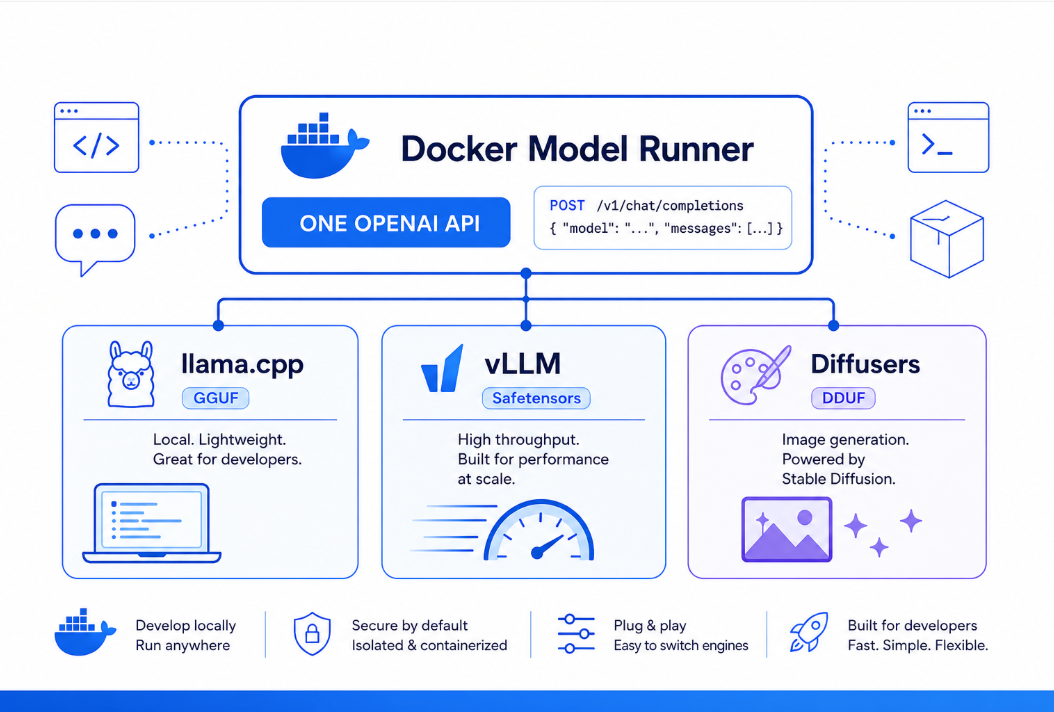
Docker Model Runner supports three inference engines namely llama.cpp, vLLM, and Diffusers. Each engine has different strengths, supported platforms, and model format requirements. This blog article helps you in making a decision to choose the right engine and configure it for your use case.

Running large language models locally used to mean juggling Python
environments, CUDA toolkits, model-conversion scripts, and a different
serving stack for every model format. Docker Model Runner (DMR) collapses
all of that into a single command:
$ docker model run ai/smollm2
Behind that one command sits a pluggable inference layer. Today DMR ships
with three production inference engines - llama.cpp, vLLM, and
Diffusers that cover CPU-only laptops, high-throughput GPU servers,
and text-to-image generation, all behind the same OpenAI-, Anthropic-, and
Ollama-compatible API surface.
This post walks through what DMR is, how the engines differ, and how requests
flow from your CLI down to the GPU.
What Docker Model Runner is
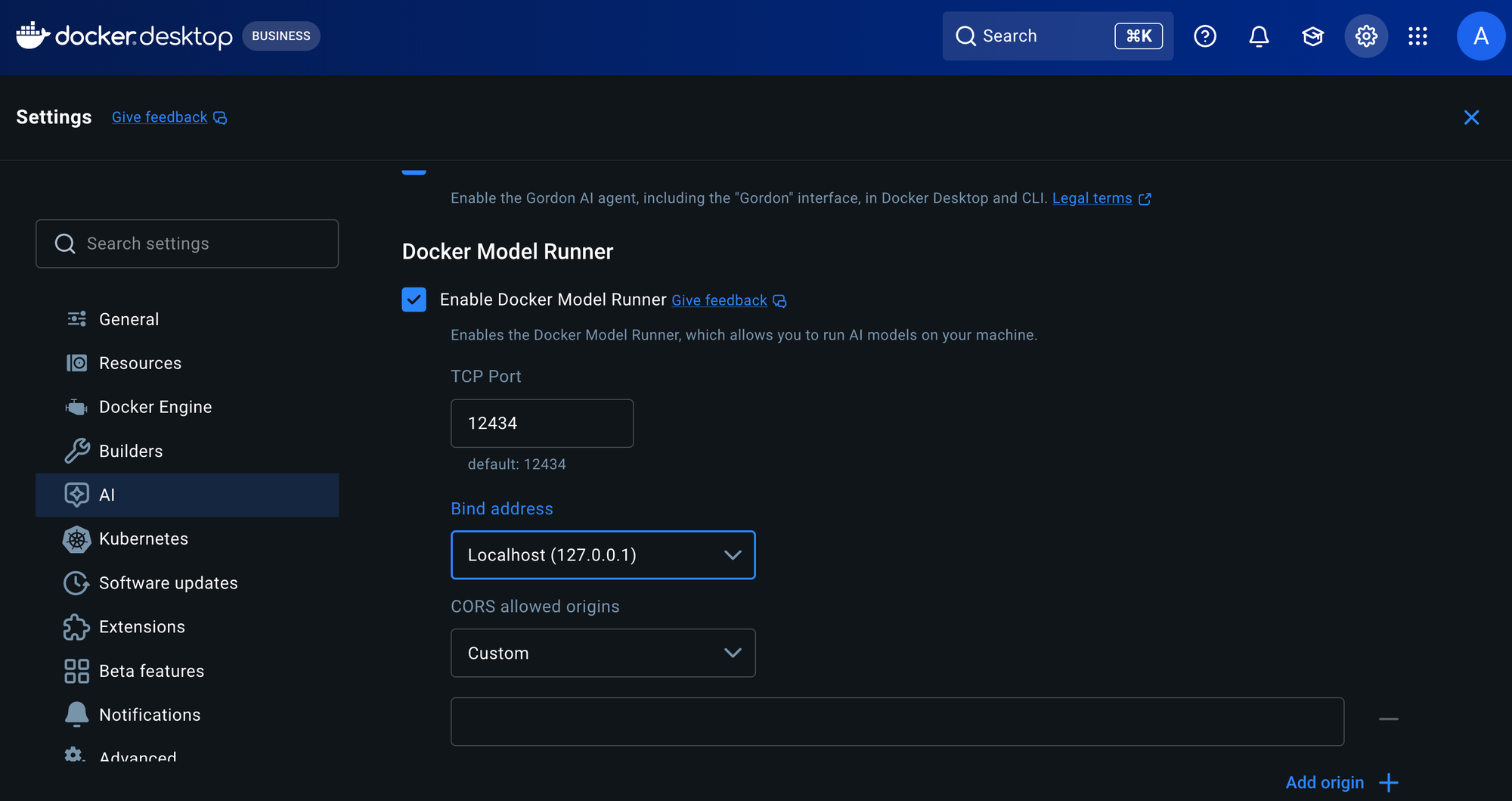
DMR is a model-serving runtime built into Docker Desktop and Docker Engine.
It pulls models from Docker Hub, any OCI-compliant registry, or Hugging Face,
stores them locally as OCI artifacts, and serves them over a local HTTP API on
port 12434.
The design goals are familiar to anyone who has used Docker:
- Models as artifacts. GGUF and Safetensors files are packaged and distributed as OCI artifacts, so a model is versioned, cached, and pulled exactly like a container image.
- Load on demand. Models load into memory only when a request arrives and unload when idle, so a machine can host many more models than it can hold in memory at once.
- A stable API. Clients talk to OpenAI, Anthropic, or Ollama-compatible endpoints. Swapping the underlying engine or model does not change the client code.
Architecture
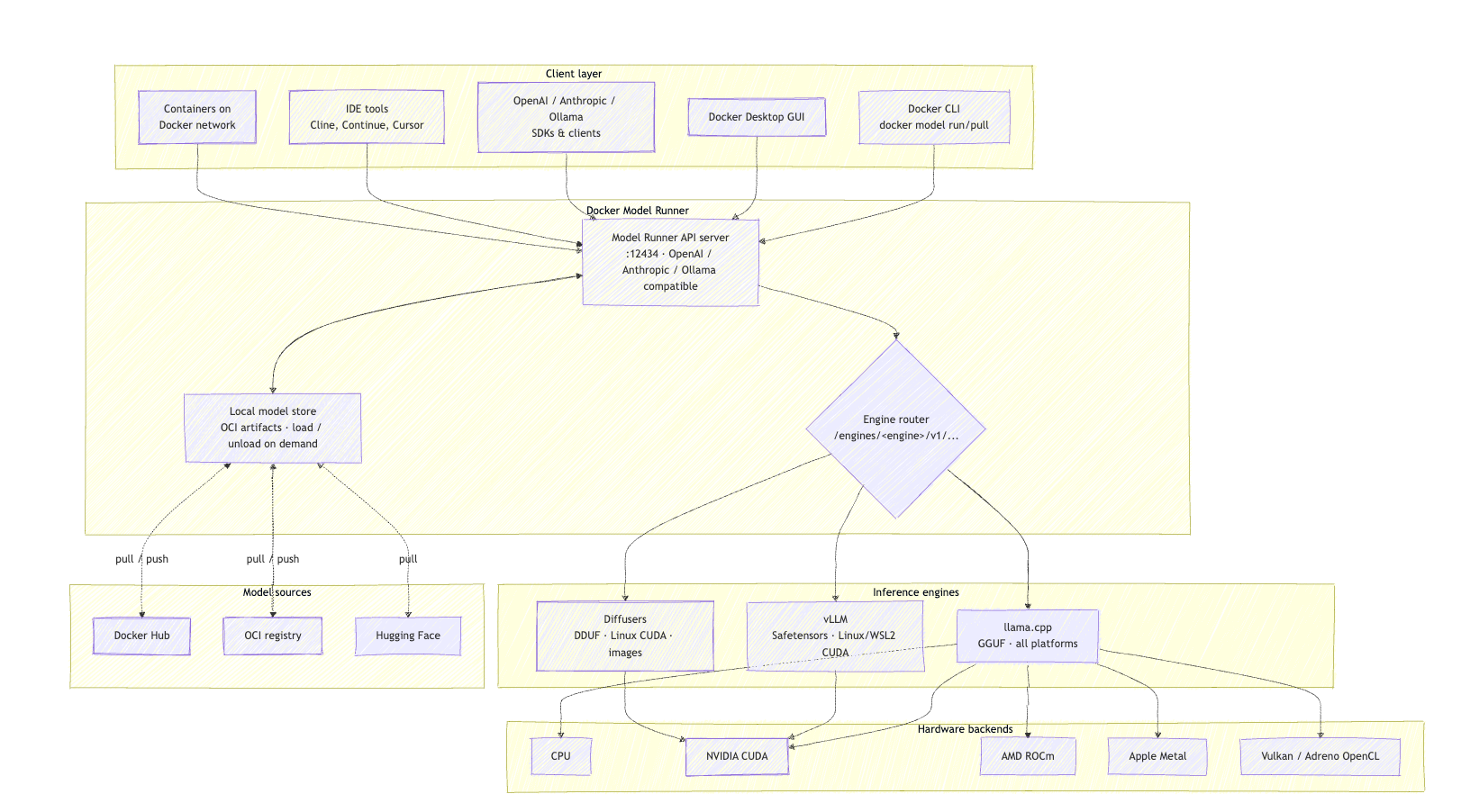
The following diagram shows how a request travels from a client, through the
Model Runner API and engine router, to an inference engine and the hardware
backend that executes it.
There are four layers:
- Clients. The
docker modelCLI, the Docker Desktop GUI, OpenAI / Anthropic / Ollama SDKs, IDE assistants such as Cline, Continue, and Cursor, and any container on the same Docker network. - Model Runner. The API server terminates OpenAI-, Anthropic-, and Ollama-compatible requests, then an engine router dispatches each request to the correct engine based on the model or an explicit backend selection. A local model store handles pull/push against registries and the load/unload lifecycle.
- Inference engines. llama.cpp, vLLM, and Diffusers — each specialized for a model format and workload.
- Hardware backends. CPU, NVIDIA CUDA, AMD ROCm, Apple Metal, Vulkan, and Adreno OpenCL.
The three engines
| Feature | llama.cpp | vLLM | Diffusers |
|---|---|---|---|
| Model formats | GGUF | Safetensors, Hugging Face | DDUF |
| Platforms | macOS, Windows, Linux | Linux x86_64, Windows WSL2 | Linux x86_64 / ARM64 |
| GPU support | NVIDIA, AMD, Apple Silicon, Vulkan | NVIDIA CUDA only | NVIDIA CUDA only |
| CPU inference | Yes | No | No |
| Quantization | Built-in (Q4, Q5, Q8, …) | Limited | Limited |
| Throughput | Good | High (with batching) | Good |
| Workload | Text generation | Text generation | Image generation |
llama.cpp ~ the default, everywhere engine
llama.cpp is the default engine and the reason DMR runs on essentially any machine. It uses the GGUF format, which bakes quantization directly into the weights so a model can shrink from 16-bit floats down to roughly 4 bits per weight with minimal quality loss.
| Quantization | Bits/weight | Memory | Quality |
|---|---|---|---|
| Q4_K_M | ~4.5 | Low | Good |
| Q5_K_M | ~5.5 | Moderate | Excellent |
| Q8_0 | 8 | High | Near-original |
| F16 | 16 | Highest | Original |
Q4_K_M is the sweet spot for most local workloads. Because llama.cpp supports CPU inference plus Metal, CUDA, ROCm, Vulkan, and Adreno OpenCL, the same GGUF model runs on an Apple Silicon MacBook, an NVIDIA workstation, or a CPU-only Linux box.
# llama.cpp is the default — no flags needed
$ docker model run ai/smollm2

# or select it explicitly
$ docker model run ai/smollm2 --backend llama.cpp
Requests hit the llama.cpp engine path:
POST /engines/llama.cpp/v1/chat/completions
Reach for llama.cpp when: you're developing locally, running on a Mac or a
CPU-only machine, or GPU memory is tight and quantization matters.
vLLM ~ throughput for production
vLLM is a high-performance engine built for serving many concurrent requests. It uses Safetensors, the standard Hugging Face format ~ these models are typically unquantized, so they use more memory but deliver strong quality and, with continuous batching, high throughput on capable GPUs.
vLLM is NVIDIA-only and does not do CPU inference. It runs on Linux x86_64 and on Windows with WSL2 (Docker Desktop 4.54+). Install it as a backend:
$ docker model install-runner --backend vllm --gpu cuda
$ docker model status
llama.cpp: running llama.cpp version: c22473b
vllm: running vllm version: 0.11.0
You can tune serving behavior with Hugging Face overrides:
$ docker model configure --hf_overrides '{"max_model_len": 8192}' ai/model-vllm
Common knobs include max_model_len, gpu_memory_utilization, andtensor_parallel_size for multi-GPU tensor parallelism. Requests route to the
vLLM engine path:
POST /engines/vllm/v1/chat/completions
Reach for vLLM when: you're serving multiple concurrent users, you have
NVIDIA GPUs, and maximum throughput matters more than running everywhere.
Diffusers ~ text-to-image generation
Diffusers breaks out of the LLM box entirely. It serves image-generation models such as Stable Diffusion, turning text prompts into images. Diffusers requires an NVIDIA GPU and runs on Linux (x86_64 or ARM64).
$ docker model reinstall-runner --backend diffusers --gpu cuda
$ docker model pull stable-diffusion:Q4
Instead of a chat endpoint, Diffusers exposes an image-generation endpoint:
$ curl -s -X POST http://localhost:12434/engines/diffusers/v1/images/generations \
  -H "Content-Type: application/json" \
  -d '{
    "model": "stable-diffusion:Q4",
    "prompt": "A picture of a nice cat",
    "size": "512x512"
  }' | jq -r '.data[0].b64_json' | base64 -d > image.png
Reach for Diffusers when: you need image generation alongside your text
models, on NVIDIA Linux hardware.
One runtime, many engines at once
The engines are not mutually exclusive. DMR can run llama.cpp, vLLM, and
Diffusers simultaneously and route each request to the right one:
$ docker model status
llama.cpp: running llama.cpp version: 34ce48d
vllm: running vllm version: 0.11.0
diffusers: running diffusers version: 0.36.0
The engine router keys off the API path (or an explicit --backend):
| Engine | API path | Workload |
|---|---|---|
| llama.cpp | /engines/llama.cpp/v1/chat/completions | Text |
| vLLM | /engines/vllm/v1/chat/completions | Text |
| Diffusers | /engines/diffusers/v1/images/generations | Images |
| Auto-select | /engines/v1/chat/completions | Text (engine chosen automatically) |
That auto-select path is the important one for portability: point a client at/engines/v1, and DMR picks the engine that fits the model and hardware. The
same application code runs on a laptop with llama.cpp and a GPU server with
vLLM.
How to choose
| Scenario | Engine |
|---|---|
| Local development, single user | llama.cpp |
| Apple Silicon Mac | llama.cpp |
| CPU-only system | llama.cpp |
| Limited GPU memory | llama.cpp (quantized) |
| Many concurrent requests | vLLM |
| Maximum throughput on NVIDIA | vLLM |
| Text-to-image generation | Diffusers |
A practical pattern: develop and test locally against llama.cpp for its portability and low resource footprint, then deploy the same application to a GPU host running vLLM when you need production throughput without touching your client code, because the API stays the same.
Packaging your own models
Both text formats are first-class OCI artifacts:
# GGUF for llama.cpp
$ docker model package --gguf ./model.gguf --push myorg/mymodel:Q4_K_M

# Safetensors for vLLM
$ docker model package --safetensors ./model/ --push myorg/mymodel-vllm
Once pushed, the model is pulled, cached, and versioned exactly like a
container image.
Wrapping up
Docker Model Runner's value is the layer between your code and the model: a stable, multi-format API on top of a pluggable inference engine. llama.cpp gives you reach and efficiency, vLLM gives you throughput, and Diffusers adds image generation and the engine router lets you use all three at once without changing how clients talk to them.
To go deeper: