Run Visual Studio Code and Claude Code Inside a Docker Sandbox microVM

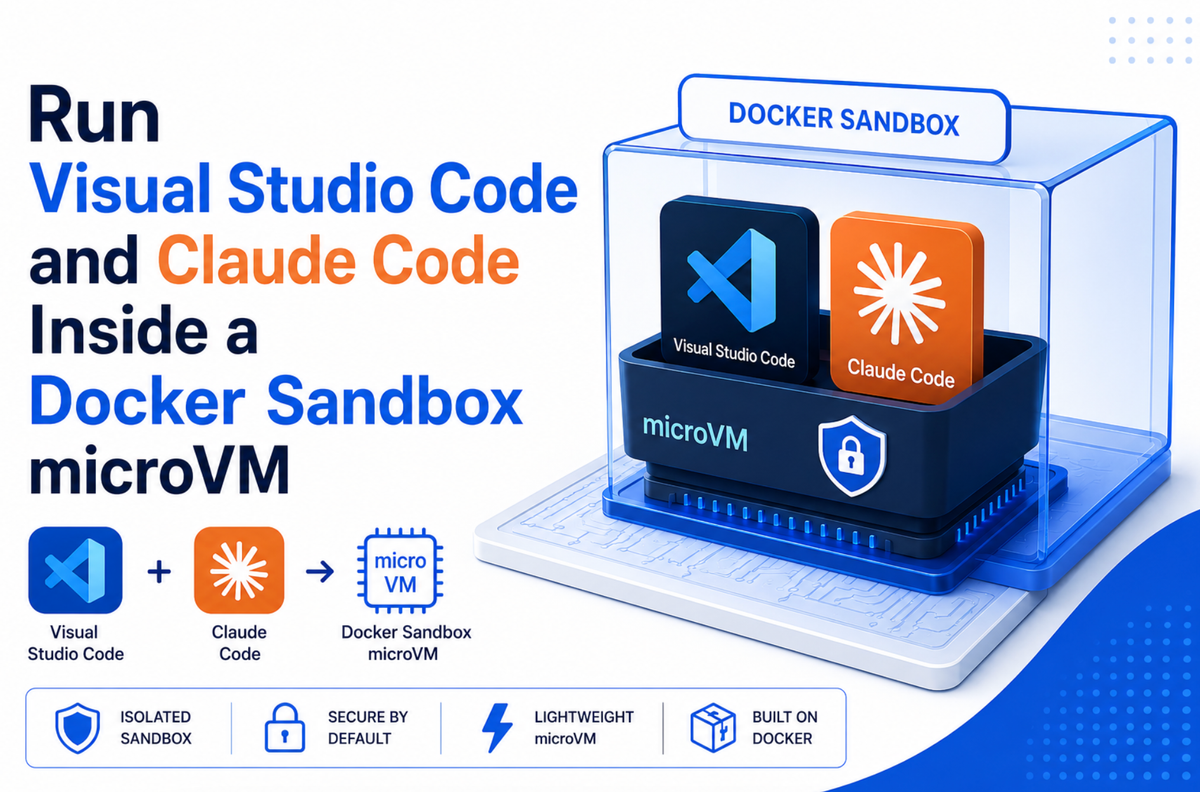
Most developers running Claude Code today run it directly on their host machine. That means the agent shares an environment with your SSH keys, your AWS credentials, your browser sessions, and every other project on your laptop. A container helps, but a container is not a sandbox. A shared kernel is still a shared kernel.
sbx-kits-vscode takes a different approach. It packages a full VS Code Server with the Claude Code extension preinstalled, runs it inside a Docker Sandbox microVM with a hard VM boundary, and exposes it to you through a VS Code Remote Tunnel. You get the complete VS Code experience in your browser or desktop editor. The agent gets a locked-down microVM with deny-by-default networking.
One command, and the entire agent environment lives behind a hypervisor boundary:
sbx run claude-vscode . --kit docker.io/ajeetraina777/sbx-vscode-kit:latest
Architecture
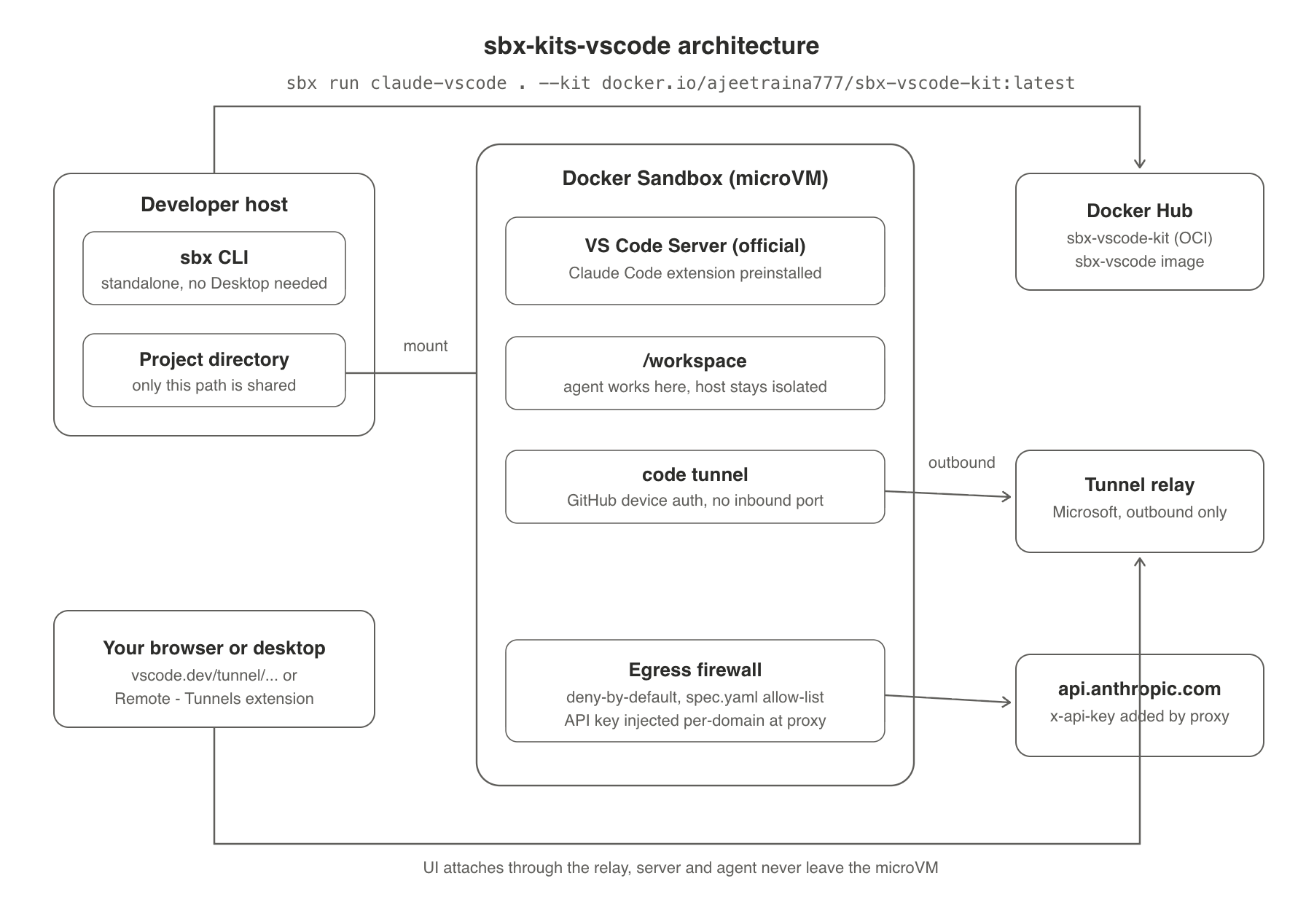
Three properties make this architecture worth paying attention to:
- The sandbox never exposes an inbound port. The tunnel connection is outbound only, from the microVM to Microsoft's tunnel relay. Zero inbound attack surface.
- Network egress is deny-by-default. Only the domains listed in the kit spec are reachable. Everything else is blocked at the sandbox boundary.
- The Anthropic API key never sits inside the sandbox as a general-purpose secret. It is injected as an
x-api-keyheader at the proxy layer, scoped toapi.anthropic.comonly. Even a fully compromised agent cannot exfiltrate the key to an arbitrary endpoint.
What is a kit?
A kit is a portable sandbox recipe published as an OCI artifact on Docker Hub. It bundles:
- A reference to the runtime image (
ajeetraina777/sbx-vscode, which ships VS Code Server plus the Claude Code extension) → Aspec.yamlthat defines the entrypoint, network capabilities, and credential handling → Agent context so the agent knows what is already installed
Because the spec travels inside the artifact, sbx run <agent-name> --kit pulls everything it needs. No clone, no local setup, no drift between what you tested and what your teammate runs.
One gotcha I hit while testing: sbx --kit requires the full registry host. Passing ajeetraina777/sbx-vscode-kit:latest without the docker.io/ prefix fails with a DNS lookup error. Always use the fully qualified reference.
The spec.yaml, field by field
The spec is short. Every line does security work.
schemaVersion: "2"
kind: sandbox
name: claude-vscode
The entrypoint is the entire job of this sandbox:
entrypoint: code tunnel --accept-server-license-terms
The sandbox boots, VS Code Server starts, and it immediately stands up a Remote Tunnel. That license flag is also your first clue about what is actually running here, more on that below.
Network allow-list
caps:
  network:
    allow:
      - claude.com
      - api.anthropic.com
      - update.code.visualstudio.com
      - "**.vscode-cdn.net"
      - marketplace.visualstudio.com
      - "**.gallerycdn.vsassets.io"
      - github.com
      - "**.rel.tunnels.api.visualstudio.com"
This is the minimum viable set:
- Anthropic endpoints, so Claude Code can talk to the API
- The VS Code update CDN and marketplace asset hosts, so the server and extensions can install
- GitHub, for the device auth handshake
- The tunnel relay domains, so the outbound tunnel can register
Nothing else resolves. If the agent tries to reach any other domain, the request dies at the sandbox boundary. This is enforcement, not policy-as-suggestion.
Scoped credential injection
credentials:
  - name: ANTHROPIC_API_KEY
    inject:
      header: x-api-key
      domains:
        - api.anthropic.com
This is the part I want more people to copy. The key is not an environment variable the agent can read and ship anywhere. The sandbox proxy attaches it as a header, and only for requests going to api.anthropic.com. The trust boundary moves from "hope the agent behaves" to "the proxy physically cannot attach this key elsewhere."
Agent context
agentContext: |
  The Claude Code extension (anthropic.claude-code) is already
  installed on the VS Code server. Do not reinstall it.
Small detail, saves a wasted first turn where the agent tries to install something that is already there.
Real VS Code Server, not code-server
A question I got immediately after publishing this: is this the open source code-server project from Coder, or real VS Code?
It is Microsoft's official VS Code Server. The code tunnel entrypoint is the official VS Code CLI creating a Remote Tunnel, the same component that powers Remote-SSH and GitHub Codespaces. That --accept-server-license-terms flag exists because the server binary is Microsoft-proprietary.
The practical differences matter for this use case:
- No exposed HTTP port. code-server self-hosts a web server you have to expose and secure yourself (reverse proxy, TLS, auth). The official tunnel is outbound-only to Microsoft's relay, which fits a sandbox threat model perfectly.
- Real Microsoft Marketplace. code-server is barred from the official marketplace by its terms of service and uses Open VSX, where availability lags. This kit preinstalls
anthropic.claude-codestraight from the official marketplace. - The tradeoff: the server binary is not open source, and you need a GitHub account for device auth. For this threat model, the tradeoff runs the right direction.
Running it
Pull-and-run path. Prefer sourcing the key from a secrets manager at invocation time instead of a bare export, so it never lands in shell history:
# 1Password CLI
ANTHROPIC_API_KEY=$(op read "op://Private/Anthropic/api-key") \
  sbx run claude-vscode . --kit docker.io/ajeetraina777/sbx-vscode-kit:latest

# or pass / Doppler / your secrets manager of choice
ANTHROPIC_API_KEY=$(pass show anthropic/api-key) \
  sbx run claude-vscode . --kit docker.io/ajeetraina777/sbx-vscode-kit:latest
If you must use export, set HISTCONTROL=ignorespace and prefix the command with a space to keep the key out of bash history.
The tunnel prints a GitHub device auth link:
To grant access to the server, please log into
https://github.com/login/device and use code XXXX-XXXX
Complete the device auth, then open the vscode.dev/tunnel/... URL it prints. VS Code loads in your browser with your project mounted at the workspace root and Claude Code ready in the sidebar.
Prefer your desktop editor? Install the Remote - Tunnels extension in desktop VS Code and attach to the same tunnel. Either way, the UI is the only thing running on your side. The server, the extension host, the terminal, and the agent all stay inside the microVM.
If you clone the repo instead, the helper script wraps the lifecycle:
./sbx-vscode ~/your/project→ Creates a sandbox named claude-<dirname> → Re-attaches if the sandbox already exists → Supports -d for detached mode
Governed environments: one caveat
If your organization manages sandbox governance through the Docker Admin Console, check before you assume the kit's allow-list applies:
sbx policy ls
When org-level governance is active, the corporate policy overrides and deactivates all local rules, including the kit's caps.network.allow. The tunnel domains must be added to the Hub org network policy instead.
And use the double-star wildcard. *.tunnels.api.visualstudio.com will not match multi-level subdomains like global.rel.tunnels.api.visualstudio.com. You need:
**.rel.tunnels.api.visualstudio.com
I lost time to this one so you do not have to.
Why this pattern matters
The mental model for a kit: a signed-off recipe combining image, entrypoint, firewall, and scoped credentials, turned into a one-liner. sbx run gives you full VS Code with Claude Code, a hard VM boundary, and deny-by-default egress, and your teammate gets exactly the same environment from the same artifact.
Agents are the new microservices. And like microservices, they need a runtime contract, not a trust relationship. This kit is what that contract looks like for the most common agent workflow there is: an AI pair programmer inside your editor.
Resources
- Repo: https://github.com/ajeetraina/sbx-kits-vscode
- Kit artifact:
docker.io/ajeetraina777/sbx-vscode-kit - Runtime image:
docker.io/ajeetraina777/sbx-vscode - VS Code Remote Tunnels docs: https://code.visualstudio.com/docs/remote/tunnels