Running Docker Agent Inside a Sandbox
Run Docker Agent inside a microVM with one command. Hard VM isolation, workspace-only mount, and API keys that never cross the boundary.

When you give Docker Agent a filesystem toolset and a shell, you want isolation that you can actually trust. Docker Sandboxes give you exactly that. A microVM wraps the agent, your workspace is the only thing mounted in, and API credentials get injected by a proxy on the host rather than living on the agent's filesystem.
This post walks through running Docker Agent inside a sandbox end to end.
What Docker Agent Is
Docker Agent is an open-source framework for building teams of specialized AI agents. Instead of one generalist model trying to do everything, you define agents with specific roles in YAML and let them delegate to each other.
A simple two-agent debugger team:
agents:
  root:
    model: openai/gpt-5-mini
    description: Bug investigator
    instruction: |
      Analyze error messages, stack traces, and code to find bug root causes.
      Explain what's wrong and why it's happening.
      Delegate fix implementation to the fixer agent.
    sub_agents: [fixer]
    toolsets:
      - type: filesystem
      - type: mcp
        ref: docker:duckduckgo

  fixer:
    model: anthropic/claude-sonnet-4-5
    description: Fix implementer
    instruction: |
      Write fixes for bugs diagnosed by the investigator.
      Make minimal, targeted changes and add tests to prevent regression.
    toolsets:
      - type: filesystem
      - type: shell
Each agent has its own model, its own context, its own toolset. The framework handles coordination.
That filesystem toolset and that shell toolset are exactly what you want inside a sandbox.
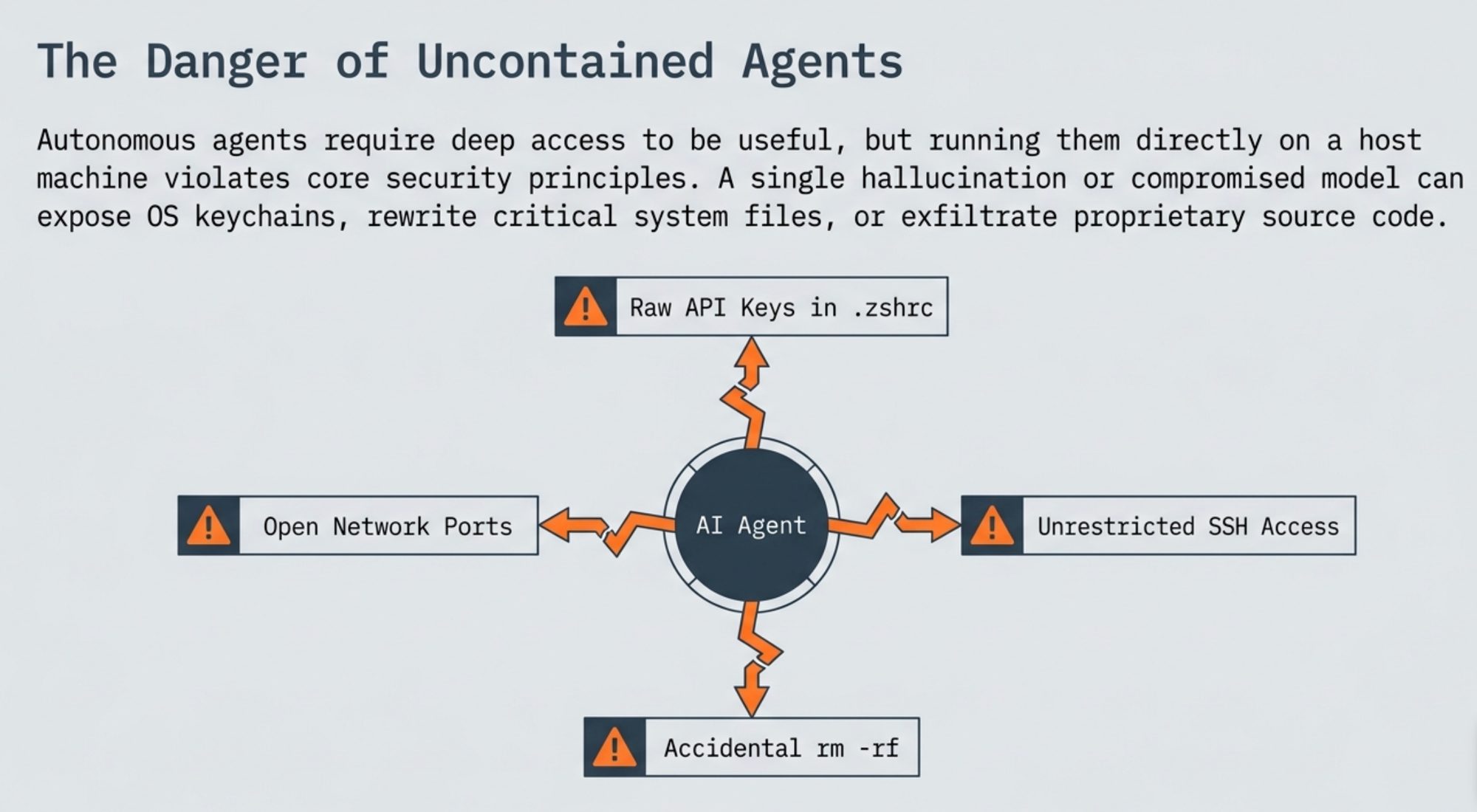
Why microVM
Standard containers share the host kernel. For an agent that runs arbitrary commands and edits arbitrary files, you want a stronger boundary.
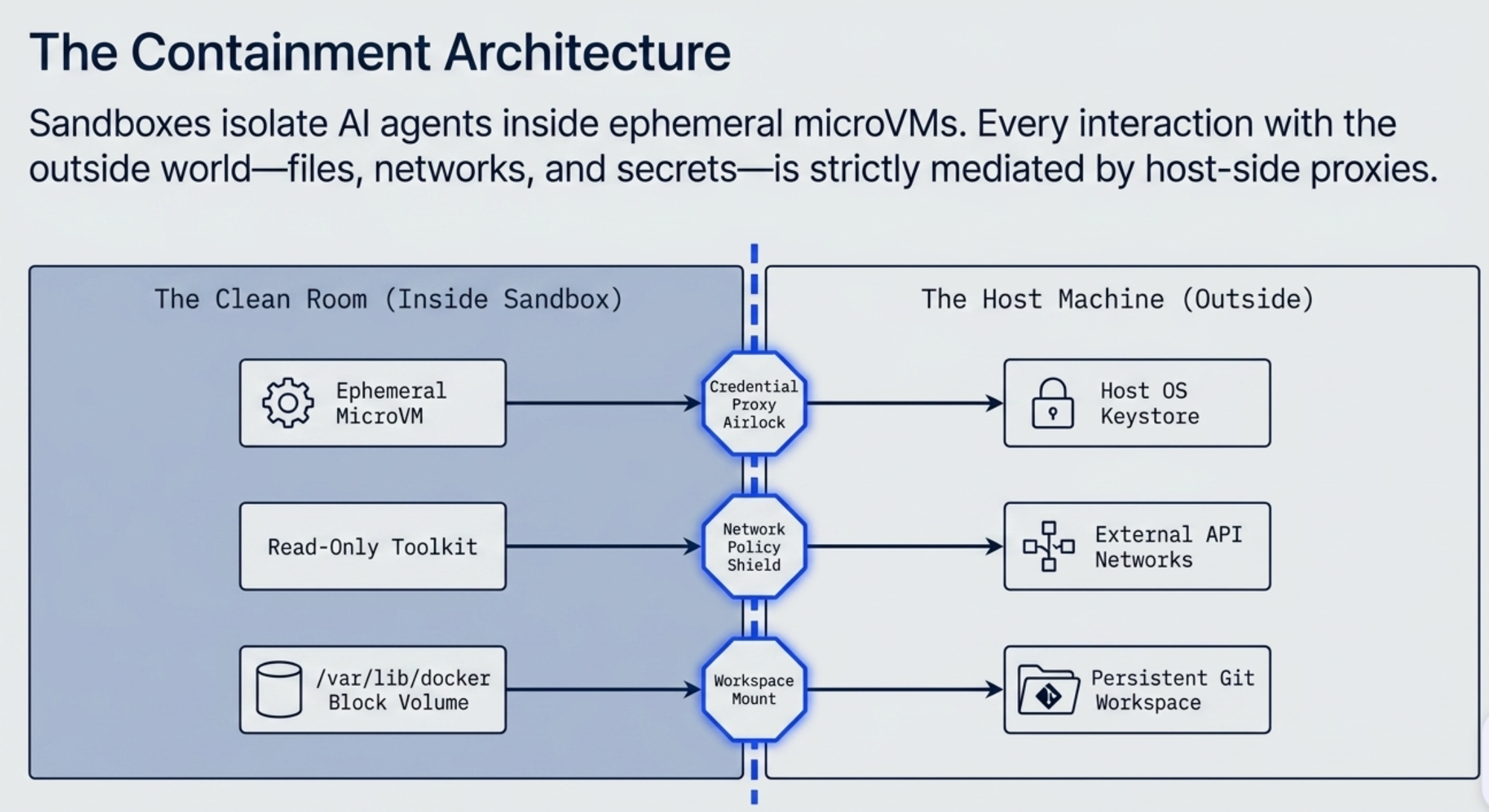
Docker Sandboxes wrap the agent in a microVM. Real virtualization between the agent and your machine. Credentials never sit on the agent's filesystem. The only thing mounted in is the workspace you choose.
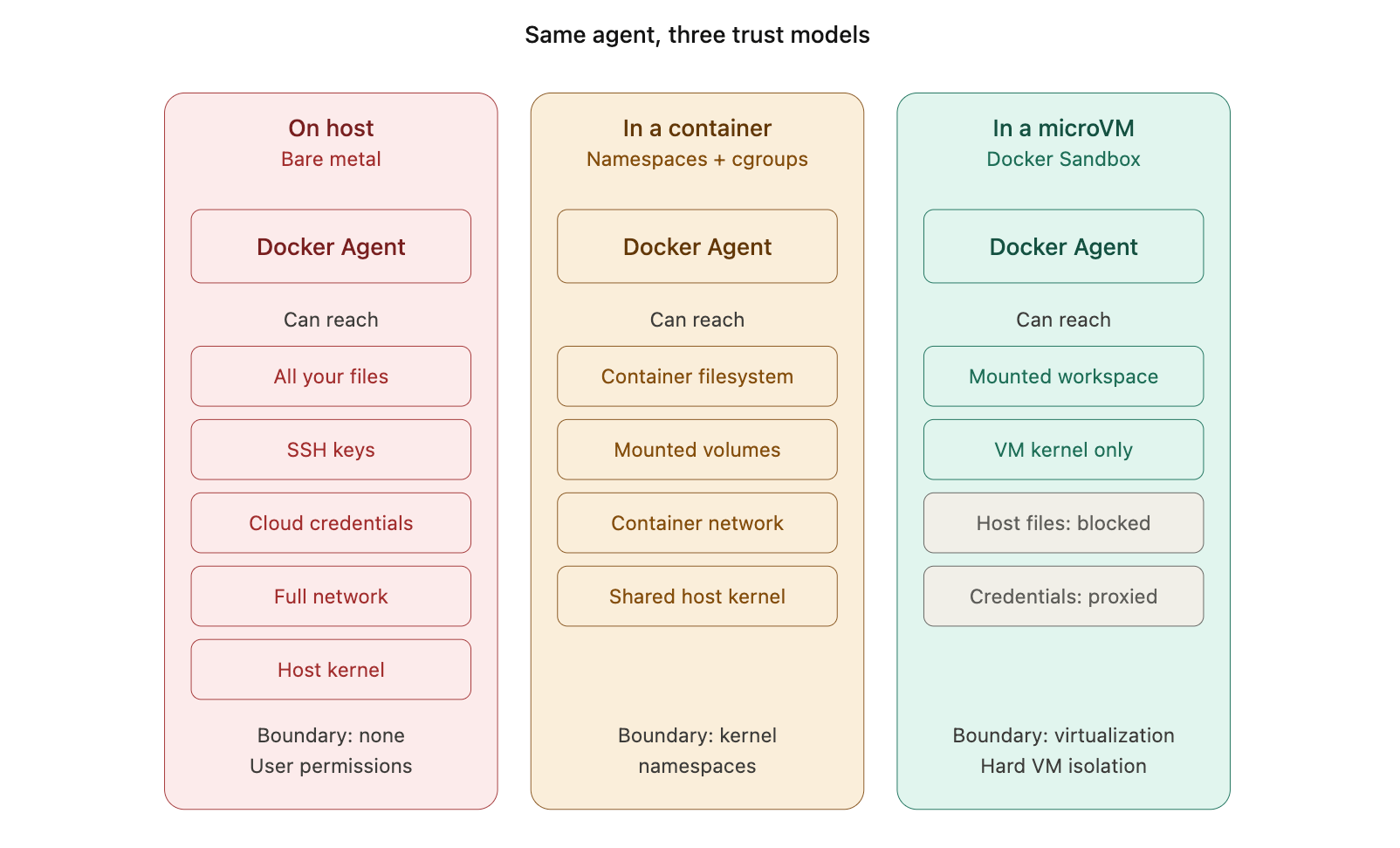
The third panel is what you get with one sbx command.
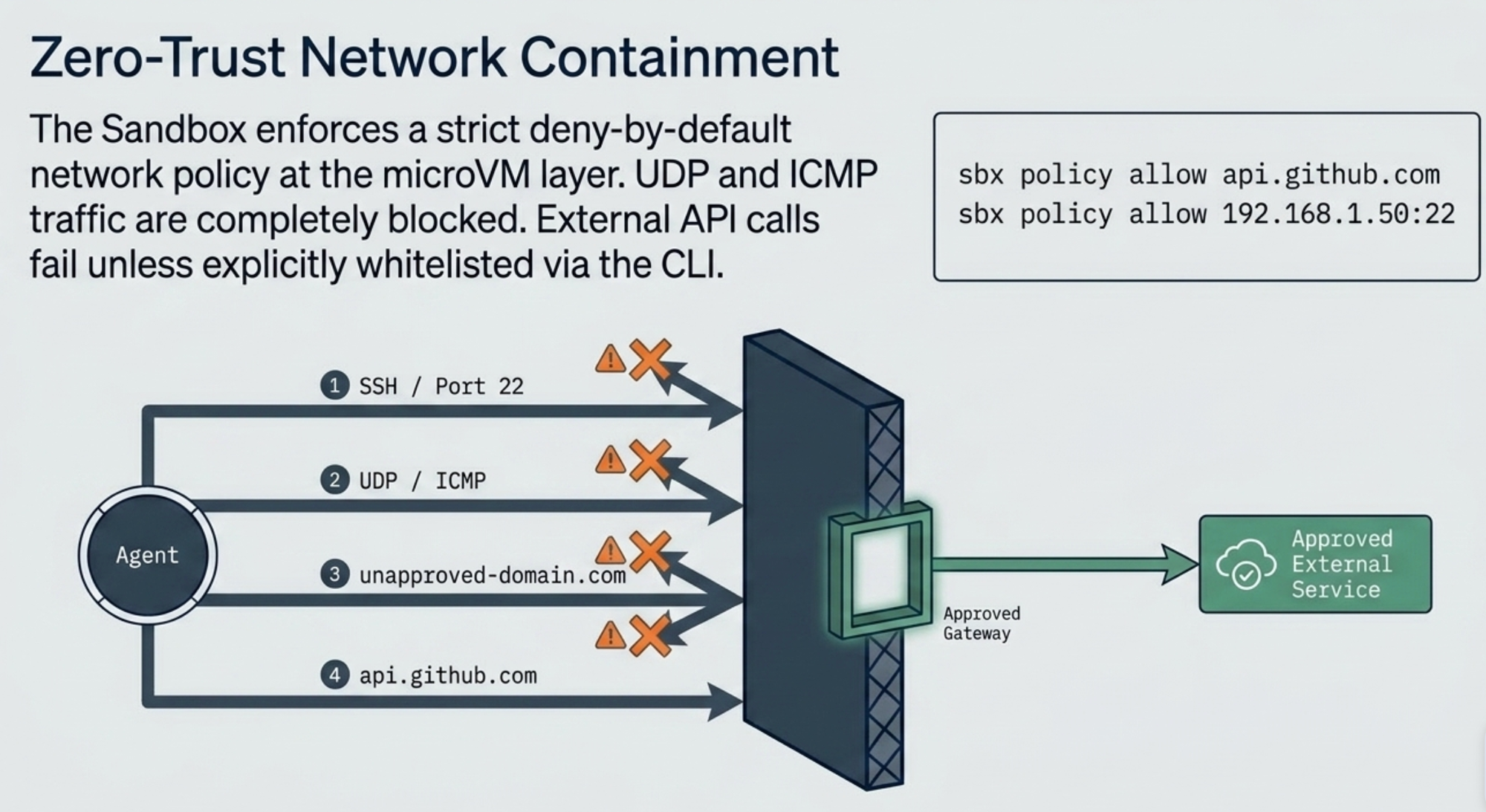
What You Need
- sbx CLI installed - No Docker Desktop required
- An API key for your chosen model provider, stored with
sbx secret set.
Setting Up Credentials
Docker Sandboxes give you two ways to hand your model keys to the proxy. Stored secrets are the recommended one. They live in your OS keychain, encrypted at rest, and the host proxy reads them when a sandbox starts. The key never enters the VM.
Store each provider key once:
$ sbx secret set -g openai
$ sbx secret set -g anthropic
Each command prompts for the value and writes it to the keychain. The -g flag makes the secret global, so every sandbox you create can resolve it. For scripted setup, pipe the value over stdin instead of typing it:
$ echo "$OPENAI_API_KEY" | sbx secret set -g openaiDocker Agent is multi-provider, and that matters here. When one agent in your YAML calls openai/gpt-5-mini and another calls anthropic/claude-sonnet-4-5, the proxy selects the right credential per request based on the API endpoint being hit. You store both keys and wire nothing else up.
Confirm what landed:
$ sbx secret ls
SCOPE      SERVICE     SECRET
(global)   openai      sk-proj-****...****
(global)   anthropic   sk-ant-****...****
When the sandbox starts, it reports the services it resolved:
Using stored credentials for services: openai, anthropicTwo operational notes:
→ A global secret (-g) is read at sandbox creation. Rotate a key while a sandbox is running and you recreate the sandbox to pick up the new value. A sandbox-scoped secret, sbx secret set <sandbox-name> <service>, takes effect immediately.
→ sbx reset deletes stored secrets along with all sandbox state, so you re-add them after a reset.
How the Secret Gets Consumed
Storing the key is half the picture. The other half is what happens the moment the agent makes a call, and this is where the isolation actually pays off. Nothing inside the VM ever holds your real key. The request-time flow:
→ The agent inside the microVM makes an outbound call to a model endpoint, say api.openai.com.
→ The host proxy intercepts it, matches the destination domain to the openai service, and writes the auth header from the stored secret.
→ The forwarded request carries the real key out to the provider. The agent only ever saw a placeholder.
That Using stored credentials for services: openai line you saw at startup is the proxy telling you which keys it resolved and is ready to inject. You can verify each step rather than take it on trust.
1. Confirm the key is stored before you run.
$ sbx secret ls
SCOPE      SERVICE   SECRET
(global)   openai    sk-proj-****...****
If the service you expect isn't listed, the proxy has nothing to inject and your model calls will fail with a 401 the moment the agent tries to think.
2. Confirm the real key never entered the VM. Exec into the running sandbox and read the environment the agent process sees:
$ sbx exec docker-agent-my-project -- bash -c 'printenv OPENAI_API_KEY'You get back a placeholder, not your key. (Built-in agents that validate the variable at boot see a sentinel like proxy-managed; the proxy swaps in the real value on the way out regardless.) The point is what you don't see: an agent that reads its own environment, or a prompt-injected command that tries to exfiltrate the key, comes up with nothing usable.
3. Watch the injection happen. The policy log shows every outbound request the proxy saw, the rule it matched, and how it handled it:
$ sbx policy logFind the request to your model endpoint and check its PROXY value. A forwarded model call is the proxy confirming it matched the service and injected the header. This is also your first stop when something silently doesn't work: a blocked or unmatched model domain shows up here before it shows up as a confusing agent error.
The end-to-end proof is the simplest one. The agent gives you a real model response, and it did that without ever holding the credential that made the response possible.
Running Docker Agent in a Sandbox
The simplest invocation:
$ sbx run docker-agent ~/my-project
If the workspace doesn't exist yet, sbx will offer to create it. Then it pulls the template image, sets up the microVM, and launches the agent's TUI:
Creating new sandbox 'docker-agent-my-project'...
Using stored credentials for services: openai
Status: Downloaded newer image for docker/sandbox-templates:docker-agent-docker
✓ Created sandbox 'docker-agent-my-project'
  Workspace: /Users/ajeetraina/my-project (direct mount)
  Agent: docker-agent

Starting docker-agent agent in sandbox 'docker-agent-my-project'...
Workspace: /Users/ajeetraina/my-project
The sandbox name is auto-generated by combining the template name and the workspace basename. The template image includes a Docker daemon inside the microVM, so the agent can build and run containers without touching your host daemon.
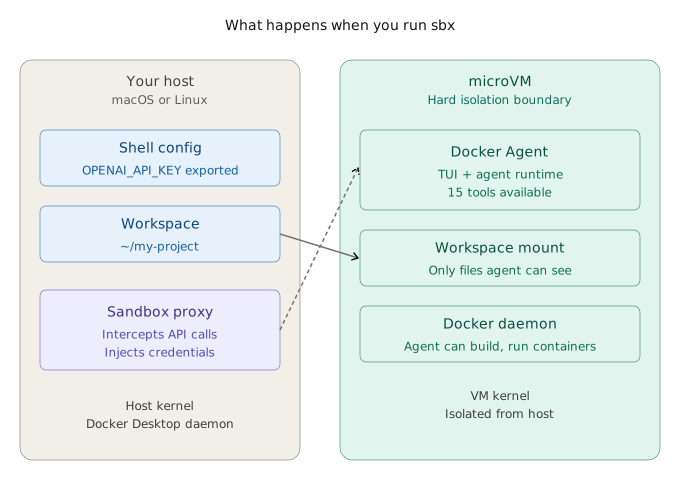
The workspace is mounted directly into the VM. API keys live on the host and never cross the boundary; the proxy injects them into outbound calls at request time.
On subsequent runs, reconnect with:
$ sbx run docker-agent-my-project
The TUI
When the agent launches, you get a split-pane terminal UI. Left pane is the conversation, right pane is a session sidebar showing workspace path, token usage, the active agent, and tool count.
The default agent ships ready to use with 15 tools available out of the box.
Hotkeys are shown along the bottom: Ctrl+c to quit, Tab to switch focus, Ctrl+t/Ctrl+w for new/close tab, Ctrl+p/Ctrl+n for prev/next tab.
Choosing Your Model
To use a specific model, pass --model after a -- separator:
$ sbx run docker-agent-my-project -- --yolo --model openai/gpt-5-mini
The provider prefix is explicit: openai/, anthropic/, google/, or dmr/ for local models through Docker Model Runner. The sidebar will reflect the active provider and model:
Agent
▶ root
  A helpful AI assistant
  Provider: openai
  Model: gpt-5-mini
You can also bring your own YAML. Drop an agent.yaml in your workspace and pass it through:
$ sbx run docker-agent-my-project -- agent.yaml --yolo
This is how you run the multi-agent debugger team from earlier. The YAML lives in the workspace mount, so the agent inside the microVM picks it up directly.
A Practical Workflow
Putting it all together:
# One-time setup in ~/.zshrc
export OPENAI_API_KEY=sk-proj-...

# After editing the shell config, restart Docker Desktop once.

# Create and connect
$ sbx run docker-agent ~/my-project -- --yolo --model openai/gpt-5-mini
When you are done, the conversation persists with the sandbox. To wipe it and start fresh:
$ sbx rm docker-agent-my-project
Sandbox CLI Reference
| Command | What it does |
|---|---|
sbx run <template> <workspace> |
Create a new sandbox and connect to it |
sbx run <sandbox-name> |
Reconnect to an existing sandbox |
sbx run <sandbox-name> -- <flags> |
Pass flags directly to the agent CLI |
sbx exec <sandbox-name> -- <cmd> |
Run a command in the sandbox without launching the agent |
sbx ls |
List existing sandboxes |
sbx rm <sandbox-name> |
Tear down a sandbox |
Where to Go From Here
A few directions worth exploring:
- Write your own agent team in YAML and run it inside a sandbox
- Build custom sandbox templates with extra tools baked in
- Wire the agent up to an MCP server through the MCP Gateway so it can reach external tools without credentials living in the VM
- Package agent configs as OCI artifacts with
docker agent pushand pull them down on another machine to run inside a sandbox there
The combination of "I can define a team of agents in YAML" with "I can run that team inside a hard isolation boundary with one command" is what turns experimental agent work into something you can leave running.
References
- Docker Agent sandbox docs: https://docs.docker.com/ai/sandboxes/agents/docker-agent/
- Docker Agent overview: https://docs.docker.com/ai/docker-agent/
- Docker Agent CLI reference: https://docs.docker.com/ai/docker-agent/reference/cli/
- Custom sandbox templates: https://docs.docker.com/ai/sandboxes/templates/
- Docker Agent on GitHub: https://github.com/docker/docker-agent