I Tried to Run NVIDIA NemoClaw Inside Docker Sandboxes. It Got Seven Layers Deep Before Hitting a Wall.
I tried running NVIDIA NemoClaw inside Docker Sandboxes to see what happens when you stack two isolation systems. It got seven layers deep before hitting a wall at /dev/kmsg

I've been spending a lot of time with Docker Sandboxes lately ~ writing labspaces, validating the CLI, poking at its edges. And I've also been poking at NVIDIA's NemoClaw on Apple Silicon, to the point where one of the community members filed issue #260 and cited my blog as the reference walkthrough for Mac.
So at some point the obvious question showed up: what happens if I run NemoClaw inside Docker Sandboxes?
Two isolation systems, stacked. One microVM-based, one container-based. Both designed by people who care about agent safety. I figured either it would just work, or it would break in an interesting way. Either answer seemed worth a few hours on a Thursday morning.
It broke in an interesting way. This post is about where it broke and why.
Why I wanted to try this
A quick bit of context in case you're coming in cold.
Docker Sandboxes (the docker sandbox CLI on Mac, sbx on Linux ~ same binary underneath) creates microVM-isolated environments for AI agents. On my M-series Mac it uses Apple's Virtualization.framework to spin up a Linux guest, and your agent runs inside that. The threat model is: even if an agent goes rogue, it can't touch your host.
NVIDIA NemoClaw is a different take on the same problem. It installs NVIDIA OpenShell — a container-based sandbox using Landlock, seccomp, and network namespaces — and runs an OpenClaw agent inside it. The isolation happens at the container layer, not below it. There's also a k3s gateway that coordinates things, which turns out to matter a lot.
Both products are solving "how do I run an AI agent without letting it eat my laptop." They just solve it at different layers of the stack.
Running NemoClaw inside Docker Sandboxes means stacking them. The microVM becomes the outer wall; OpenShell becomes the inner one. In theory that's belt-and-suspenders. In practice, well, keep reading.
Setting up
I started with a clean directory on my Mac and the latest sbx build:
mkdir -p ~/nemoclaw-sbx-spike
cd ~/nemoclaw-sbx-spike
sbx diagnose
Diagnose came back all green. Seven checks passed, daemon healthy at v0.27.0.
Before creating the sandbox, I needed to make sure NemoClaw could reach NVIDIA's API endpoints from inside. Docker Sandboxes ships with a sensible default policy it calls balanced — GitHub, npm, Docker Hub, Ubuntu archives, the major AI providers — all allowlisted on port 443. That covers most of what NemoClaw's installer needs.
But NVIDIA's API endpoints weren't in the defaults. I added them explicitly:
sbx policy allow network integrate.api.nvidia.com:443
sbx policy allow network api.nvidia.com:443
sbx policy allow network build.nvidia.com:443
sbx policy allow network www.nvidia.com:443
(www.nvidia.com is where the NemoClaw install script lives. Not obvious until you read the README.)
Then I created the sandbox:
sbx create --name nemoclaw-spike shell .
shell is the generic agent type — no pre-configured agent, just a Linux environment with Node, Docker, and the usual dev tooling. It pulled the docker/sandbox-templates:shell-docker image, which is about 400MB of compressed layers. The "-docker" suffix is the tell: this template ships with dockerd running inside the sandbox, which is what NemoClaw needs.
A few seconds later:
✓ Created sandbox 'nemoclaw-spike'
  Workspace: /Users/ajeetraina/nemoclaw-sbx-spike (direct mount)
  Agent: shell
I shelled in:
sbx exec -it nemoclaw-spike bash
And got this on the first line inside:
INFO: Starting Docker daemon
agent@nemoclaw-spike:workspace$
That's the bit that made me optimistic. dockerd was starting up inside the sandbox — a full Docker engine running inside a microVM running on my Mac. Not a socket passthrough, not a proxy. Actually separate dockerd with its own storage on /dev/vdc. If NemoClaw needed Docker, it had Docker. Nested, but real.
A quick egress sanity check inside the sandbox:
curl -s -o /dev/null -w "%{http_code}\n" https://integrate.api.nvidia.com/
# 404 — reached NVIDIA, wrong path, expected

curl -s -o /dev/null -w "%{http_code}\n" https://github.com/
# 200 — obviously fine

curl -s -o /dev/null -w "%{http_code}\n" https://example.com/
# 403 — blocked by sbx's egress proxy, exactly what I wanted
That last one's the money shot. example.com isn't on the allowlist, so Docker Sandboxes' egress proxy returns 403 without the request ever reaching the internet. The isolation is real and observable.
Installing NemoClaw
NemoClaw's install is a curl-to-bash. NVIDIA's docs warn it needs Node 22+, but the shell sandbox ships with Node 20. I figured the installer would handle the upgrade via nvm, which the README confirms.
First attempt:
curl -fsSL https://www.nvidia.com/nemoclaw.sh | bash
It got through the banner (there's a big ASCII-art NemoClaw logo, I'll spare you), detected Node 20, and started installing nvm. Then it fell over:
nvm is not compatible with the "NPM_CONFIG_PREFIX" environment variable:
currently set to "/usr/local/share/npm-global"
Run `unset NPM_CONFIG_PREFIX` to unset it.
Turns out the shell-docker sandbox image pre-sets NPM_CONFIG_PREFIX to a system-wide global directory. That's a reasonable default for an isolated environment. nvm refuses to coexist with it.
Easy fix:
unset NPM_CONFIG_PREFIX
Second attempt got further — all the way through Node 22 install, NemoClaw CLI build, and into onboarding — and then cancelled itself politely because I'd piped the installer through tee and stdin wasn't available for the license prompt. Third attempt, using script to preserve the TTY:
curl -fsSL https://www.nvidia.com/nemoclaw.sh -o /tmp/nemoclaw-install.sh
chmod +x /tmp/nemoclaw-install.sh
script -q -c "/tmp/nemoclaw-install.sh" -a ~/nemoclaw-install.log
Third time lucky. The installer skipped the already-done steps and got into onboarding.
A few things it detected:
- Docker is running ✓ (the inner dockerd)
- No GPU detected — will use cloud inference (good, that's the path I wanted)
- Low memory detected: 8068 MB RAM, 0 MB swap — offered to create a 4GB swap file
I accepted the swap offer. Status 255. dd couldn't create the swap file — the microVM guest doesn't allow creating swap-backed block devices in the filesystem it's given. Reasonable. The installer warned me about potential OOM during the sandbox build and continued anyway.
Then it started pulling OpenShell.
Starting the OpenShell gateway
[2/8] Starting OpenShell gateway
  ──────────────────────────────────────────────────
  Using pinned OpenShell gateway image: ghcr.io/nvidia/openshell/cluster:0.0.29
  Starting gateway cluster...
  Still starting gateway cluster... (5s elapsed)
  Still starting gateway cluster... (10s elapsed)
The image pulled fine. ghcr.io is in the Docker Sandboxes default allowlist, no surprises there. And then the counter started.
  Still starting gateway cluster... (30s elapsed)
  Still starting gateway cluster... (60s elapsed)
  Still starting gateway cluster... (90s elapsed)
At 60 seconds I was still optimistic. The OpenShell gateway cluster is a non-trivial piece of software — k3s underneath, a bunch of init containers, a whole control plane coming up. I've watched slower things start on less-constrained hosts.
At 180 seconds I started checking docker ps in another shell to see what was happening.
  Still starting gateway cluster... (300s elapsed)
  Still starting gateway cluster... (330s elapsed)
  Still starting gateway cluster... (380s elapsed)
  Gateway start returned before healthy
Six and a half minutes of Still starting gateway cluster... before the installer gave up and dumped a diagnostic. The error it printed was helpful in a superficial way — "Gateway failed: nemoclaw", "Try destroying and recreating" — but the actual cause was buried in the container logs a few screens down.
The wall
Here's the line that matters, from the kubelet inside the gateway container:
Error: failed to run Kubelet: failed to create kubelet:
open /dev/kmsg: no such file or directory
/dev/kmsg is the kernel log device. It's how kubelet reads kernel messages — oom-kills, device events, the things it needs to monitor node health. Every normal Linux system has it. It's one of those devices you've never thought about because it's always been there.
Except it wasn't there. k3s crashlooped, the gateway never became healthy, the Still starting... counter kept ticking until the outer installer timed out.
I dropped back to the sandbox shell and checked directly:
agent@nemoclaw-spike:workspace$ ls -la /dev/kmsg
ls: cannot access '/dev/kmsg': No such file or directory
One command. One result. The entire expedition's outcome, in one line.
Why this happens
Once I saw that, the whole failure made sense.
/dev/kmsg isn't just missing from the inner container. It's missing from the sbx microVM itself. The guest kernel exists, the log stream exists, but the /dev/kmsg device node that would expose that stream to userspace — and therefore to anything running inside containers within the VM — isn't created.
And that's not a bug. It's the right call.
/dev/kmsg exposes the kernel's message buffer. On a multi-tenant or untrusted system, that buffer is a significant information leak — you can read what other processes in the kernel are doing, you can see device events, you can observe OOM kills on containers you don't own. Docker Sandboxes' threat model assumes the agent running inside is untrusted. Exposing kmsg to untrusted workloads would undercut the whole point.
Meanwhile, NemoClaw's OpenShell gateway assumes a standard Linux host where kmsg is there by default. That's also the right call. It's 2026. Kmsg has been there since forever. k3s needs it because k3s is a production Kubernetes distribution and kubelet has always had kmsg on every machine it's ever run on.
Both teams made correct decisions. The decisions are just mutually incompatible at exactly this seam.
This is the kind of failure that only shows up when you try to compose two isolation systems that were each designed in isolation. Individually, sbx works. Individually, NemoClaw works. Nested, they meet at /dev/kmsg and neither gives an inch.
Counting the layers
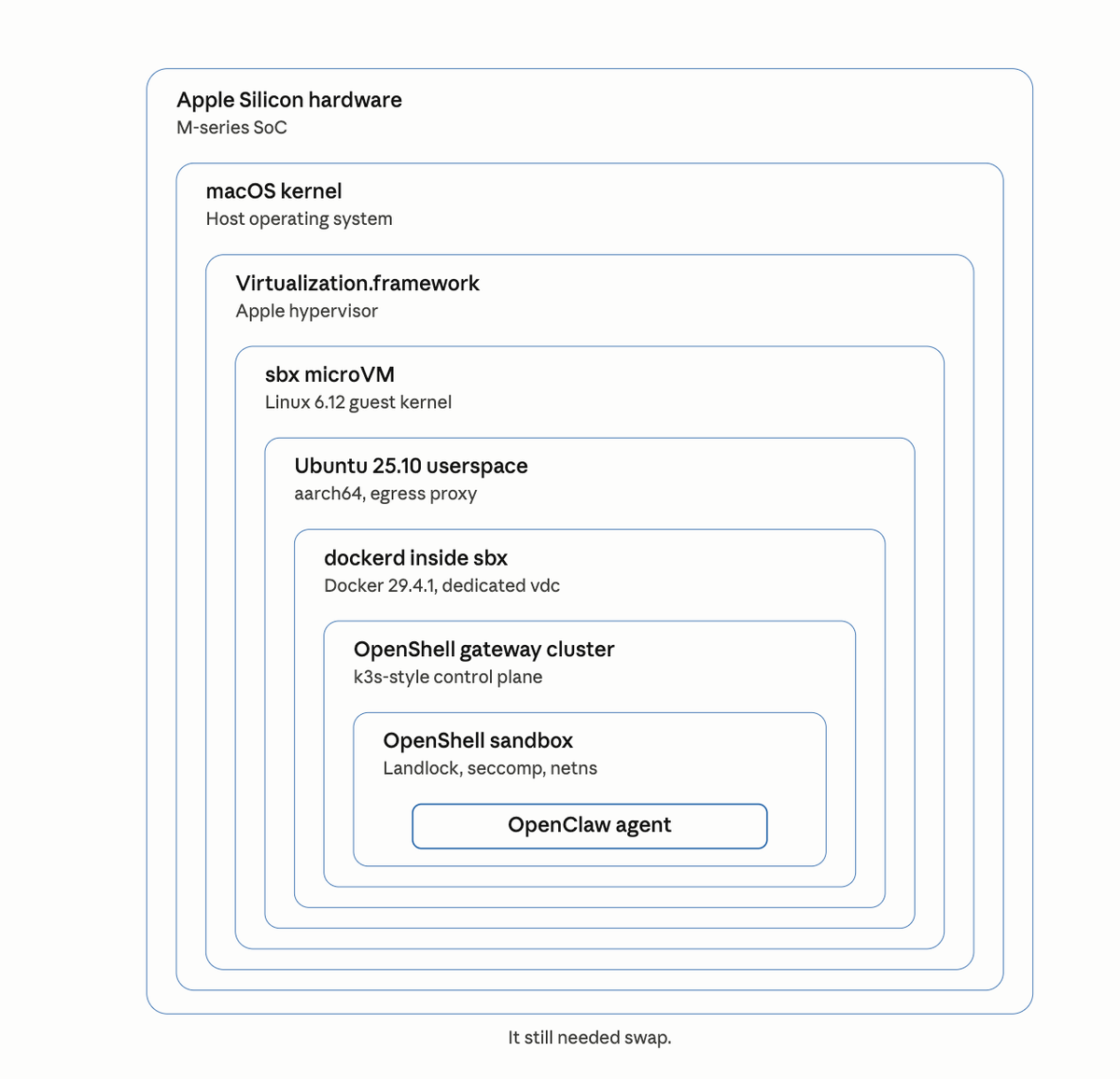
Here's the stack I'd built by the time it failed:
- Apple Silicon hardware (M-series SoC)
- macOS kernel
- Apple Virtualization.framework (the hypervisor)
- Docker Sandboxes microVM (Linux 6.12 guest)
- Ubuntu 25.10 userspace inside the microVM
- dockerd running inside Ubuntu
- The OpenShell gateway container — which wanted to be home to k3s, which would have hosted the OpenShell sandbox, which would have run OpenClaw
That's seven layers before the stack gave up. If the gateway had come up, there would have been three more below it — the k3s pod network, the inner OpenShell sandbox container, and the OpenClaw agent itself. Ten layers of isolation for one AI agent.
And it still wanted 4 GB of swap.
I drew the full stack because I wanted to see it. Each layer is doing a real job — hardware isolation from macOS, kernel isolation from hardware, VM isolation from kernel, container isolation from VM, namespace isolation from container, agent isolation from namespace. None of them are redundant. Each layer has a different threat model and is defending against a different adversary.
But ten layers is also a tell. When the minimum viable stack for "run one AI agent safely" is this tall, the industry is saying something uncomfortable. We're building nested containment systems for software we wrote ourselves because we don't fully trust what it'll do. That's new.
What I'd try differently
If you're curious about the same question, a few things I'd change next time.
Use NemoClaw's cloud-only mode if it exists. OpenShell's gateway seems to be the component that drags in k3s, and k3s is what triggered the kmsg dependency. If NemoClaw had a lighter-weight "just run the agent against cloud NIM, no local control plane" path, it'd likely sail right through. Worth checking the nemoclaw onboard --help flags before trying again.
Try a simpler agent stack first. Oleg Selajev's NanoClaw — completely unrelated to NemoClaw despite the name, it's a WhatsApp-assistant pattern — runs cleanly inside Docker Sandboxes. There's a whole Docker blog post walking through it. That's the demonstration of what works. What I did is the demonstration of where the edges are.
File a compatibility note, not a bug. I'm not convinced either project should change here. NemoClaw's k3s dependency is load-bearing for features I'm not using. Docker Sandboxes' kmsg-less environment is load-bearing for its security posture. The right output is documentation — a note in NemoClaw issue #260 saying "tested inside Docker Sandboxes, blocked on kmsg, likely needs cloud-only mode" — so the next person who tries this saves themselves six and a half minutes of watching a counter.
Final thought
I went into this expecting a clean yes or no. I got something more useful.
The reason nested isolation is an interesting problem in 2026 is that we're past the point where any one team can solve agent safety alone. There's Docker Sandboxes. There's NVIDIA OpenShell. There's whatever Anthropic ships around Claude Code, whatever Google ships around Gemini CLI, whatever shows up next quarter. Each one makes different assumptions about the substrate below it and different promises about the workload above it. Each one is correct for its own slice of the stack.
The compatibility layer between them doesn't exist yet. That's the work.
For now, if you want to run a single-process agent safely on your Mac, Docker Sandboxes does that really well. If you want to run a k3s-backed agent control plane, use a proper Linux host. If you want to run one inside the other, read this post first.