Running Open-Source Models and Docker Sandboxes: Agent in a microVM, Model on the Host, Zero Cloud Dependency
I've been deep in Docker sbx + Docker Model Runner for the past week. The combination is quietly the first real open-source implementation of "agent in a microVM, model on the host, zero cloud." Full walkthrough ~ 8 steps, every command tested on my Mac.

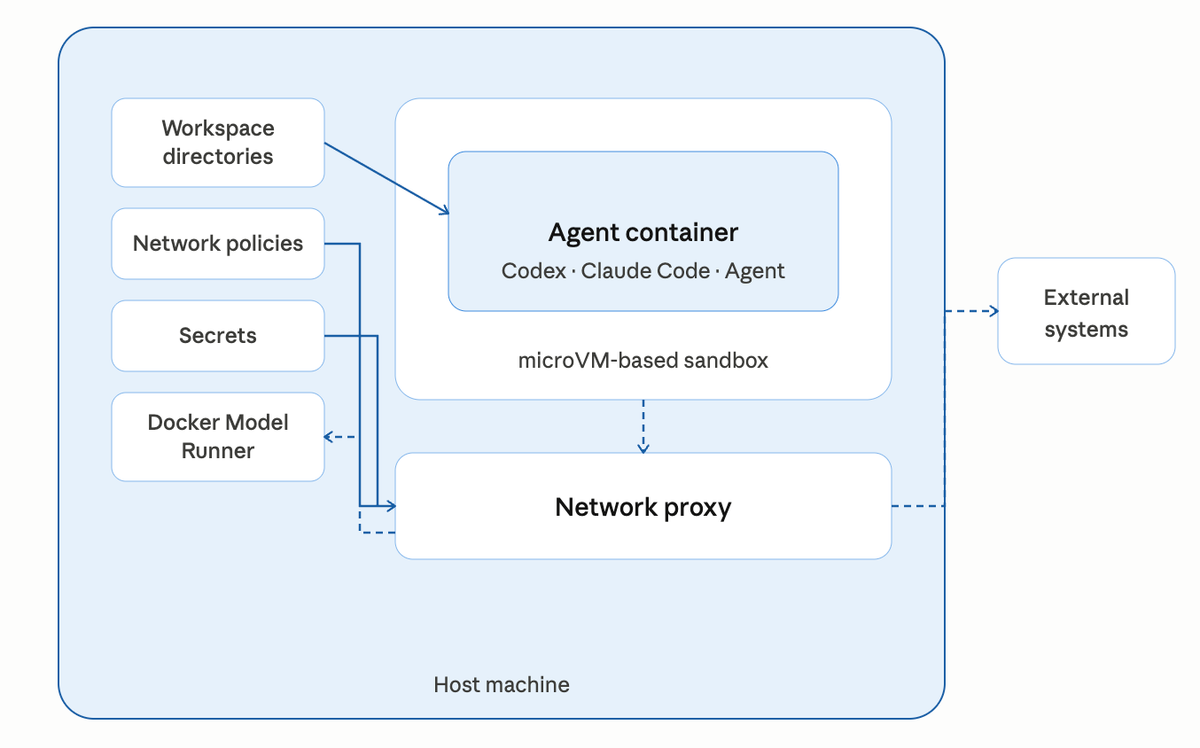
If you've been following the Docker Sandboxes (sbx) story, you already know the pitch: run your coding agent inside a microVM ~ powered by Docker's own purpose-built VMM that runs natively on Apple's Hypervisor.framework, Windows Hypervisor Platform, and Linux KVM governed by explicit network policy, with a full audit trail of every outbound call.
 Srini Sekaran
Until now, most of those outbound calls have gone to cloud LLM providers ~ Anthropic, OpenAI, Google. That's fine for most workflows, but it leaves a gap for anyone who needs to run agents offline, on air-gapped networks, or without sending a single token to a third party.
This post closes that gap.
The architecture is deceptively simple: the agent runs inside the sbx microVM, Docker Model Runner (DMR) runs on your Mac host at localhost:12434, and a single OpenAI-compatible HTTP endpoint crosses the VM boundary. No API keys. No egress. No cloud dependency. Same sandbox isolation, same network policy, same audit log you already get with cloud-backed agents.
Let's walk through the setup end-to-end.
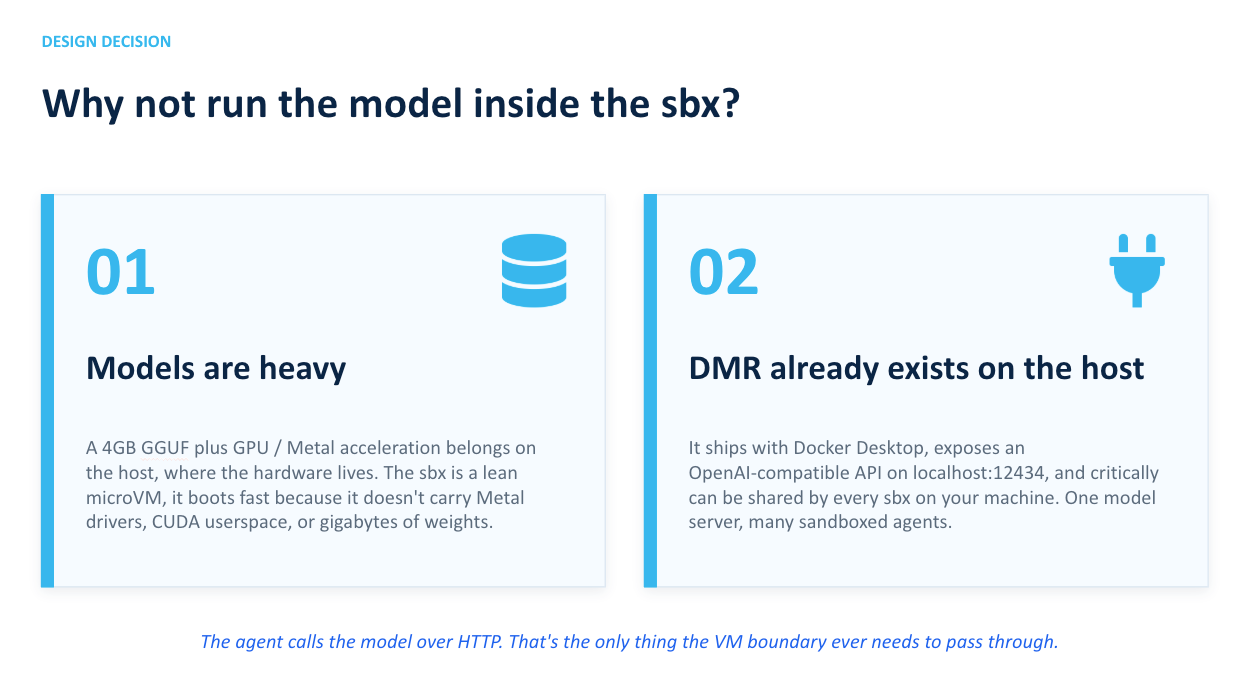
Why not just run the model inside the sbx?
Two reasons, both practical:
- Models are heavy. A 4GB GGUF file plus GPU/Metal acceleration belongs on the host where the hardware lives. The sbx is intentionally a lean microVM ~ it boots fast because it doesn't haul around Metal drivers, CUDA userspace, or gigabytes of model weights.
- DMR already exists on the host. It's shipped with Docker Desktop, exposes an OpenAI-compatible API on
localhost:12434, and critically ~ can be shared by every sbx on your machine. One model server, many sandboxed agents.
The agent calls the model over HTTP. That's the only thing the VM boundary ever needs to pass through. Everything else ~ filesystem, secrets, SSH keys, AWS credentials stays firmly on the host side of the microVM wall.
Step 1: Confirm DMR is running on the host
Assuming that you already have Docker Desktop installed on your Mac system.On your Mac, check that Model Runner is alive and has models loaded:
docker model ls
curl -s http://localhost:12434/engines/llama.cpp/v1/models | head -20
If docker model ls comes back empty, pull a small model first. smollm2 is ~360MB and loads almost instantly ~ perfect for connectivity testing:
docker model pull ai/smollm2:360M-Q4_K_M
For a realistic coding demo, pull something heavier:
docker model pull ai/qwen3:8B-Q4_K_M
Step 2: Create a fresh sbx
On the host:
mkdir -p /tmp/dmr-test && cd /tmp/dmr-test
sbx create --name dmr-test shell .
Using the shell agent here is deliberate ~ it drops you into a plain bash prompt inside the microVM with no AI agent attached. That's exactly what you want for testing connectivity before wiring up Codex or Claude Code.
Step 3: Allow DMR through the network policy
Before you attach to the sbx, add a local allow rule. The sbx proxy normalizes the target to localhost:12434 internally ~ even though you'll reach it from inside the VM via host.docker.internal:
sbx policy allow network localhost:12434
Verify the rule landed:
sbx policy ls | grep localhost
You should see one local allow entry for localhost:12434.
Whylocalhost:12434and nothost.docker.internal:12434? The sbx proxy strips the hostname and matches the destination port against policy aslocalhost:<port>. It's the same reason you'll usehost.docker.internalfor thecurlcall but allowlocalhostin the policy — a quirk of the proxy internals worth internalizing.
Step 4: Attach to the sbx
sbx run dmr-test
You'll land inside the VM:
agent@dmr-test:dmr-test$
Confirm you're actually inside a fresh Linux guest and not still on your Mac:
hostname
cat /etc/os-release | head -2
You'll see the sandbox name and a clean Ubuntu 25.10 image — not macOS.
Step 5: Reach DMR from inside the sbx
Three networking facts to internalize before you try to curl anything:
localhostinside the VM is the VM's own loopback — not your Mac.curl localhost:12434will return connection refused.host.docker.internaldoes resolve — it points at your Mac host via the sbx gateway. This is what you use.model-runner.docker.internaldoes not resolve inside sbx. Don't waste time on it.
Get the model list from inside the VM:
curl -s http://host.docker.internal:12434/engines/llama.cpp/v1/models | head -30
You'll see the same list you saw on the host in Step 1 — proof that the sbx proxy forwarded the request to DMR and the policy allow rule matched.
Step 6: Run inference across the boundary
Time for an actual completion:
curl -s http://host.docker.internal:12434/engines/llama.cpp/v1/chat/completions \
  -H "Content-Type: application/json" \
  -d '{
    "model": "ai/smollm2:360M-Q4_K_M",
    "messages": [{"role":"user","content":"Reply with exactly: sbx to DMR works"}],
    "max_tokens": 20
  }'
You'll get back a JSON response with the model's output in choices[0].message.content. That's a complete inference round-trip: agent environment inside the microVM, model executing on your Mac, OpenAI-compatible protocol between them.
Tip:smollm2at 360M is great for connectivity tests but too small for real code generation. For anything production-adjacent, useai/qwen3:8B-Q4_K_Mor a similarly-sized model.
Step 7: Python client using the OpenAI SDK
This is the pattern any real agent will use. Create test_local.py inside the sbx:
from openai import OpenAI

client = OpenAI(
    base_url="http://host.docker.internal:12434/engines/llama.cpp/v1",
    api_key="not-needed"
)

resp = client.chat.completions.create(
    model="ai/qwen3:8B-Q4_K_M",
    messages=[{
        "role": "user",
        "content": "Write a Python function that reads a CSV and counts rows."
    }]
)
print(resp.choices[0].message.content)
Install the SDK and run it:
pip install --break-system-packages openai
python3 test_local.py
The model generates Python code, entirely offline. No API key, no egress, no tokens billed anywhere.
Step 8: Run a coding agent against the local model
Now swap the shell agent for a real one. Both Codex and Claude Code respect the OPENAI_BASE_URL and OPENAI_API_KEY environment variables, so pointing them at DMR is effectively a one-liner.
First, tear down the shell sandbox:
sbx stop dmr-test
sbx rm dmr-test
Create a codex sandbox:
cd /tmp/dmr-test
sbx create --name dmr-codex codex .
Inside the sandbox, export the local-model env vars and invoke the agent:
export OPENAI_BASE_URL=http://host.docker.internal:12434/engines/llama.cpp/v1
export OPENAI_API_KEY=not-needed
codex "write a Python script that prints the first 10 Fibonacci numbers"
Take a second to appreciate what's actually happening here. The agent is running inside the microVM. The model is running on your Mac. The only thing crossing the boundary is OpenAI-compatible JSON over HTTP. No cloud. No secrets leaving the host. No tokens billed. No third-party LLM provider in the trust chain.
Watch the policy log during the run
In a separate host terminal:
sbx policy log dmr-codex
Every inference request shows up as an allowed localhost:12434 entry. That's your audit trail — concrete proof that the agent only talked to the local model and nothing else.
Want to verify the policy is actually enforced? Stop the sbx, flip the allow rule to a deny, restart, and watch the agent fail to reach the model. Network policy governs local traffic the same way it governs cloud traffic — that's the whole point.
Troubleshooting
curl localhost:12434 returns connection refused inside sbx. Expected. localhost is the VM's own loopback. Use host.docker.internal.
curl host.docker.internal:12434 returns Blocked by network policy. You didn't add the allow rule. Run sbx policy allow network localhost:12434 on the host and restart the sbx.
curl model-runner.docker.internal returns no such host. That DNS name doesn't resolve inside sbx. Only host.docker.internal does.
Agent reaches DMR but inference returns 404 or garbled output. Check the exact model ID with docker model ls on the host. Names with quantization tags like ai/smollm2:360M-Q4_K_M must be passed verbatim in the request body.
Why this pattern matters
Pull the architecture back and the story writes itself:
- Agent is fully isolated. microVM boundary, not a container-escape risk surface.
- Model runs locally. No cloud API costs, no third-party LLM exposure, no token limits, no rate-limit surprises.
- Secrets never leave the host. Your Mac keeps its API keys and SSH credentials. The sbx never sees them.
- Network is governed. Even
localhost:12434requires an explicit allow rule. Every request is logged. - Works air-gapped. Regulated environments — healthcare, finance, defense — can run this pattern on air-gapped networks with zero cloud dependency.
That's the "agent in a microVM, model on the host, zero cloud dependency" architecture in full. sbx + DMR is the first real open-source implementation of it that you can run on a laptop today.
✅ Checkpoint
Before moving on, confirm you can:
- Reach DMR from inside the sbx via
host.docker.internal:12434 - Run a chat completion against a local model
- Point a Python OpenAI SDK client at the local endpoint
- Point a coding agent (codex) at the local model via
OPENAI_BASE_URL - Watch the connections land in
sbx policy log
If all five boxes are ticked, you've got the full pattern working. Next up: the governance summary — the complete architecture pulled together with policy, audit, and multi-tenant isolation.