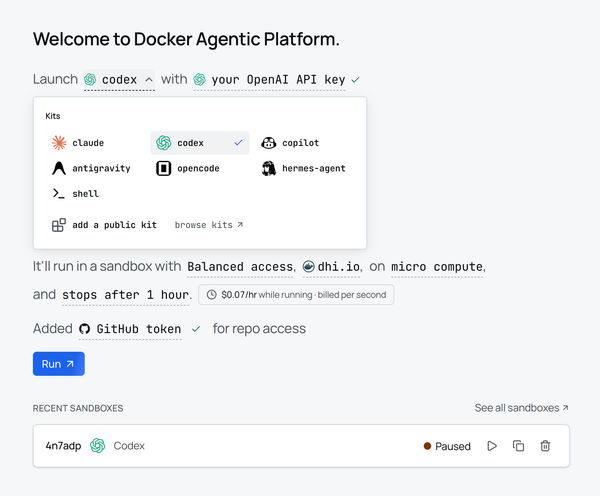
What's New in Docker Sandboxes (sbx) 0.35.0
Everything you want to know about the latest Docker sbx 0.35.0

Docker Sandboxes (sbx) runs AI coding agents inside isolated microVMs each
agent gets its own Docker daemon, filesystem, and network, so it can build
images, install packages, and rewrite files without ever touching your host.
Version 0.35.0 (released July 10, 2026) is a substantial release: it revamps the
policy tooling, teaches the proxy to chain through a SOCKS5 upstream, adds a
first-class secret import flow, makes sbx kit add recreate the sandbox cleanly,
and ships a proper sbx daemon command family.
Let's demystify each of these new features one by one.
Upgrade to 0.35.0
On macOS, upgrade through Homebrew and confirm the version:
$ brew upgrade docker/tap/sbx
docker/tap/sbx 0.34.0 -> 0.35.0
...
🍺  sbx was successfully upgraded!

$ sbx version
sbx version: v0.35.0 01e0152...
On Windows use winget upgrade Docker.sbx; on Ubuntu, sudo apt-get update && sudo apt-get install --only-upgrade docker-sbx.
The new sbx daemon command
Everything sbx does runs against a background daemon, sandboxd. Before
0.35.0 that daemon was mostly invisible. Now it has its own command group:
$ sbx daemon --help
Manage sandboxd daemon

Available Commands:
  log-level   Inspect or change sandboxd's per-category log levels
  start       Start the sandboxd daemon
  stop        Stop the sandboxd daemon
  status      Check sandboxd daemon status
Start it and check status:
$ sbx daemon start
Starting daemon at .../sandboxd.sock (Ctrl+C to stop)...

$ sbx daemon status
Status: running
Socket: .../sandboxd/sandboxd.sock
Logs:   .../sandboxd/daemon.log
When something misbehaves, you can raise the log level of a single category
without restarting anything. The categories are proxy, general, and all:
$ sbx daemon log-level
general info
proxy   info

$ sbx daemon log-level set proxy debug
proxy   debug
That proxy debug toggle is exactly what you want when you are debugging the
networking changes covered later in this post.
Policy tooling, rebuilt
The headline of 0.35.0 is the policy tooling. Sandboxes are deny-by-default:
a sandboxed process can only reach hosts and paths that policy explicitly
allows. Until now, understanding why a request was allowed or denied meant
squinting at logs. Three commands change that.
sbx policy ls ~ a readable overview
sbx policy ls now prints one row per policy, with its source, scope, and a
decision summary. On a governed machine, the header shows who manages the
policy and when it last synced:
$ sbx policy ls
Governance: Managed by acme-corp | Sync: OK, last synced 19:37:04 | Hidden: 15 inactive rules.

POLICY                                SOURCE   APPLIES TO   SUMMARY
allowanthropic                        org      all          network: 5 allow
allowdocker                           org      all          network: 15 allow
allowvscode                           org      all          network: 5 allow
denypaste                             org      all          network: 3 deny
Labspace AI Governance - network      org      all          network: 8 allow, 3 deny
Labspace AI Governance - filesystem   org      all          filesystem write: 1 allow, 5 deny
...
New filters let you slice that list. Combine --source (local, org, orkit), --decision (allow or deny), and --type (network orfilesystem):
$ sbx policy ls --source org --decision deny
POLICY                                SOURCE   APPLIES TO   SUMMARY
deny-blocked-site                     org      all          network: 1 deny
denypaste                             org      all          network: 3 deny
Labspace AI Governance - network      org      all          network: 3 deny
Add --wide to expand every policy into its individual rules, with the exact
resources each one covers:
$ sbx policy ls --wide
SOURCE   APPLIES TO   POLICY/RULE                    TYPE               DECISION   RESOURCES
org      all          denypaste / Deny Slack chat    network            deny       hooks.slack.com
                                                                                    paste.ee
                                                                                    pastebin.com
org      all          allowanthropic / Allow AI ...  network            allow      api.anthropic.com:443
                                                                                    api.openai.com:443
                                                                                    ...
org      all          allowwork / allowwork          filesystem:write   allow      /Users/dev/work/**
sbx policy inspect ~ full detail on one policy
When you want everything about a single policy or rule, sbx policy inspect
takes a policy ID, policy name, rule ID, or rule name:
$ sbx policy inspect allowanthropic
Policy:      allowanthropic
Policy ID:   pol_06fa1waj241pgefktj4zbwph8909
Source:      org
Applies to:  all
Status:      active

Rules in this policy:
DECISION   RESOURCE                    TYPE      RULE                STATUS
allow      *.googleapis.com:443        network   Allow AI services   active
allow      api.anthropic.com:443       network   Allow AI services   active
allow      api.openai.com:443          network   Allow AI services   active
allow      platform.claude.com:443     network   Allow AI services   active
allow      statsig.anthropic.com:443   network   Allow AI services   active
sbx policy check network ~ test before you run
This is the one to reach for first. sbx policy check network evaluates a
request against the same daemon-side policy engine that enforces sandbox traffic
without launching a sandbox so you can answer "would this be allowed?" up
front.
An allowed host:
$ sbx policy check network api.anthropic.com:443
Allowed: api.anthropic.com:443
Governance: Managed by acme-corp
Context: global
A host blocked by an explicit deny rule tells you which rule blocked it:
$ sbx policy check network blocked-site.example:443
Denied: blocked-site.example:443
Context: global
Reason: denied by corporate policy rule "blocked-site-rule"
And a host that simply isn't allowed hits the default deny:
$ sbx policy check network example.com:443
Denied: example.com:443
Context: global
Reason: no matching allow rule (default deny)
Two details make this easy to script. The command exits non-zero on a denied
target, so you can gate a task on it in CI. And --json gives you the full
decision, including the deny kind and the rule that matched:
$ sbx policy check network --json blocked-site.example:443
{
  "action": "net:connect:tcp",
  "allowed": false,
  "deny_kind": "explicit",
  "reason": "Denied by corporate policy",
  "resource_value": "blocked-site.example:443",
  "rule": "blocked-site-rule",
  "type": "network"
}
Use --sandbox <name> to evaluate in a specific sandbox's context rather than
the global policy.
Import secrets from your environment
Before 0.35.0, sbx would silently pull API keys out of your host environment
at sandbox startup. That was convenient but opaque, you couldn't see what was
being injected. That auto-injection is gone. Instead, you now explicitly import
the keys you want into the keychain once with sbx secret import.
Start with a dry run to see what sbx detects in your environment:
$ sbx secret import --dry-run
Would import groq from GROQ_API_KEY (last 4: 5678)
Import a single service, or --all for everything detected non-interactively:
$ sbx secret import groq --all
✓ Imported groq from GROQ_API_KEY (last 4: 5678)

Imported 1 secret(s).
sbx secret ls now makes the source of every credential visible. Values are
masked, and importantly, it flags when a service is shadowed by an OAuth
token, so you know an imported API key would never actually be used:
$ sbx secret ls
SCOPE       TYPE      NAME        SECRET
(global)    service   github      gho_0C******...******QilS
(global)    service   openai      sk-pro******...******YGQA
(global)    service   anthropic   (oauth configured)
That last line is the new visibility: anthropic has an OAuth token fromsbx run claude ... -- auth login, so sbx secret import deliberately skips
it. Supported services include anthropic, openai, github, google,groq, mistral, openrouter, xai, and more.
sbx kit add recreates the sandbox cleanly
Kits are declarative YAML artifacts that extend a sandbox with extra tools, credentials, network rules, and files. Before 0.35.0, adding a kit to a running
sandbox injected it at runtime, which could leave the sandbox in an inconsistent state. Now sbx kit add recreates the container with the augmented kit list and preserves your data across the swap.
Here's a minimal demo kit that runs one install command:
schemaVersion: "1"
kind: mixin
name: hello-kit
displayName: Hello Kit
description: A tiny demo kit that installs a marker file

commands:
install:
- command: "echo 'installed by hello-kit' > /etc/hello-kit.txt"
With a running sandbox that has some workspace state, add the kit:
$ sbx kit add whatsnew-demo ./hello-kit
Recreating sandbox "whatsnew-demo" to apply augmented kit list...
  Swap container whatsnew-demo-swap-1491f52c started (id=54e880...).
Kit "hello-kit" added to sandbox "whatsnew-demo"
Two things to verify. First, the workspace file written before the swap is
still there ~ recreation preserves your data:
$ sbx exec whatsnew-demo -- cat /workspace/state.txt
state written at recreate test
Second, the kit's install command actually ran against the recreated container:
$ sbx exec whatsnew-demo -- cat /etc/hello-kit.txt
installed by hello-kit
The kit's network allow/deny rules and composed policy are applied to the
running sandbox too, so a kit that needs a new host can bring its own rule with
it.
Chain egress through a SOCKS5 upstream proxy
Networking gained a genuinely new capability: the sandbox proxy can now chain
its upstream egress through a SOCKS5 proxy. That means sandbox traffic can
respect the same egress controls as the rest of your machine — routed through a
corporate proxy, an SSH tunnel, or anything that speaks SOCKS5.
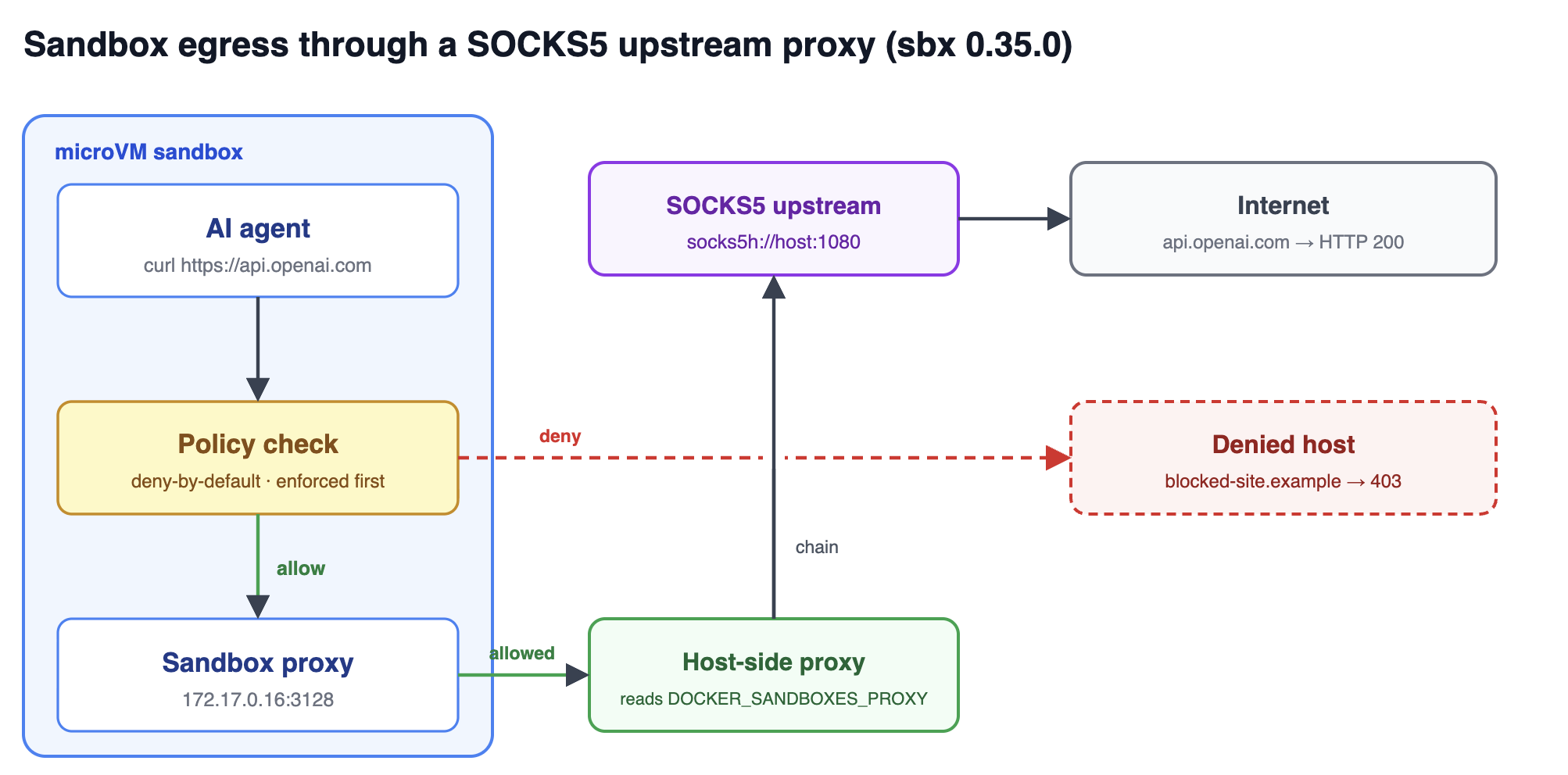
DOCKER_SANDBOXES_PROXY now accepts http://, https://, socks5://, andsocks5h:// URLs (with optional user:pass@). With socks5://, DNS is
resolved on the host before the connection is handed to the proxy; withsocks5h://, DNS resolution happens at the proxy.
Let's prove it end to end. Start a local SOCKS5 proxy:
$ docker run -d --name socksdemo -e REQUIRE_AUTH=false -p 1080:1080 serjs/go-socks5-proxy
Point the daemon at it and start it. DOCKER_SANDBOXES_NO_PROXY — also new in
0.35.0 — excludes destinations from the upstream proxy using standardNO_PROXY matching semantics:
$ export DOCKER_SANDBOXES_PROXY="socks5h://127.0.0.1:1080"
$ export DOCKER_SANDBOXES_NO_PROXY="registry-1.docker.io,auth.docker.io"
$ sbx daemon start
Now run an allowed request from inside a sandbox and watch it succeed:
$ sbx exec whatsnew-demo -- curl -s -o /dev/null -w "HTTP %{http_code}\n" https://api.openai.com/v1/models
HTTP 200
Check the SOCKS5 proxy's own logs, and you can see the sandbox's connection
arriving at the upstream:
$ docker logs socksdemo
[INFO] socks: Connection from allowed IP address: 192.168.65.1
Crucially, policy is still enforced before traffic reaches the upstream
proxy. A denied host is blocked no matter how egress is routed:
$ sbx exec whatsnew-demo -- curl -s -o /dev/null -w "HTTP %{http_code}\n" https://blocked-site.example
HTTP 403
The upstream proxy changes where allowed traffic goes, not what is allowed.
Richer sbx inspect
sbx inspect now gives you a single readable summary of a sandbox — its agent,
kits, injected secrets, network and mount policy, proxy, and active sessions:
$ sbx inspect whatsnew-demo
  Name:           whatsnew-demo
  Agent:          shell
  Kits:           ./hello-kit
  State:          running (13s)
  Image:          docker/sandbox-templates:shell-docker
  Workspace:      /Users/dev/workdemo/sbx-demo
  Network Policy: global (organizational policy: acme-corp)
  Mount Policy:   allowed
  Proxy:          172.17.0.16:3128
  Secrets:        box (uploaded), github (uploaded), openai (uploaded)
  Ports:          none published
  Sessions:       0

  Daemon:         v0.35.0   uptime 7m
This is the fastest way to answer "what does this agent actually have access
to?" - kits, secrets, and policy all in one place.
Smaller changes worth knowing
sbx rmprotects active sessions. Removing a sandbox that is in use (for example, an open SSH connection) now requires--force, so you can't pull the rug out from under a running agent by accident.- virtiofs caching is on by default everywhere. Faster filesystem performance across macOS, Linux, and Windows. Opt out with
DOCKER_SANDBOXES_ENABLE_VIRTIOFS_CACHE=0if you hit a caching edge case. - Faster startup. The TLS-proxy CA is installed by merging into the trust bundle instead of running
update-ca-certificates, shaving several hundred milliseconds off each sandbox launch. - Balanced network preset additions. The balanced preset now allows VS Code domains, Azure Blob Storage (
*.blob.core.windows.net), anddhi.ioover HTTP out of the box.
Wrapping up
Docker Sandboxes 0.35.0 is mostly about visibility and control: you can now ask
the policy engine what it would decide before you run, see exactly which
credentials are injected and why, route sandbox egress through your own proxy,
and add capabilities to a live sandbox without corrupting its state. Thesbx policy check network and sbx secret ls commands in particular turn what
used to be guesswork into a quick, script-friendly question.
For the full change list, see the Docker Sandboxes release notes, and try sbx yourself from the get started guide. Found a bug or have a request? Open an issue at github.com/docker/sbx-releases/issues.